JavaScript · Core Series
Tips, patterns & best practices.
Deep dives into modern JavaScript — functions, scoping, prototypes, and the nuanced power of the language.
JavaScript · Core Series
Deep dives into modern JavaScript — functions, scoping, prototypes, and the nuanced power of the language.
Looking for JavaScript training or expert guidance on your project? Let's talk.
Contact Us for TrainingA deep dive — April 2026 · 7 min read
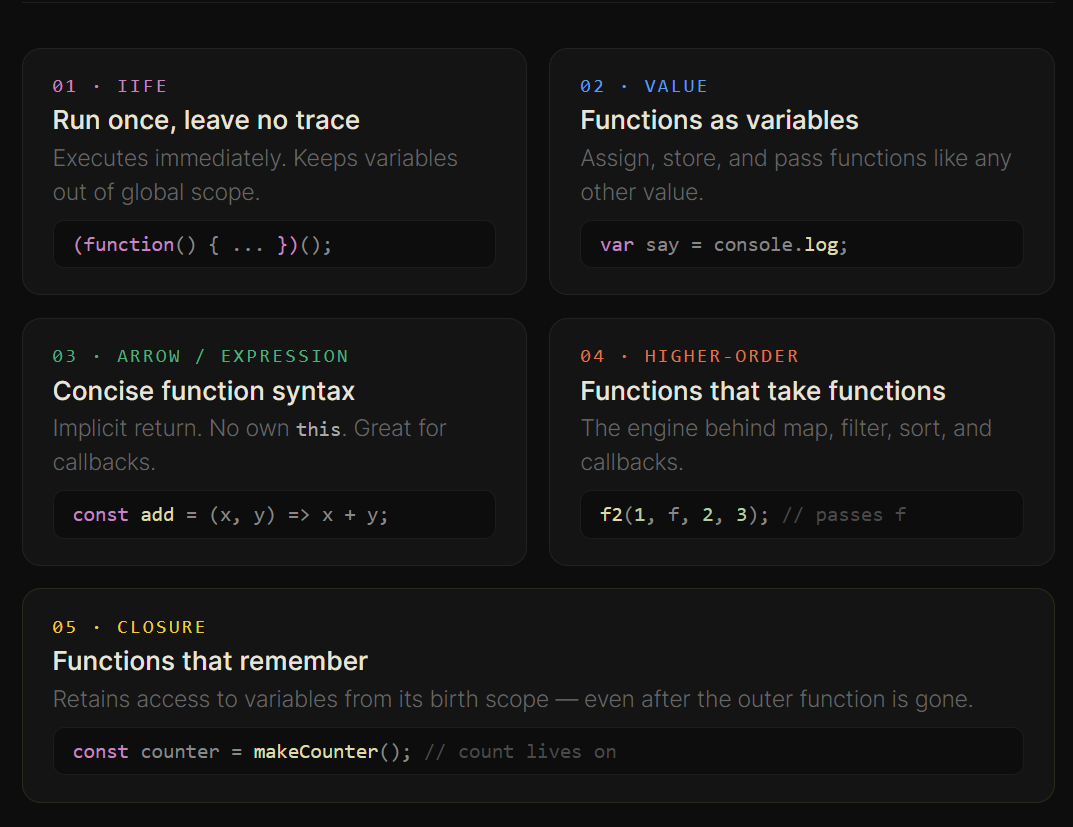
Functions are the beating heart of JavaScript. Not just chunks of reusable code — they're objects, values, arguments, and return values all at once. Understanding them deeply unlocks everything from elegant callbacks to powerful higher-order patterns.
Let's explore the different flavors of JavaScript functions, when to use each, and the nuanced power they carry.
An IIFE (Immediately Invoked Function Expression) is a function that executes the moment it's defined. It's a self-contained capsule — anything declared inside never leaks to the outer scope.
(function () {
    console.log("hello");
})();
The outer parentheses (function(){}) turn the declaration into an expression. The trailing () immediately invokes it. No name, no variable — just execution.
let, const, and ES modules existed, wrapping code in an IIFE was the only reliable way to avoid polluting the global scope. You still see them in legacy code and in some build tool outputs.
"An IIFE is like a party held in a sealed room — everything that happens inside stays inside."
In JavaScript, functions are just values — like numbers or strings. This means you can assign them to variables, store them in arrays, and pass them around. Consider this elegantly simple example:
var say = console.log;

say(1 + 2);  // → 3
console.log is simply a function stored on the console object. Assigning it to say creates a new reference to the same function.
JavaScript gives you multiple syntaxes for defining functions. Each has subtly different behavior.
const add = (x, y) => x + y;

console.log(add(3, 4)); // 7
console.log(add(5, 4)); // 9const add2 = function(x, y) {
return x + y;
};
console.log(add2(2, 5)); // 7Both store a function in a variable. But there's a key difference when it comes to recursion.
Named function declarations can call themselves. Anonymous and arrow functions can too — as long as they're stored in a variable, the variable name acts as the self-reference:
// Named declaration — recursion via its own name
function factorial(x) {
    if (x === 0) return 1;
    return x * factorial(x - 1);
}

// Arrow function — recursion via the variable it's stored in
const fact = (x) => {
    if (x === 0) return 1;
    return x * fact(x - 1);
};

console.log(fact(3));  // → 6  (3 × 2 × 1)
console.log(fact(5)); // → 120 (5 × 4 × 3 × 2 × 1)fact = null), recursive calls inside will break — they look up fact at call time. Named function declarations don't have this problem.
Because functions are values, they can be passed as arguments to other functions. A function that accepts or returns another function is called a higher-order function.
function f(a, b) {
    return a + b;
}

// f2 accepts a function (f1) as its second argument
function f2(c, f1, a, b) {
    console.log(f1(a, b) + c);
}

f2(1, f, 2, 3);
// f(2, 3) → 5, then 5 + 1 → logs 6
Here, f2 doesn't care what f1 does — it just calls it with a and b and uses the result. This is the same pattern used by Array.prototype.map, filter, reduce, sort, and virtually every event listener you've ever written.
const nums = [40, 1, 15, 7];

// Pass a function to define sort order
nums.sort((a, b) => a - b);
// → [1, 7, 15, 40]

// Same idea with map — transform each element
const doubled = nums.map(n => n * 2);
// → [2, 14, 30, 80]Functions in JavaScript don't just execute code — they capture the environment they were created in. This is called a closure. Even after the outer function returns, an inner function holds a reference to its variables.
function makeCounter() {
    let count = 0;         // lives in makeCounter's scope

    return () => {
        count++;
        return count;      // still has access!
    };
}

const counter = makeCounter();
console.log(counter());  // 1
console.log(counter());  // 2
console.log(counter());  // 3
makeCounter has finished executing — but the inner arrow function still holds a live reference to count. Each call to counter() increments the same variable. This is a closure, and it's the foundation of state, private variables, and module patterns in JavaScript.
"A closure is a function that has packed its entire neighborhood into its suitcase before leaving."
A practical guide — April 2026 · 8 min read
Scoping is one of the most fundamental — and often misunderstood — concepts in JavaScript. It determines where variables are accessible and how they behave across functions and blocks.
Master scoping, and you'll avoid subtle bugs that plague inexperienced developers. Ignore it, and watch your code crumble in unexpected ways.
Scope defines where a variable is visible and accessible in your code. JavaScript features three primary types:
{} (with let and const)
The classic trap: var is function-scoped, not block-scoped. This means a variable declared inside a loop is visible to the entire function:
function foo(){
    function bar(){
        x = 10;
        console.log(x);
    }

    for (var x = 1; x < 10; x++){
        bar(); // prints 10 and exits
    }
}

foo();
What happens:
var x is function-scoped (exists in the entire foo function)bar() modifies the same xx = 1, bar() sets x = 10, loop increments to x = 11, condition failsbar() runs only once!"Modifying a loop variable inside another function can break loop execution. Beware."
var x = 10;

function f1(){
    x++;          // modifies global variable
    y = 10;       // becomes global (bad practice!)
    console.log(x);
    var z = 10;   // local variable
}

f1();
console.log(++x + " From outside");
console.log(++y + " From outside");
Key observations:
x is global — modified inside functiony becomes global because it's not declared (implicit global)z is local — not accessible outside{
let y = 20;
}
// console.log(y); // ReferenceErrorlet and const are block-scoped, meaning they exist only inside their {} block. This prevents accidental leaks into outer scope — a massive improvement over var.
var x = 10;

function print(){
    var x = 5; // new variable, shadows outer x
    console.log(x);
}

print();        // 5
console.log(x); // 10
The inner x completely shadows the outer x. They are entirely different variables. This can be confusing, so always declare variables with clarity about scope.
(function (){
    var x = 2;
    console.log(x);
})();
// Output: 2
x is completely isolated inside the function. IIFEs create intentional scope isolation — preventing any pollution of the global namespace.
Named IIFE:
(function p1(){
    var x = 3;
    console.log(x);
})();p1) is not accessible outsidefunction test(){
a = 100; // no var/let/const
}
test();
console.log(a); // Works (but bad practice)a becomes global unintentionally. This is a silent bug that causes real problems in larger codebases. Always declare variables explicitly.
| Feature | var | let | const |
|---|---|---|---|
| Scope | Function | Block | Block |
| Re-declare | Yes | No | No |
| Re-assign | Yes | Yes | No |
| Hoisting | Yes | Yes (TDZ) | Yes (TDZ) |
1. Avoid global variables
// Bad
x = 10;

// Good
let x = 10;
2. Prefer let and const over var
// Modern, safer
const PI = 3.14;
let counter = 0;

// Avoid
var x = 5;
3. Use const by default
const PI = 3.14;    // Won't change
let counter = 0;    // Will change
4. Avoid modifying outer variables inside functions
// Risky
function update(){
    x = 10;
}

// Better
function update(newValue){
    return newValue;
}
5. Use IIFE or modules for isolation
Scoping is not just a theoretical concept — it directly impacts:
"Good developers don't just write code — they control where their data lives. Master scoping, and you'll avoid some of the most subtle and frustrating bugs in JavaScript."
Master JavaScript's most flexible features — April 2026 · 10 min read
JavaScript provides multiple ways to create and work with objects. Along the way, concepts like this, prototypes, and function invocation patterns play a crucial role. Understanding these deeply will unlock the full power of the language.
Let's walk through these concepts step by step with practical examples.
The simplest way to create an object is using an object literal:
var person = {
    name: "John",
    age: 30,
    city: "New York",
    greet: function() {
        console.log("Hello, my name is " + this.name);
    }
};

person.greet();
Key Concepts:
this refers to the object (person)To create multiple similar objects, we use constructor functions:
var Person = function(name, age, city){
    this.name = name;
    this.age = age;
    this.city = city;
};

let p = new Person("John", 30, "New York");
What does new do?
this to that objectPerson, not person) to signal they should be called with new.
If we attach methods inside the constructor, each object gets its own copy (inefficient). Instead, we use prototype:
Person.prototype.print = function(){
    console.log(this.age + ", " + this.city);
};

p.print();
Why use prototype?
"Prototype inheritance is JavaScript's way of sharing behavior between objects without duplicating code."
JavaScript classes are syntactic sugar over prototypes:
class Person {
    constructor(name, age, city){
        this.name = name;
        this.age = age;
        this.city = city;
    }

    print(){
        console.log(this.age + ", " + this.city);
    }
}

let p = new Person("John", 30, "New York");
p.print();print is added to Person.prototype.
this is not determined where a function is defined — it's determined how it's called:
let p1 = {
   name: "Payal",
   printDetails: function(){
       return this.name;
   }
};

let p2 = {
   name: "Alice"
};

p1.printDetails(); // "Payal" — this is p1
The critical insight: this depends on how the function is called, not where it's defined. This flexibility is powerful but can be tricky.
We can explicitly control what this refers to using call() and apply().
Using apply():
function print(city){
    return this.name + " " + city;
}

console.log(print.apply(p1, ["New Delhi"]));
// → "Payal New Delhi"
Using call():
console.log(print.call(p2, "Paris"));
// → "Alice Paris"| Method | Arguments | Use Case |
|---|---|---|
| call() | Passed individually | When you know the exact number of arguments |
| apply() | Passed as array | When arguments are already in an array |
One of the most elegant uses of call() and apply() is borrowing methods from other objects:
console.log(p1.printDetails.apply(p2));
// Output: "Alice"
What's happening?
printDetails belongs to p1this now refers to p21. Object Creation Patterns:
// Object literals — simple cases
const obj = { name: "John" };

// Constructors / Classes — reusable objects
class Person { /*...*/ }
const p = new Person("John");
2. The this Keyword:
call(), apply(), or bind()this refers to the object containing the method3. Prototype Chain:
4. call vs apply vs bind:
call() and apply() invoke the function immediately, with different argument stylesbind() returns a new function with a fixed this context5. Method Borrowing:
Reuse functions across objects to avoid duplication. Powerful when combined with call() and apply().
JavaScript's flexibility with objects and functions is powerful, but it also introduces subtle behaviors — especially around this and prototypes. Understanding these core concepts helps in:
this breaks in callbacksIn JavaScript, how you call a function often matters more than how you define it.
Master this, closures, and prototypes — and you unlock the true flexibility of the language.
Topics