A custom software solution developed to streamline real estate bookings, financial tracking, collections, and account management within a unified system.
Built to replace scattered Excel sheets, manual tracking, and fragmented tools - this tool eliminates fragmented real estate tracking by centralizing daily operations into a single streamlined workflow.
Booking ManagementProperty InventoryOffline DashboardWorkflow AutomationSingle User System
1Operator, zero shared infra
5Core workflow modules
0Spreadsheets needed
100%Local data ownership
The Problem
One operator, scattered across too many tools
A single real estate operator managing multiple properties manually - with data scattered across Excel sheets, WhatsApp messages, and paper records. No centralized lead view. No booking history. No real-time property availability. Every update required touching three different files.
Scattered data, no single view
Lead notes in one file, bookings in another, payments tracked separately. No single screen showed the complete picture of daily operations.
Manual tracking, high error risk
Every booking update, payment receipt, and unit status change required manual entry across multiple spreadsheets - error-prone and time-consuming.
No centralized lead visibility
Leads came from multiple sources with no unified pipeline. Follow-ups were missed, site visits weren't logged, and booking conversions were hard to track.
No real-time property availability
Unit status (available, booked, blocked) wasn't visible in one place. Double-booking risks were real, and inventory decisions relied on memory rather than data.
The solution required unified visibility across operations and accounting:
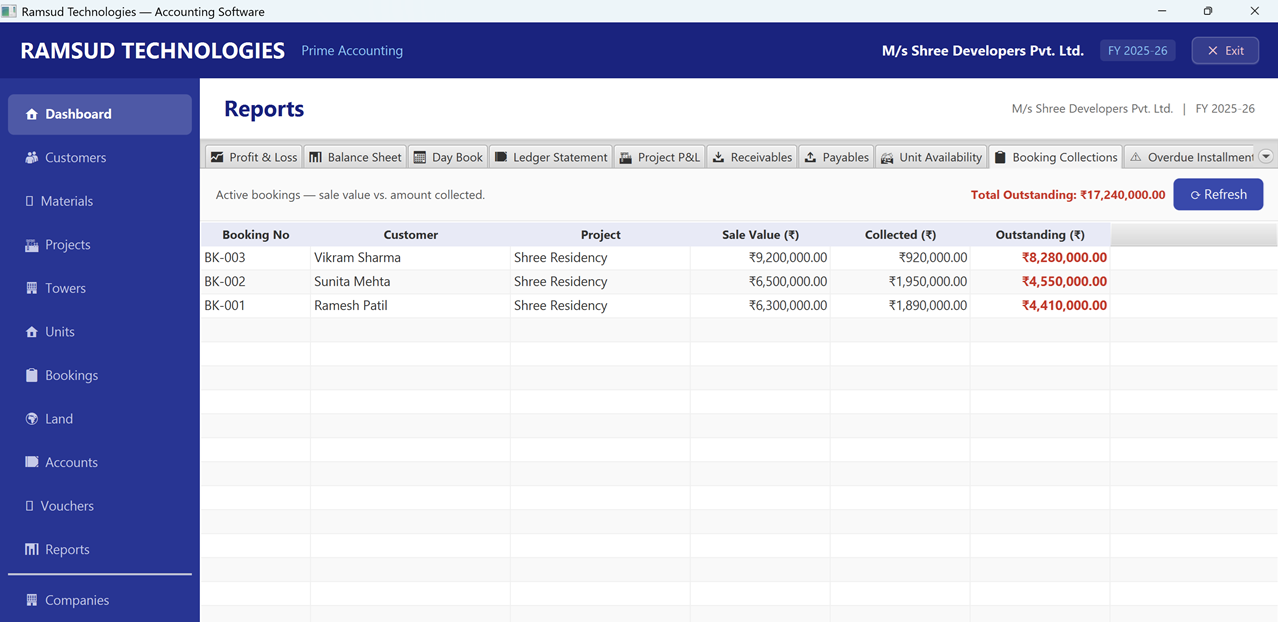
Booking & Collections
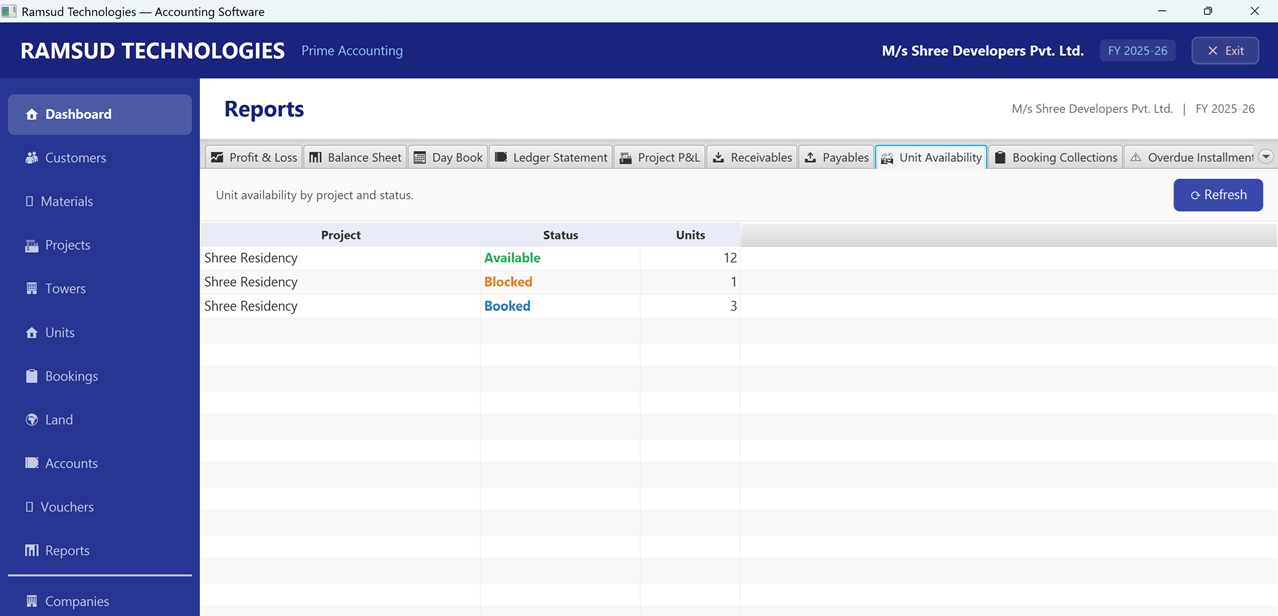
Unit Availability
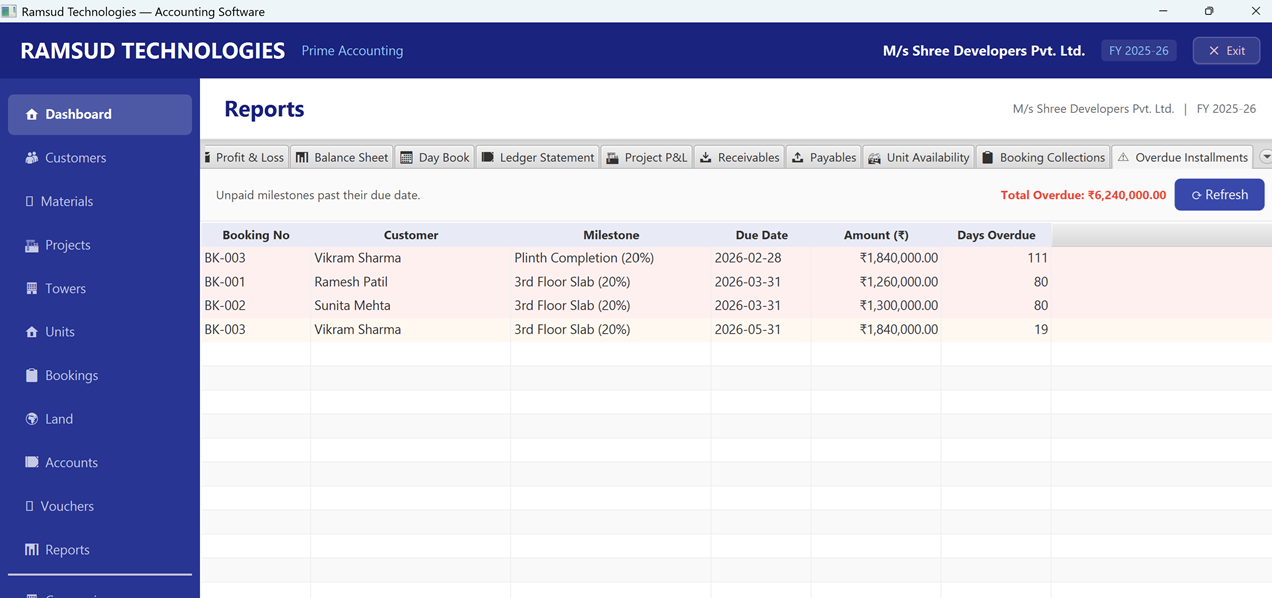
Overdue Milestones
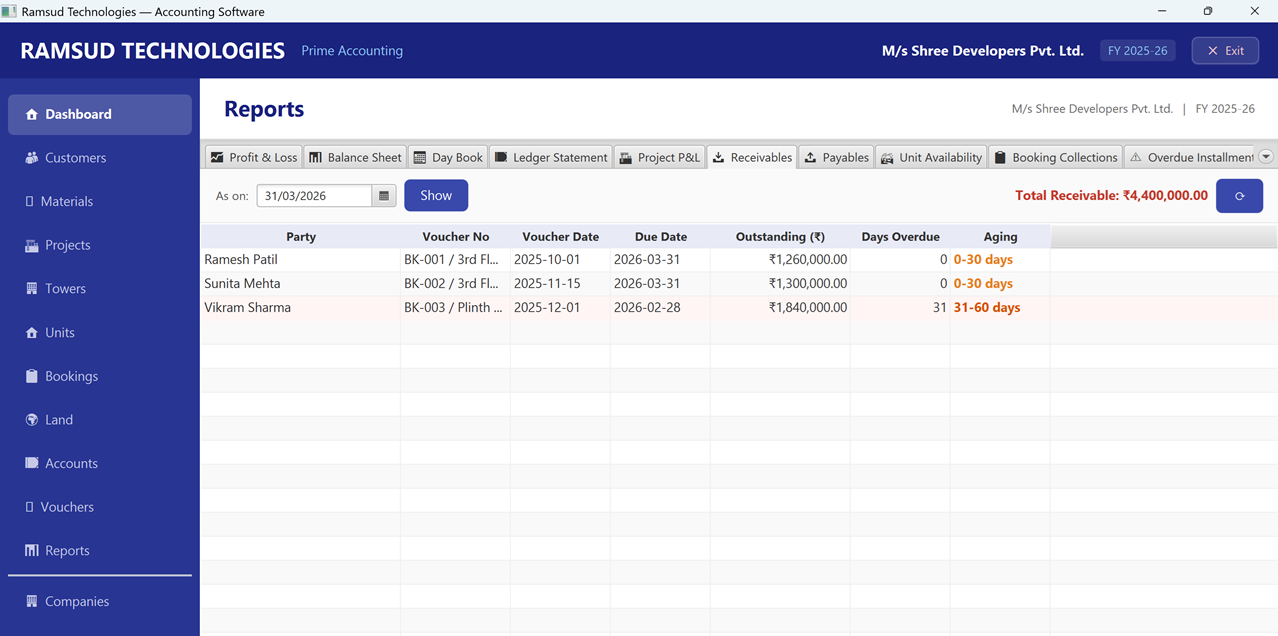
Receivables & Aging
Architecture
How the workflow was structured
The tool is built around a centralized workflow model - daily operations (leads, bookings, payments) flow through automated rules into structured records, eliminating manual re-entry at every step. Everything runs locally, on one machine, with no internet dependency.
Application service layer - business logic, rule engine, validation
↓
Domain
Real estate domain + accounting rule engine - event-to-entry mapping
↓
Ledger
Financial entry system - immutable ledger, accrual/cash support
↓
Storage
On-device encrypted database - fully local, ACID-compliant, zero setup
↓
Documents
Local file system - agreements, KYC, receipts, invoices
No external APIsNo cloud syncNo remote databaseNo internet required
Engineering Decisions
Five design decisions that shape this tool
1
Embedded database over client-server architecture
SQLite was chosen deliberately - no server setup, no DBA overhead, no network latency. A single real estate operator gains ACID-compliant transactional integrity with zero operational complexity. The database ships inside the application.
SQLiteZero administrationACID compliant
2
Ledger-centric accounting - no direct UI-to-record writes
Every financial record is an immutable ledger entry. There is no "edit invoice" button that overwrites data. Corrections are made through reversal entries, mirroring how chartered accountants work. This guarantees a complete, auditable financial history from day one.
Ledger-firstImmutable recordsAudit trail
3
Event-driven financial mapping from real estate operations
Business operations - booking creation, payment receipt, cancellation, possession transfer - are modelled as domain events. Each event fires configurable accounting rules that generate draft ledger entries for review, eliminating manual re-entry entirely.
Event-drivenRule engineDraft-before-post
4
Encrypted backup-and-restore as the only data migration path
Rather than building distributed sync (with its concurrency complexity and conflict-resolution risks), the system provides encrypted full-system backups exportable to USB at any time. Migration to a new machine is a controlled restore - predictable, safe, and fully user-owned.
JavaFX + Spring Boot on desktop, not Electron or web
A Java-native stack was chosen over web-based desktop (Electron) to maximise local file system access, avoid browser sandbox restrictions, and deliver a responsive UI without the overhead of a bundled Chromium instance on modest office hardware.
JavaFXSpring BootNo Electron overheadNative file access
Core Workflows
What the tool handles, end to end
Accounting Engine
Tally-class core
Built
P&L, Balance Sheet, Cash Flow statements ✓
Accrual and cash-basis accounting modes ✓
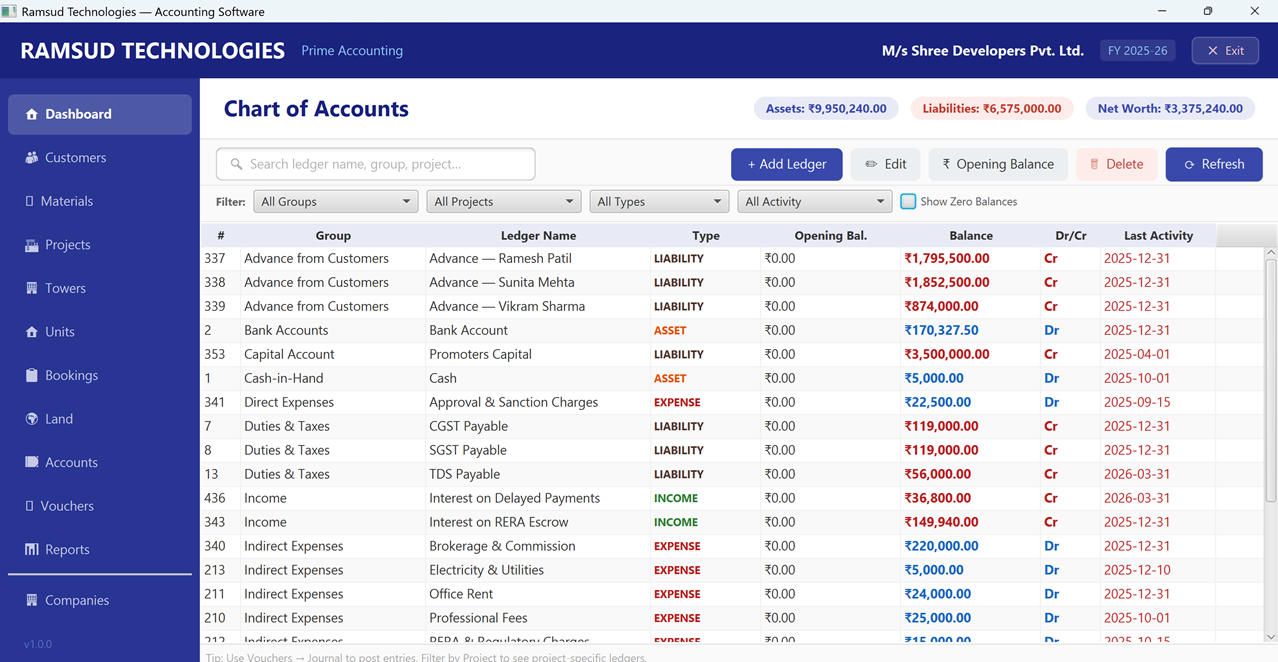
Configurable chart of accounts ✓
Financial reconciliation with partial payments ✓
Role-based access control on ledger functions ✓
Revenue recognition & GSTR returns (Roadmap)
Booking & Inventory Management
Domain-native module
Built
Project / tower / unit inventory management ✓
Full booking lifecycle with stage tracking ✓
Unit availability matrix (sold / booked / blocked) ✓
Dynamic pricing and discount logic ✓
Cancellation and refund workflows ✓
Reporting & Analytics
Operational intelligence
Built
Sales and collection dashboards ✓
Outstanding dues aging reports ✓
Project-level profitability tracking ✓
Unit-level financial drill-down ✓
Cash flow forecast - upcoming buyer installments vs scheduled land and contractor payments; items drop off once paid or approved ✓ Reports → Cash Flow Forecast tab
Construction Tracking
Project cost control
Built
Interest capitalisation - construction loan interest posted to project cost (WIP); shows in Project Cost Sheet and Trial Balance ✓
Interest capitalisation - construction loan interest posted to project cost (WIP); shows in Project Cost Sheet and Trial Balance ✓
Project milestones with 13 RERA-aligned defaults - overall completion % shown on each project ✓
Budget vs Actual - land, materials, and contractor spend tracked against budget; variance highlighted in green/red ✓
Material purchases tracked by project with GST and financial year filter ✓
Cost allocation per project and tower ✓
Backup & Portability
User-owned data control
Built
Encrypted full-system backup anytime ✓
Scheduled or manual export to USB / external drive ✓
Schema versioning for safe cross-version restore ✓
Controlled migration to a new machine ✓
What's Built
Complete feature coverage
A full picture of what's working in the current build - across daily operations, financial management, tax compliance, and data security. Every item below is implemented and in active use.
Property, Projects & Units
Multiple projects, towers, and units managed in one place
Unit status tracks every stage - available, held, booked, sold, or cancelled
Double-booking prevented - unit status rules are enforced automatically
GST flag per unit type so tax is calculated correctly from day one
Project milestones with 13 RERA-aligned defaults - completion % visible on each project screen
Booking Lifecycle
Full journey: enquiry → hold → booking → payment collections → possession → cancellation
Payment milestone schedules with GST applied on each collection
Broker commission auto-recorded on booking, settled via payment
Cancellation handles refund or forfeiture based on your terms
Revenue recognised at possession handover - not at the time of booking
Accounting & Ledgers
Full double-entry bookkeeping - every transaction is balanced and auditable
18 account groups with a customisable chart of accounts
5 voucher types: sales, purchase, receipt, payment, and journal entries
Corrections use reversal entries - no record is deleted, full history preserved
Bank reconciliation - match your bank statement to app entries, mark cleared items
Indian Financial Year (April�March) built in, with accrual and cash-basis support
Construction loan interest capitalised into project cost (WIP) rather than expensed - correct treatment under Indian accounting standards; shows in Project Cost Sheet and Trial Balance Projects → Cap. Interest → auto-calculates & posts journal
Planning: Cash Flow Forecast - upcoming buyer inflows vs scheduled land & contractor payments (pending items only)
Tax & Compliance
Per-collection toggle for intra-state (CGST + SGST) or inter-state (IGST) - tax posted to the correct ledger automatically
Input tax credit tracked separately for reconciliation
TDS automatically deducted and tracked on land payments
GST Summary export to CSV - produces a GSTR-1-ready file directly from the GST Summary report Reports → GST Summary → Export CSV
GST Summary report available for filing reference
RERA escrow compliance - checks whether 70% of collections are in your designated account; shortfalls flagged in red; withdrawals recorded with approver details and type Projects → RERA → 3-tab compliance dialog
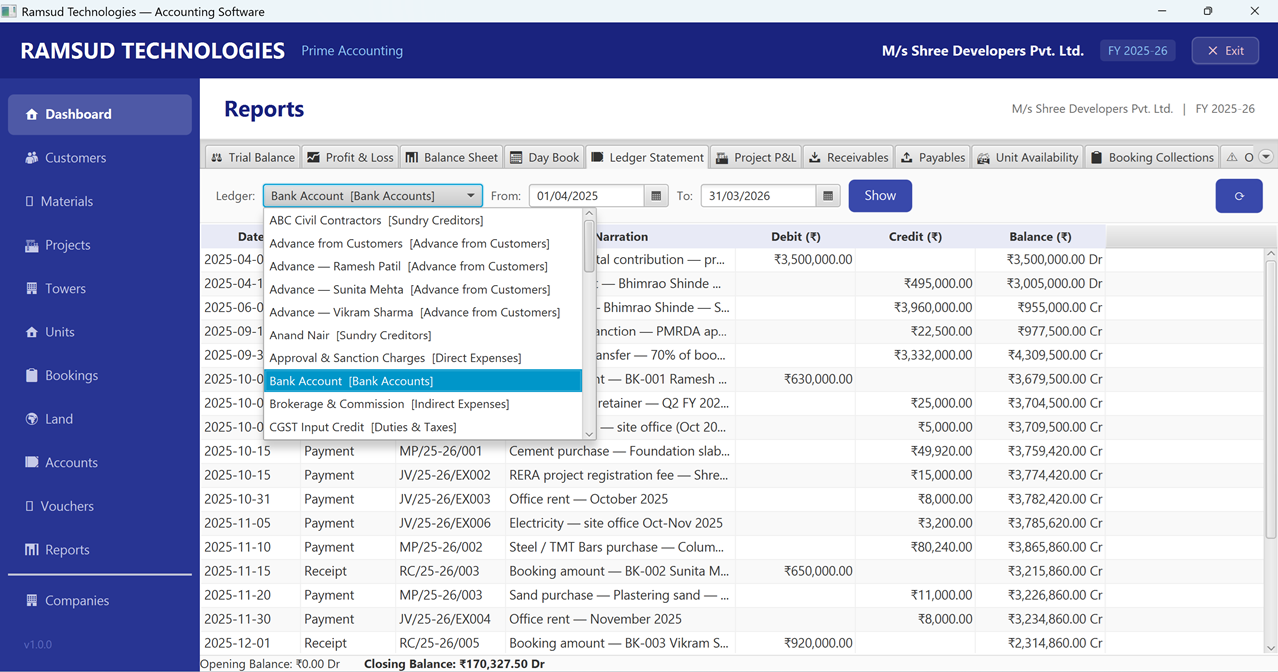
Every RERA withdrawal creates a full accounting entry - WIP cost rises, RERA bank balance falls; reflected automatically in Trial Balance, Balance Sheet, and the bank's ledger statement
Customers, Vendors & Parties
Add a customer and their accounting ledger is created automatically - no double entry
Vendor records created with their accounting ledger automatically
Brokers and contractors managed as unified party profiles - one record, multiple roles
Add a new customer inline while recording a booking - no screen-switching
Land Acquisition & Fixed Assets
Land parcel records with owner details, payment schedules, and outstanding amounts
TDS automatically deducted on each land payment and tracked separately
Fixed assets register with straight-line and reducing-balance depreciation
Asset disposal with accounting entries handled automatically
Company Setup & Dashboard
Run multiple companies from one installation - switch between them instantly
Each company has its own ledgers, financial year, and data - fully isolated
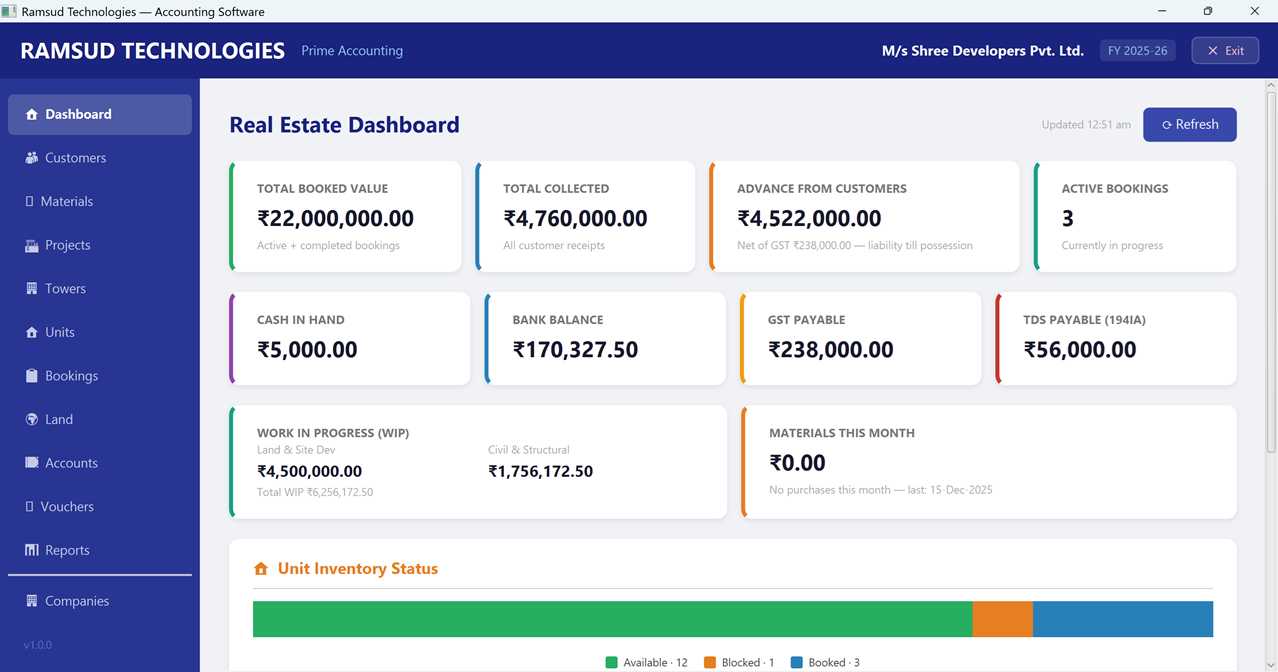
Dashboard KPI cards show current month, quarter, or full year - one click to switch
Guided workflow sidebar shows the logical order: Projects → Towers → Units → Customers → Bookings
Technology Stack
Purpose-chosen, not fashionable
Every technology choice was evaluated against the core constraint: the system must run entirely on one machine, without installation complexity, and be maintainable by a small team long-term.
JavaFX - Desktop UI layer
Spring Boot - Business logic & rule engine
SQLite - Embedded transactional database
Java - Core application runtime
Local File System - Document repository
No Electron. No web browser. No bundled Chromium. JavaFX was chosen for native file system access, lower memory footprint on office hardware, and a richer local UI without web-layer overhead. Spring Boot provides the same production-grade service architecture used in distributed systems, applied entirely on-device.
Outcomes
Time saved, clarity gained, errors reduced
Workflow outcomes
Hours saved weekly on manual data entry across scattered sheets
Complete property availability visible at a glance - no memory-dependent decisions
Leads, bookings, and payments tracked from one dashboard - no tool-switching
Real-time collections status without manually compiling spreadsheet reports
Technical outcomes
All data stays on the operator's machine - no cloud, no third-party access
Single desktop install with no server, no subscriptions, no ongoing infrastructure
Immutable ledger guarantees a complete, error-free audit trail from day one
Encrypted backup to USB - data safety without internet dependency
Visual proof of key outcomes delivered:
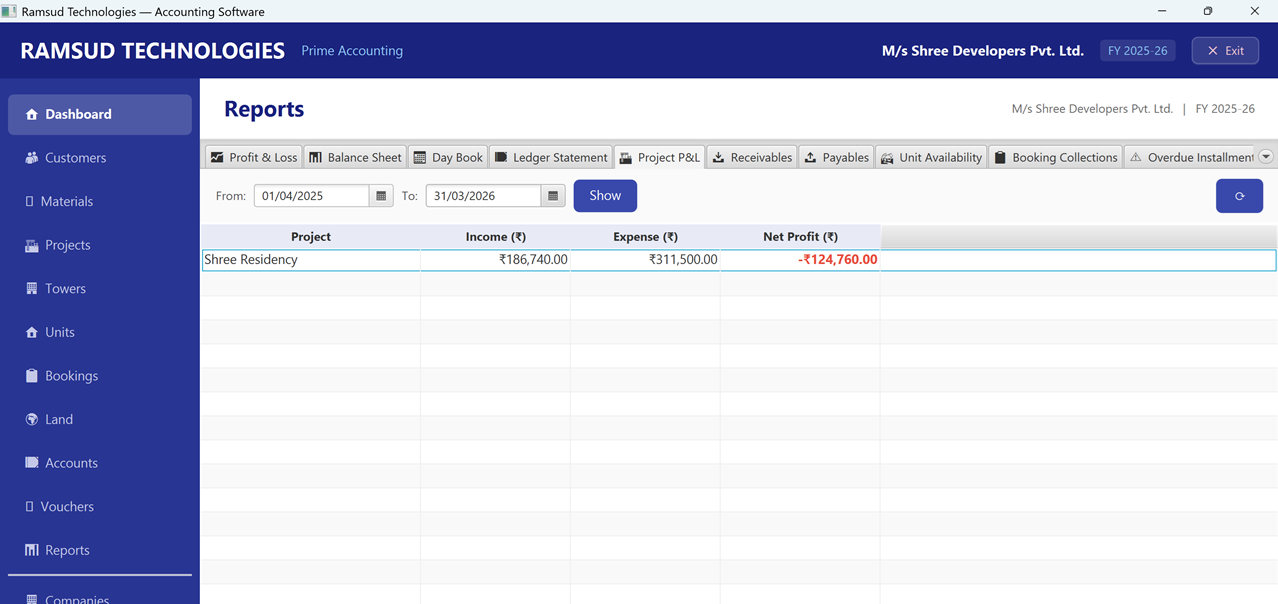
Complete dashboard unifying bookings, collections, and unit availability
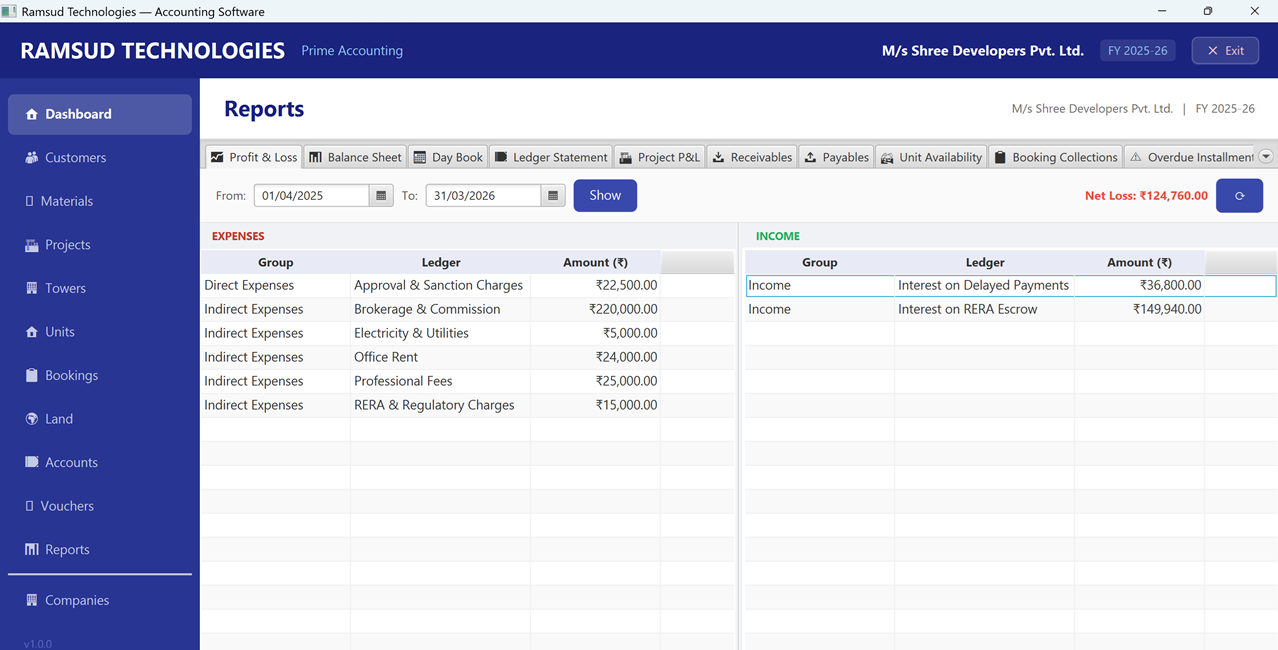
Real estate-specific chart of accounts with full audit trail
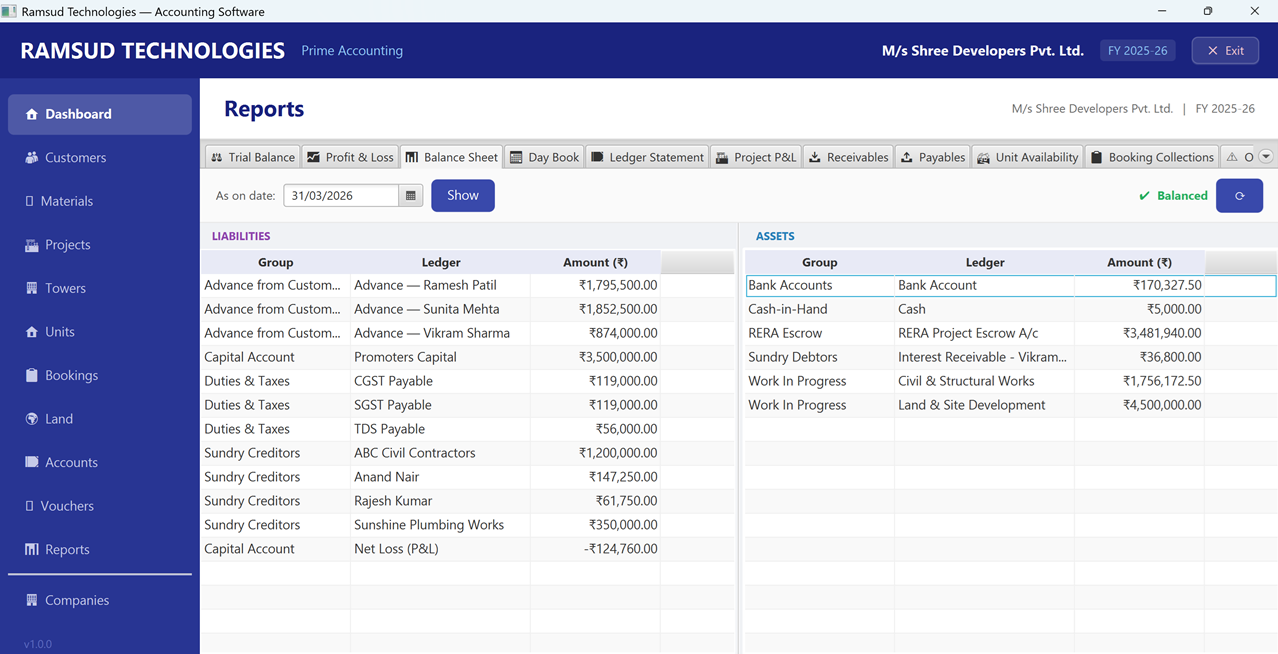
Complete immutable ledger with running balances and narrations
Customer-wise receivables with automated aging buckets
Prototype Value
What this single-user system validated
Real estate operations involve multiple interconnected processes. Bringing them into a single system improves visibility, reduces manual effort, and creates a more reliable source of operational and financial information.
Workflow depth, not scale
Building for one operator meant mapping every edge case in the real estate workflow - lead sources, booking stages, payment milestones, cancellation logic. This depth of process design is harder to achieve when designing for scale from day one.
Process mapping before automation
Before writing a single automation rule, we mapped how the operator actually worked - which data points mattered, what decisions required visibility, and where manual effort created the most friction. Automation followed the process, not the other way around.
UI clarity over feature breadth
Single-user tools demand that every screen makes sense without training. The dashboard was designed around daily decisions - what's available, what's owed, what's overdue - not around feature completeness or lengthy feature checklists.
"The project highlighted the importance of aligning software architecture with business requirements. In this case, complete data ownership and offline operation were just as important as the features themselves."
The success of the system came less from individual features and more from creating a single source of truth for bookings, collections, and financial records.
Data Security
How secure is your data?
This tool was built for a single operator managing sensitive client and financial records. Data security wasn't an afterthought - it's embedded in the architecture through three independent layers: local-only storage, password-gated access, and hardware-level database encryption. Your records cannot be accessed, transmitted, or read without the password you set.
Data never leaves your machine
The tool runs entirely offline. No cloud sync, no remote server, no analytics, no third-party services. Every lead, booking, payment record, and document stays on the local machine where it was created. There is no network pathway through which data can exit - by design, not just policy.
Password-protected access
The application requires a password at every launch. There is no guest mode, no bypass, and no account recovery that routes credentials externally. The password you choose is the only gate between an operator and the data - and it also serves as the root of the encryption key derived for the database.
Database encrypted at rest
The database stored on your machine uses on-device encrypted storage - 256-bit AES encryption is applied to every page of the file. Copying the file without the correct password produces unreadable binary. There is no unencrypted version written alongside it.
Your password protects more than the login screen
When you log in, your password is used to generate the key that unlocks the database - so the same credential that opens the app is the one that decrypts your records. Your password is never saved to a file. The moment you close the app, the data is locked again and cannot be opened without it.
Under the hood: PBKDF2-HMAC-SHA256 key derivation, key held in memory only.
Changing your password is safe - no data loss risk
You can change your password at any time. The app automatically re-locks all your existing records under the new password in one step. Nothing is lost, nothing is left exposed in a temporary file, and the old password stops working immediately.
Under the hood: SQLCipher rekey - full database re-encryption with no plaintext intermediary.
No internet connection required or used�Password never saved to file�Data file unreadable without your password�Password change takes effect instantly
Need a custom workflow automation tool for your operations?
We build custom workflow and automation systems that reflect the way your business operates. The goal isn't to add more software�it�s to create clarity, visibility, and control across critical processes.