Case Study  ·  Data Engineering  ·  Streaming Infrastructure

Real-Time CDC Pipelines,
Without the Complexity

ConnectHub is a Kafka Connect control plane we engineered from the ground up. It collapses weeks of CDC pipeline setup into a guided 6-step workflow with zero JSON configuration, live schema discovery, column-level PII masking, and one-click Kubernetes manifest generation.

ConnectHub multi-cluster management dashboard

A platform that lets any data engineer deploy a production-grade Debezium CDC pipeline in minutes, with PII compliance built in, Kubernetes manifests auto-generated, and silent failures surfaced before they become incidents.

6
Steps to Deploy
From source database to sink, a complete production pipeline
0
Lines of JSON
Written by the engineer. All 80+ properties are auto-generated
30s
Health Snapshots
Continuous pipeline health monitoring interval
4+
Source Databases
PostgreSQL, SQL Server, MySQL, Oracle via Debezium 2.7

Setting Up Kafka Connect CDC Manually
Is Brutally Hard to Get Right

A production-grade Debezium CDC pipeline from PostgreSQL to OpenSearch requires mastering 80+ connector properties, hand-writing error-prone JSON, managing plugin installation on every worker node, configuring obscure SMT chains, building Kubernetes manifests, and monitoring task failures across multiple REST endpoints. All of this with no visibility into data lag or silent failures dropping messages into a dead-letter queue nobody is watching.

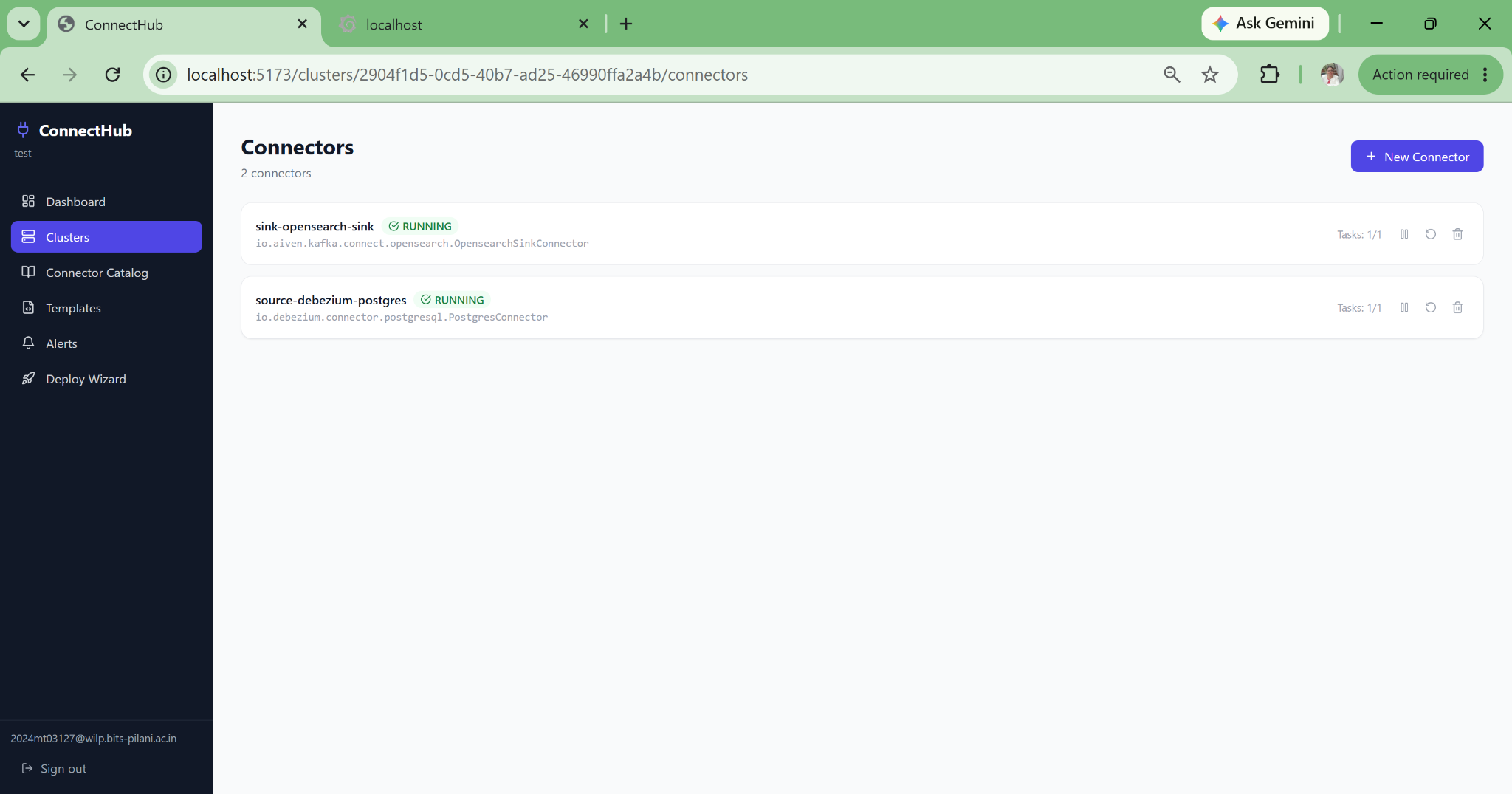
Connectors listed in a Kafka Connect cluster — showing the management complexity ConnectHub solves

JSON Configuration Hell

80+ configuration properties per connector, no validation until runtime, written entirely by hand. A single typo in table.include.list silently excludes an entire table from the CDC stream with no error logged.

Plugin Installation Chaos

The correct Debezium JAR must be manually installed on every Kafka Connect worker. No guided path, no version validation, no detection of missing plugins before the connector fails at runtime with a cryptic ClassNotFoundException.

PII Leaking Into Streams

No native mechanism to mask, hash, or exclude sensitive columns before data reaches Kafka brokers. GDPR and HIPAA compliance requires engineering each masking rule by hand, a process that scales to every table, every column, every connector.

Silent Failures

Connectors show RUNNING in the UI while silently dropping messages into a dead-letter queue with no alerts. Consumer lag accumulates for hours before anyone notices. MTTR stretches because the failure timeline is invisible.

Manual Kubernetes YAML

Writing Strimzi KafkaConnector CRDs and Secret objects manually for every pipeline. Credentials embedded in CRDs. No GitOps-safe output. Every new connector is a fragile copy-paste exercise compounding over time.

No Data Lineage

Zero visibility into which source databases feed which Kafka topics, which sinks consume them, or what transformations are applied. Lineage documentation is always out of date the moment it is written, making it a compliance audit risk waiting to happen.

The real problem wasn't the complexity of any single step. It was that every step depended on knowing all the others, and a mistake in step one wouldn't surface until step seven, in production, at 2am.

A Guided Pipeline Builder That Eliminates Every Sharp Edge

ConnectHub's deployment wizard walks engineers from source to sink without writing a single line of configuration. Live JDBC schema discovery, per-column PII controls, SMT composition, and automated artifact generation are built into every step of the workflow.

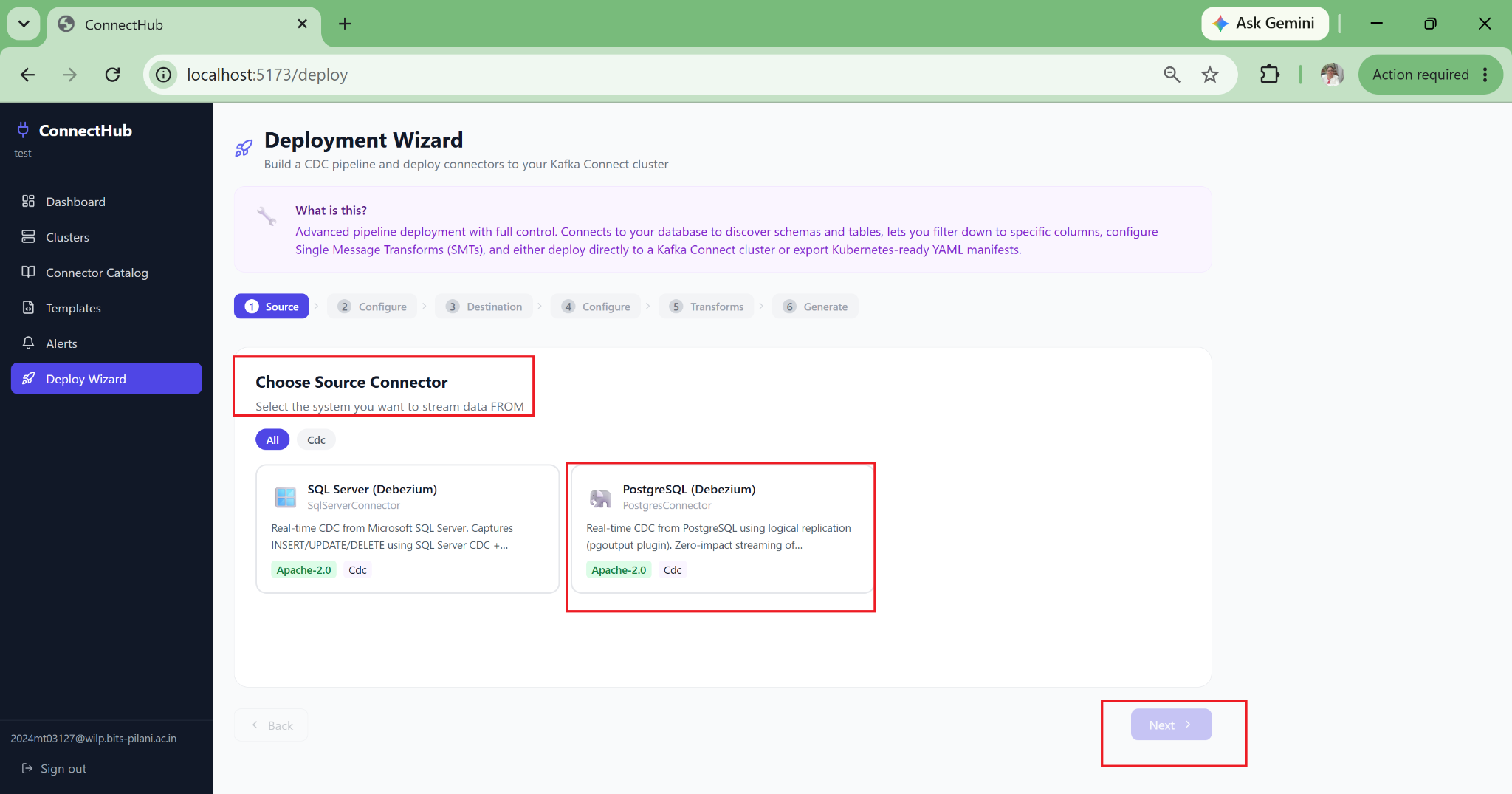
ConnectHub deploy wizard — step 1: choose your CDC source connector

How It Works

The wizard enforces a logical sequence that mirrors how a senior data engineer would think about a CDC pipeline: source first, schema second, compliance third, destination fourth, transforms fifth, deploy last. Each step validates the previous one before proceeding.

  • Connects to your source DB via JDBC at configuration time to discover live schema
  • Detects whether required Debezium plugins are installed on the Kafka Connect workers
  • Auto-derives Kafka topic names from your table selections with no manual naming required
  • Generates source and sink configs together, ensuring topic routing is consistent
01
01

Pick Source Connector

Choose PostgreSQL, SQL Server, MySQL, Oracle CDC via Debezium, or Kafka-to-Kafka replication via MirrorMaker 2. Plugin availability is checked against your cluster immediately.

02
02

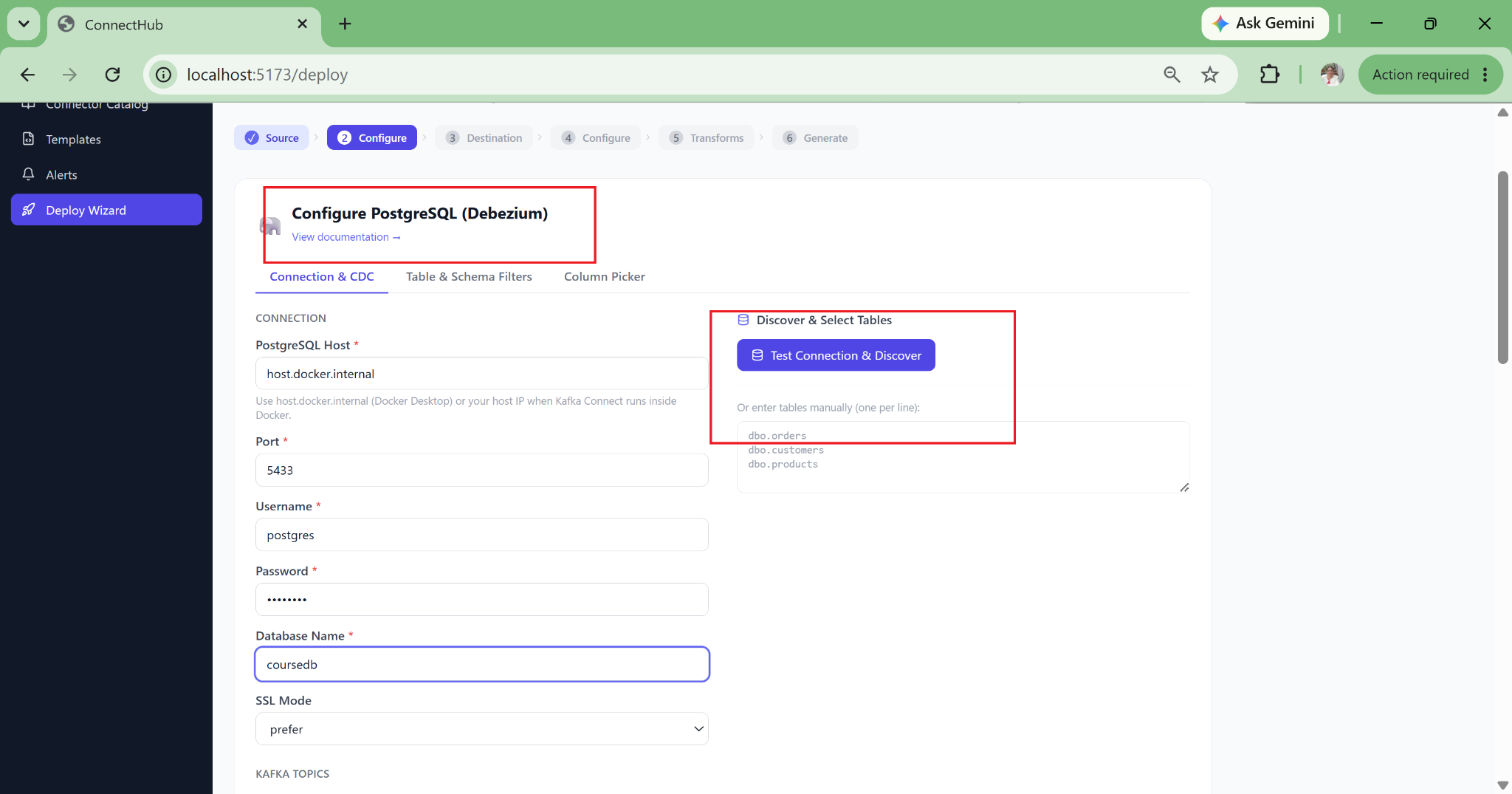
Configure & Discover Schema

Live JDBC connection enumerates every table and column in your source database. Point-and-click selection with no typing table names and no typos in table.include.list.

03
03

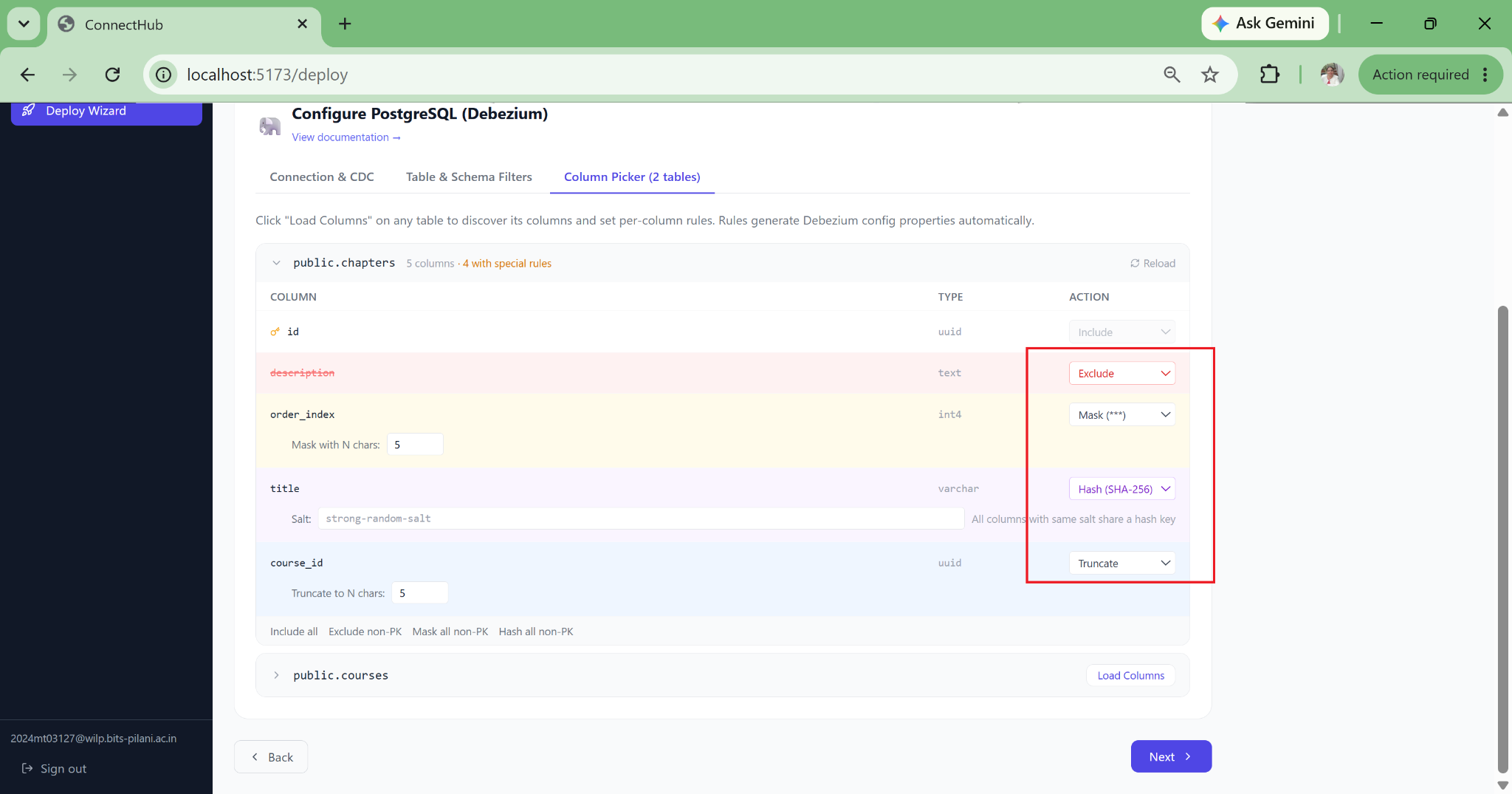
Apply PII & Compliance Rules

Per-column controls: include, exclude, mask with asterisks, SHA-256 hash (GDPR-compliant), or truncate to N characters. Rules translate directly into SMT configuration with no manual JSON required.

04
04

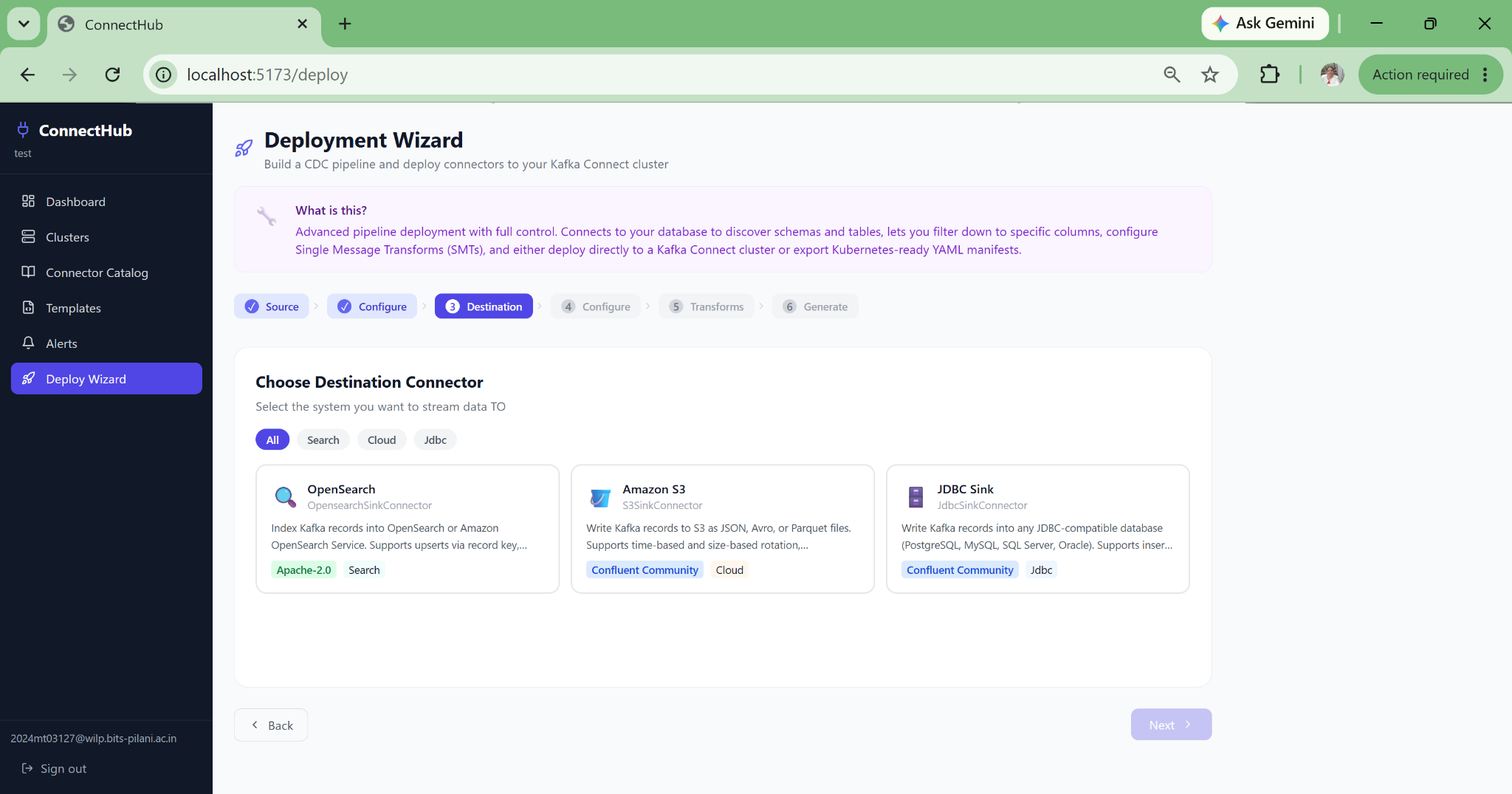
Pick Sink Connector

OpenSearch for search and analytics, Amazon S3 for data lake archival, or JDBC for any database target. Kafka topics are auto-derived from your earlier table selection.

05
05

Compose Single Message Transforms

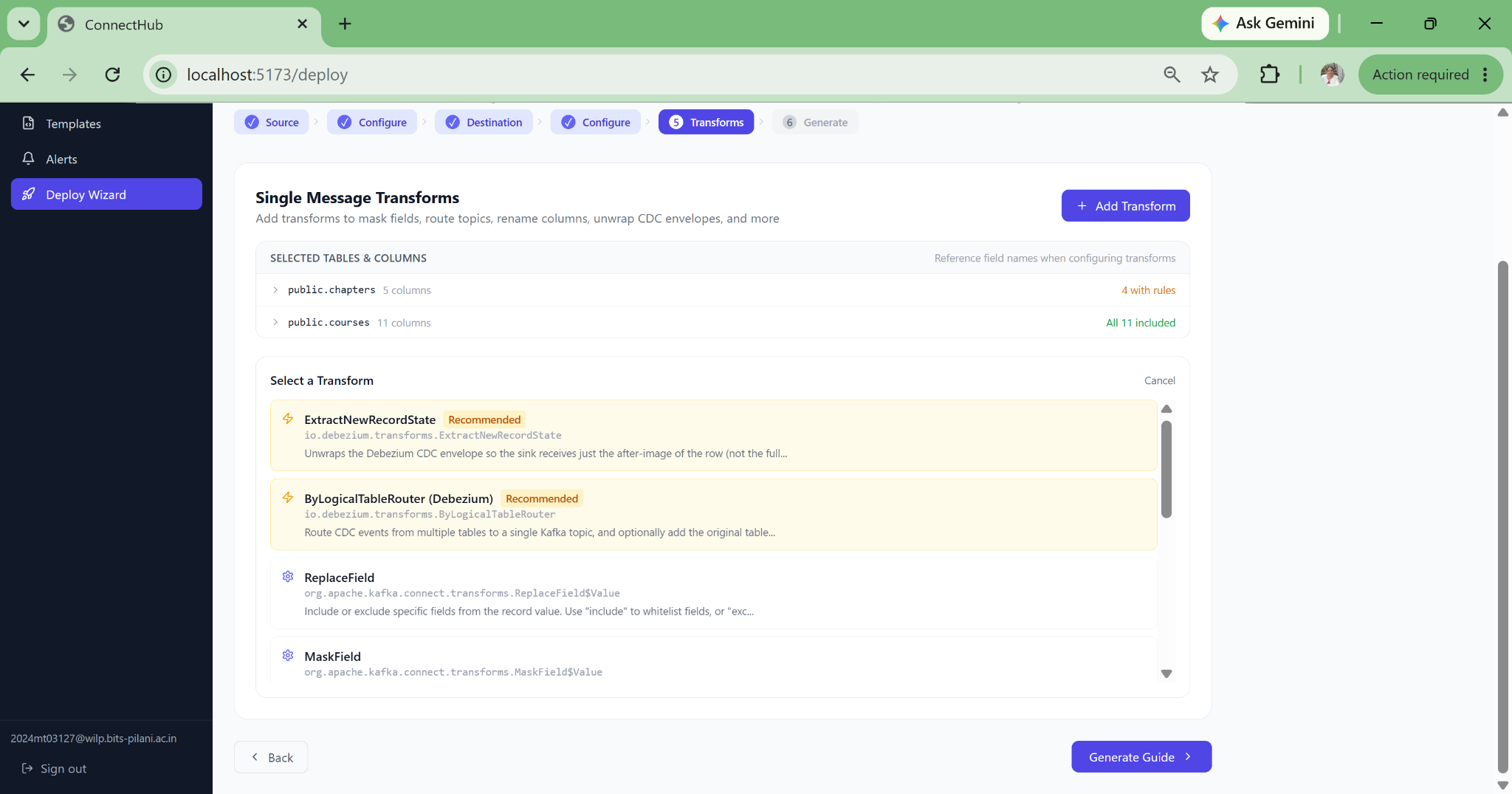
9 guided transforms: ExtractNewRecordState, MaskField, TimestampConverter, ByLogicalTableRouter, ReplaceField, InsertField, Filter, Cast, ValueToKey, each with guided configuration and field-level validation.

06
06

Deploy & Export Artifacts

One-click direct deploy via Kafka Connect REST API, or export connector JSON, Docker Compose, Helm commands, and Strimzi Kubernetes manifests for GitOps workflows.

Direct Deploy

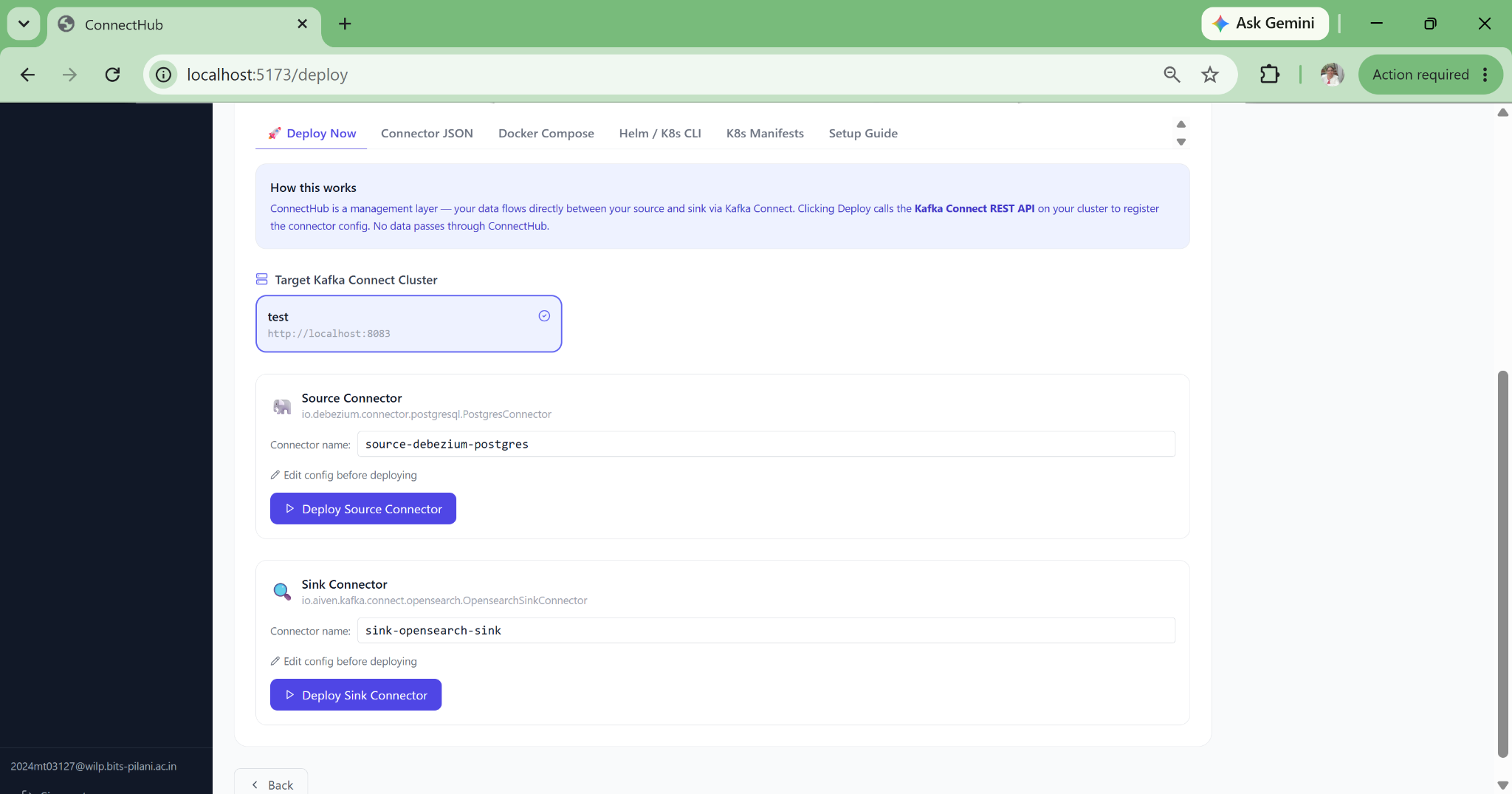
Deploys source and sink connectors to your Kafka Connect cluster via REST API instantly. No copy-paste, no manual steps.

Connector JSON

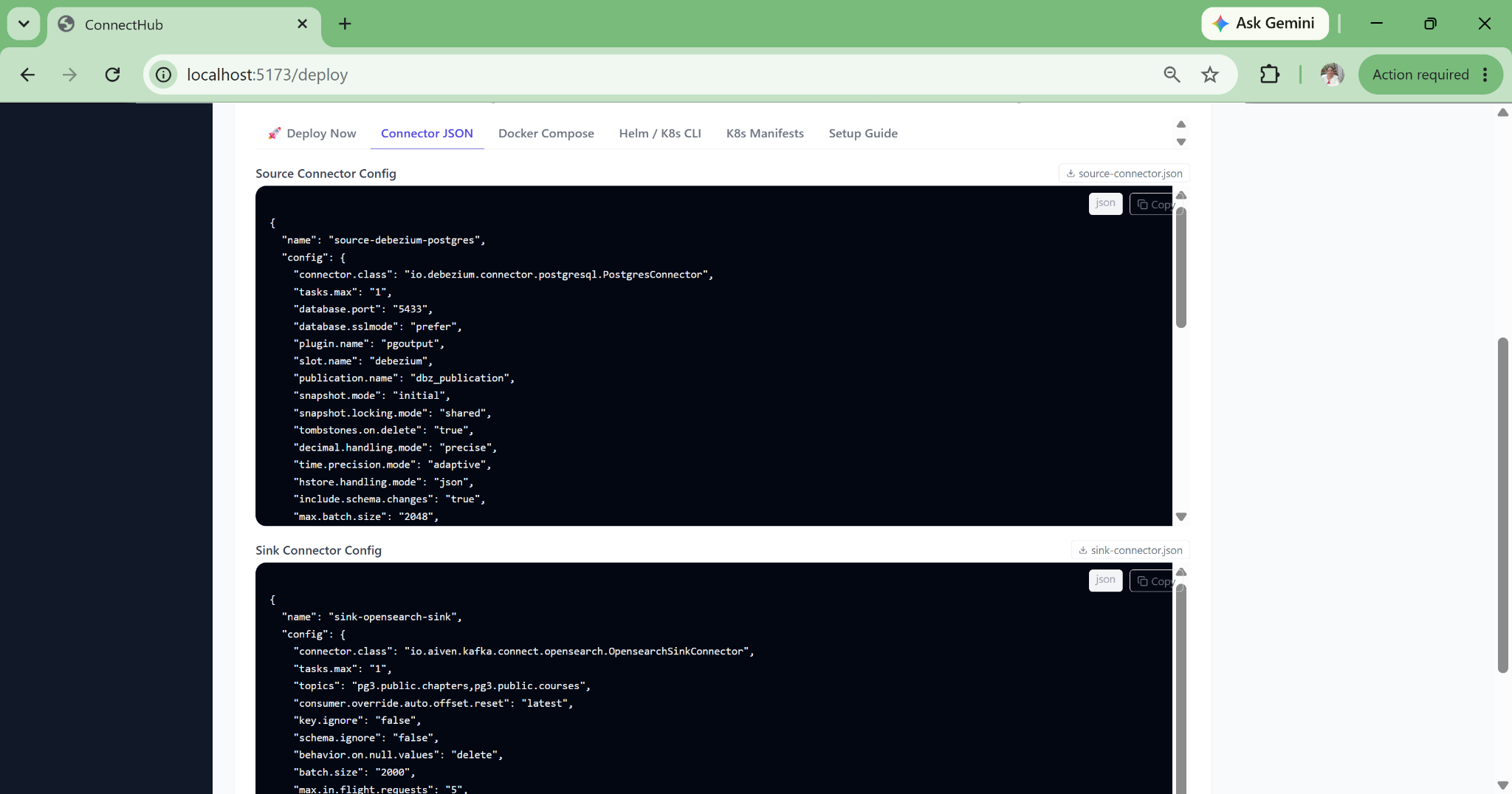
Downloadable source.json + sink.json ready for CI/CD pipelines and version control.

Docker Compose

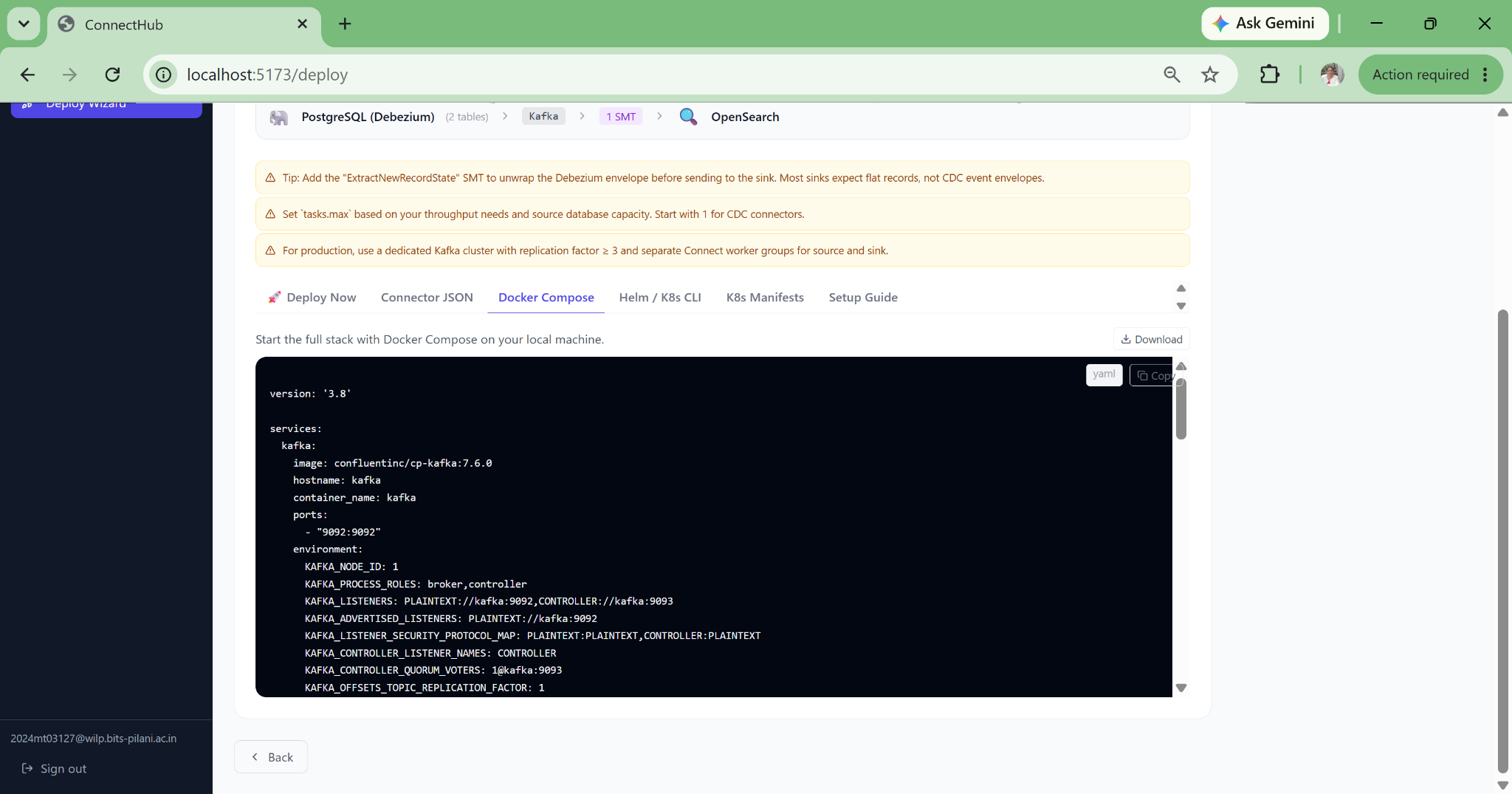
Ready-to-run compose stack with KRaft Kafka, Kafka Connect workers, and all environment variables pre-populated.

Strimzi K8s Manifests

KafkaConnector CRDs with credentials in a separate Secret object, base64-encoded and reference-linked for clean GitOps. Namespace-configurable.

Helm Commands

helm repo add, helm install, and kubectl heredoc commands ready to paste into a terminal or pipeline.

Setup Guide

Step-by-step instructions: enable CDC in PostgreSQL, set WAL level, create replication user, grant publication permissions.
Every Feature Built for
Production-Grade Data Engineering

Thirteen capabilities we built to cover the full lifecycle of a Kafka Connect deployment, from connector discovery and initial pipeline setup through day-two operations, compliance, and multi-cluster management.

ConnectHub source connector live status view
01 — DEPLOYMENT

Zero-JSON Pipeline Deployment

The wizard fills safe defaults for 80+ connector properties, auto-derives Kafka topic names, and deploys directly. A new data engineer can deploy a production Debezium CDC pipeline on their first day with no documentation required.

Core Feature
02 — SCHEMA DISCOVERY

Live Database Schema Discovery via JDBC

Connects to your source database at configuration time and enumerates every table, every column, every data type in a point-and-click interface. Eliminates the typos in table.include.list that cause silent data quality failures at snapshot time.

Core Feature
03 — COMPLIANCE

PII and Data Governance Built-In

Column-level controls: mask with asterisks, SHA-256 hash (irreversible, GDPR-compliant), exclude entirely, or truncate to N characters. Rules are enforced at the Kafka Connect layer so no PII ever reaches the Kafka broker. Masking proof is persisted in config history for auditors.

Compliance
04 — ZERO DATA CUSTODY

Pure Control Plane: Your Data Never Touches Our Servers

ConnectHub calls only the Kafka Connect REST API. It is not a Kafka consumer, not a JDBC proxy in production. Data flows source to broker to sink exactly as with raw connector JSON. This eliminates data sovereignty objections in financial services and healthcare.

Security
05 — OBSERVABILITY

Silent Failure Detection

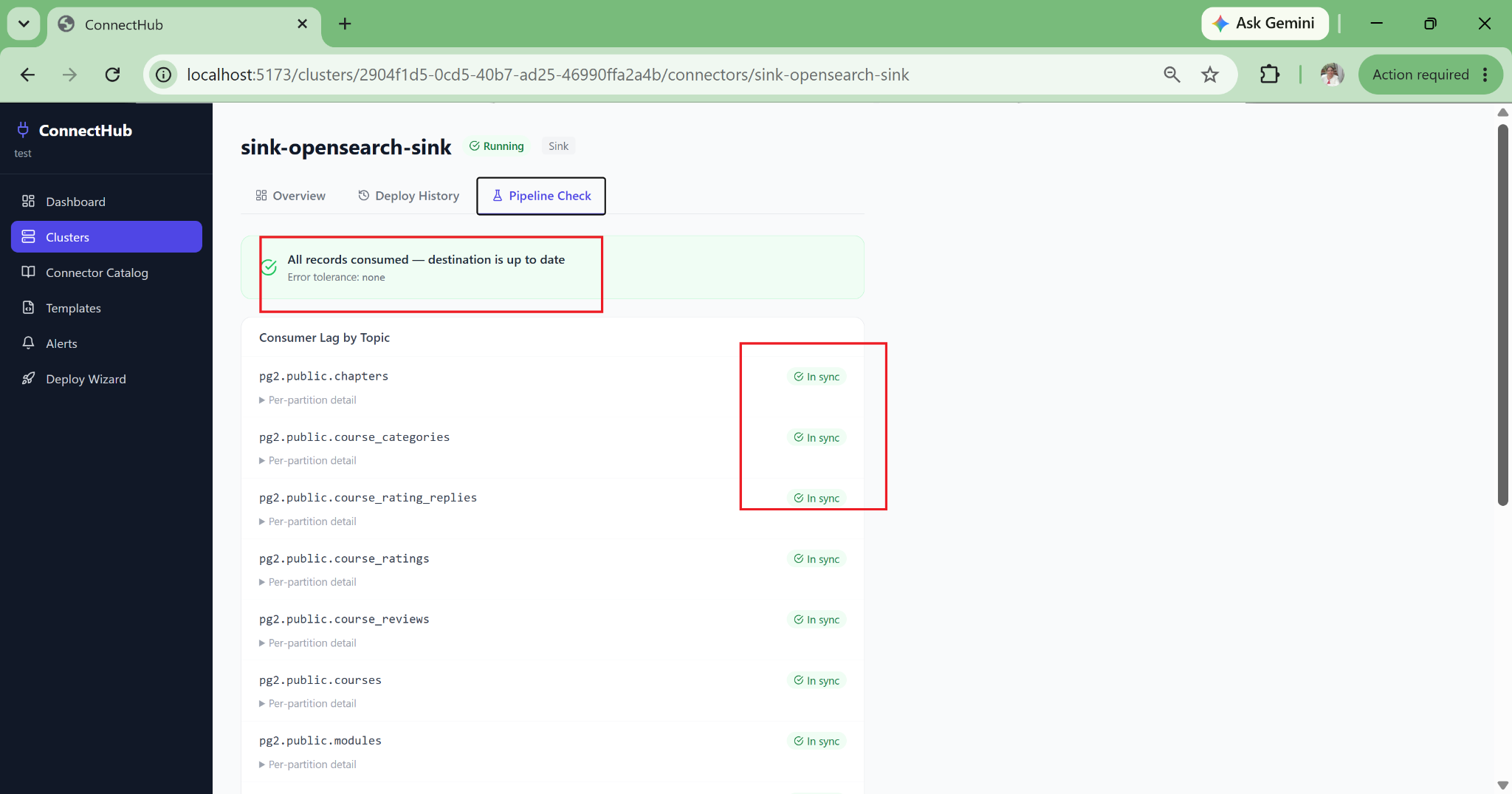
Pipeline Health Check surfaces what the standard Kafka Connect UI hides: DLQ accumulation, consumer lag per partition, tables with zero messages (snapshot gap), error tolerance misconfigurations, schema mismatches, and auth failures, all categorised in plain language.

Operations
06 — ALERTING

Webhook Alerting with Auto-Resolve

Alert rules scoped to connector name patterns using regex. Configurable duration threshold prevents noise from transient restarts. Webhooks to PagerDuty, Slack, OpsGenie, or custom endpoints. Auto-resolves when the condition clears. Full event history for post-mortems.

Operations
07 — LINEAGE

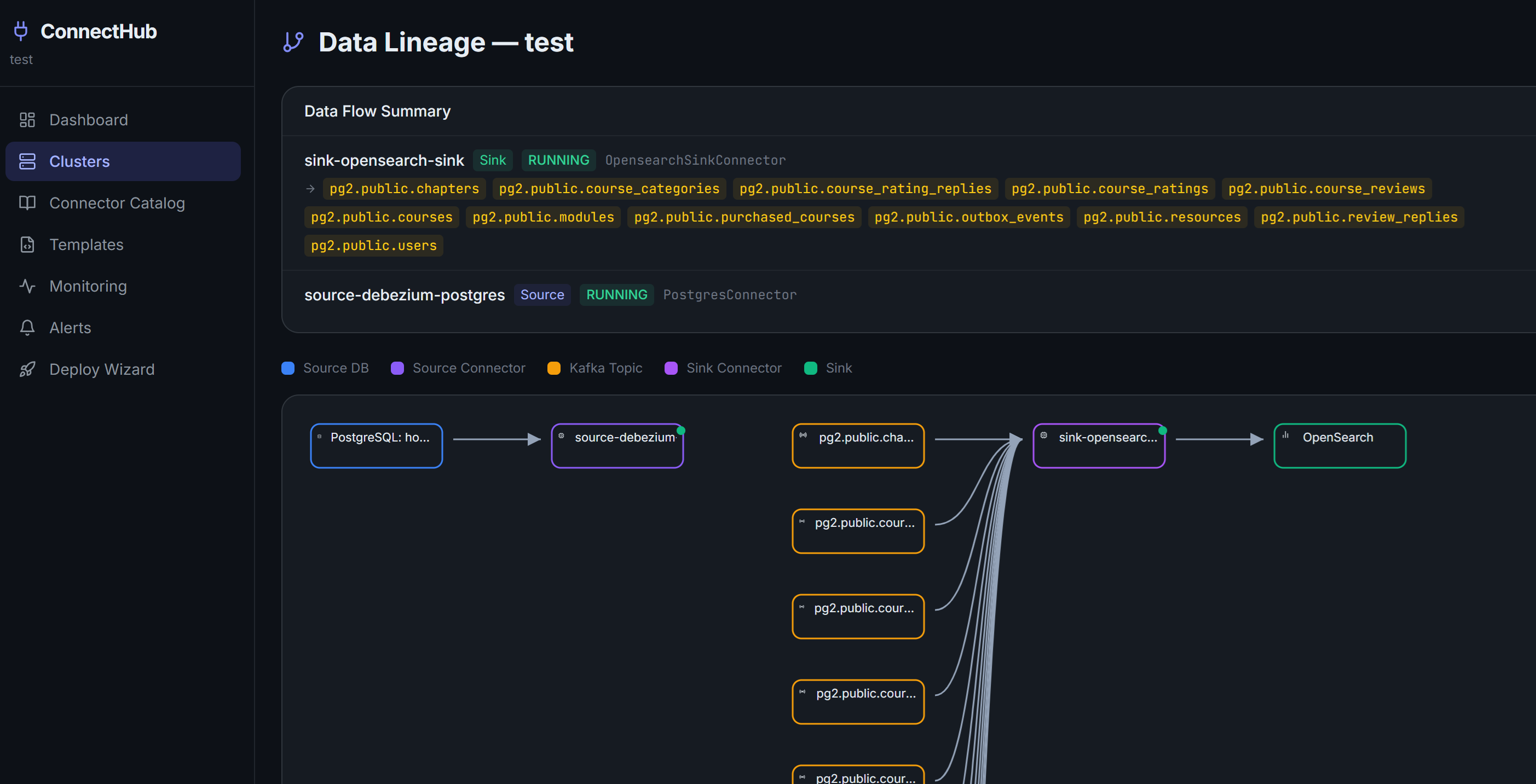
Automated Data Lineage DAG

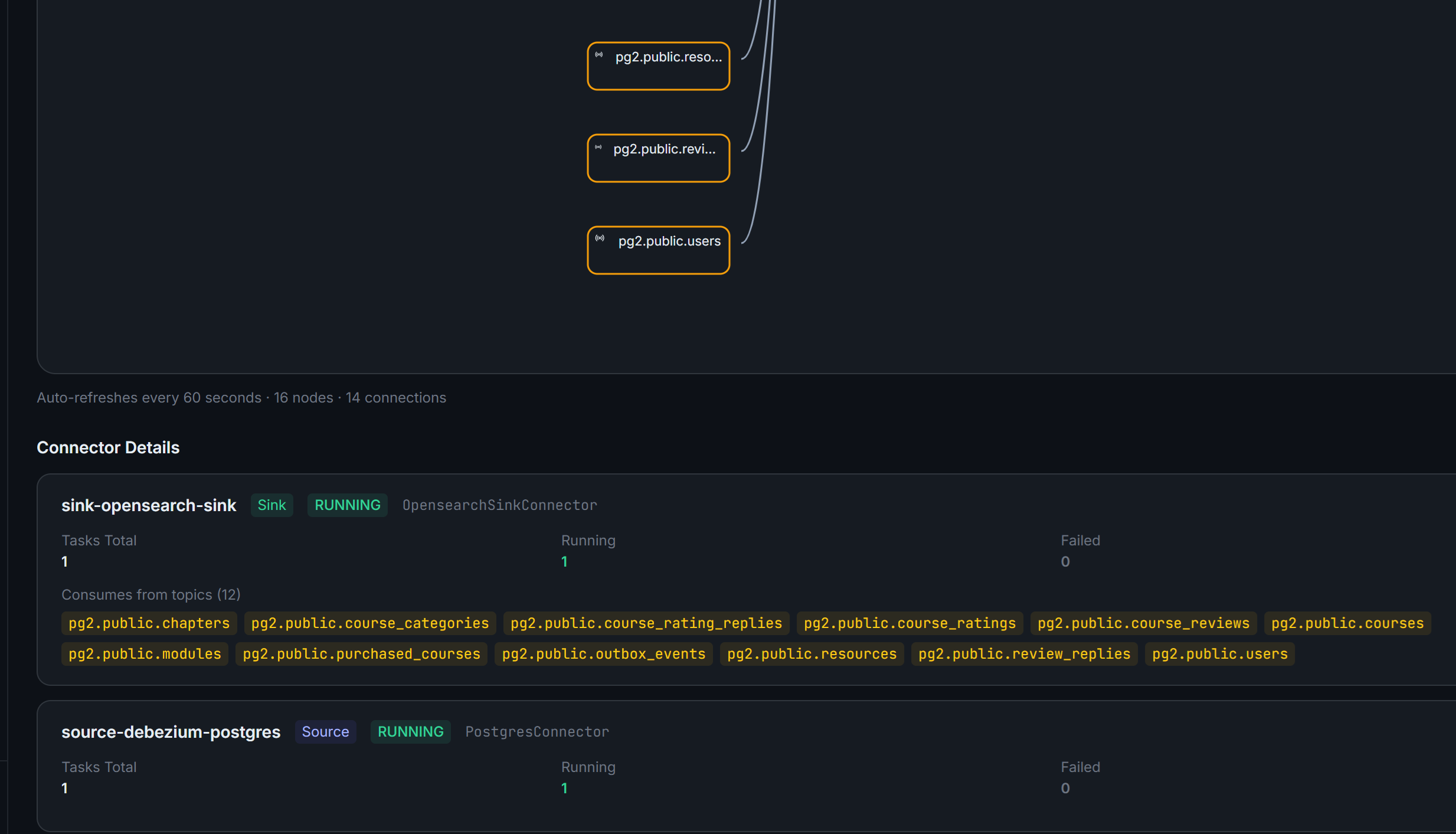
A visual SVG directed acyclic graph automatically derived from live connector configurations, with no manual metadata entry required. Source database to connector to Kafka topic to sink to destination. Auto-refreshes every 60 seconds and is always current.

Visibility
08 — MONITORING

Uptime, MTTR, and Consumer Lag Dashboards

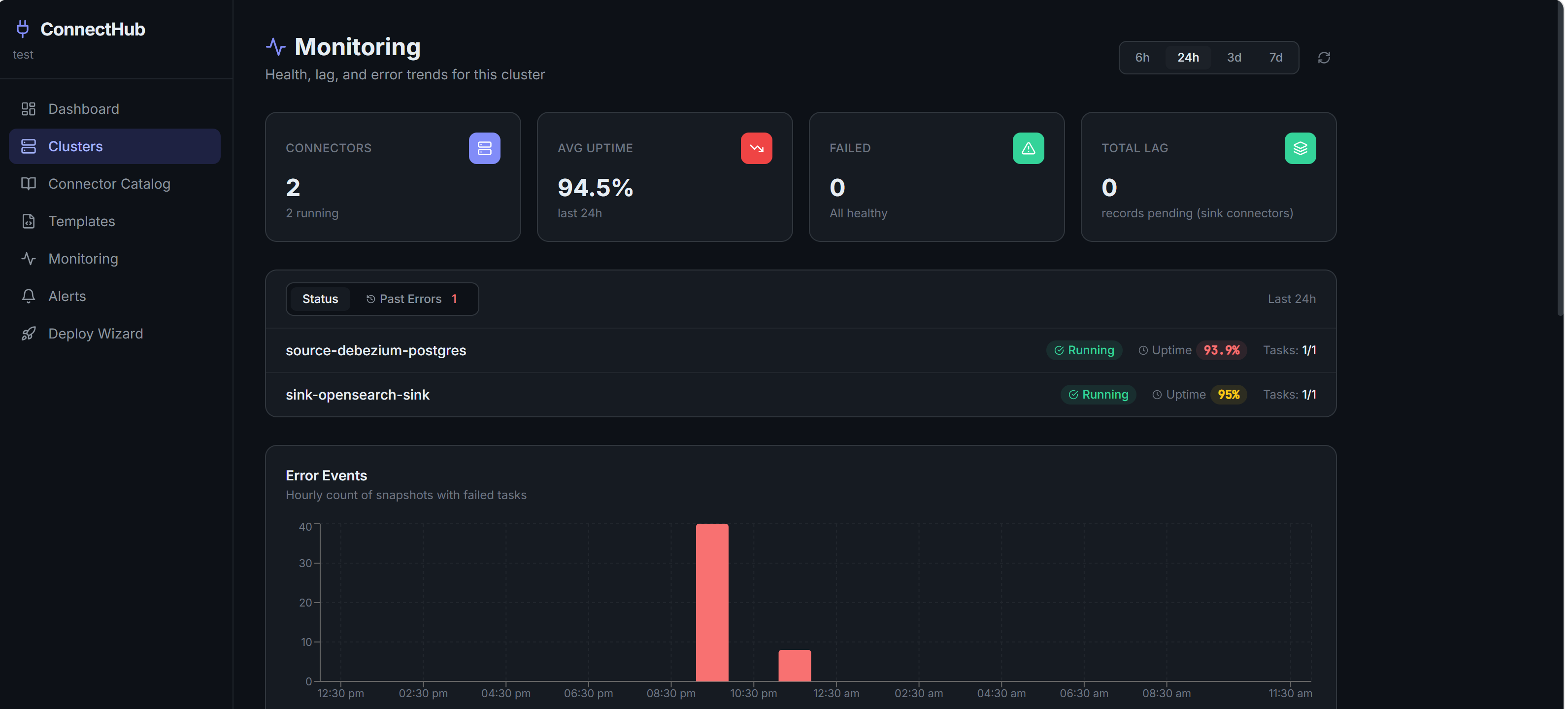
Per-cluster: connector uptime percentage, mean time to recovery computed from FAILED-to-RUNNING transitions, hourly error timeline, and consumer lag trends per sink connector. Time windows from 6h to 7d. Auto-refreshes every 60 seconds.

Operations
09 — KUBERNETES

One-Click Strimzi Manifest Generation

Generates Strimzi KafkaConnector CRDs plus a separate Secret object, where credentials are never embedded in the CRD. Namespace-configurable. Base64-encoded and reference-linked for clean GitOps workflows. Helm commands included in the same view.

Infrastructure
10 — AUDITABILITY

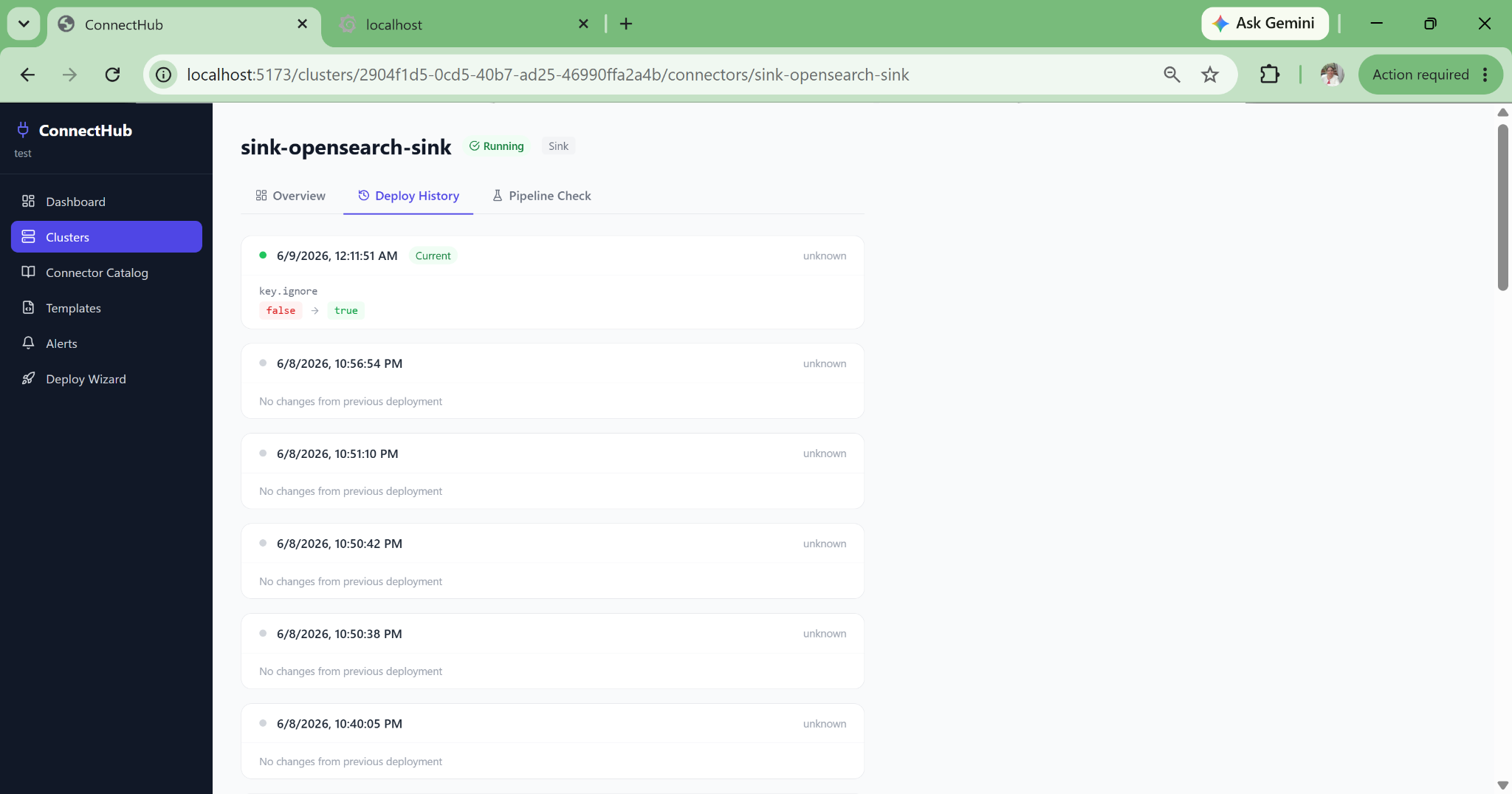
Full Config Change History and Audit Trail

Every configuration change persisted with a diff view: which properties changed, old and new values, timestamp, who made the change. Passwords masked in history. Answers "who changed this connector config and when?" immediately after a 2am incident.

Compliance
11 — SCHEMA REGISTRY

Confluent Schema Registry Integration

Per-connector Schemas tab auto-derives topics, fetches key and value subjects, shows full version history. Evolution warnings via the SR compatibility endpoint surface schema incompatibilities before production failures occur. Avro, Protobuf, and JSON Schema supported.

Core Feature
12 — MULTI-ENV

Multi-Cluster, Multi-Environment Management

Register dev, staging, prod, and multi-region Kafka Connect clusters in a single pane of glass. Full isolation prevents accidental prod deploys. Deploy to dev first, inspect configuration, then promote. Each cluster independently scoped per organisation.

Operations
13 — CONNECTOR CATALOG

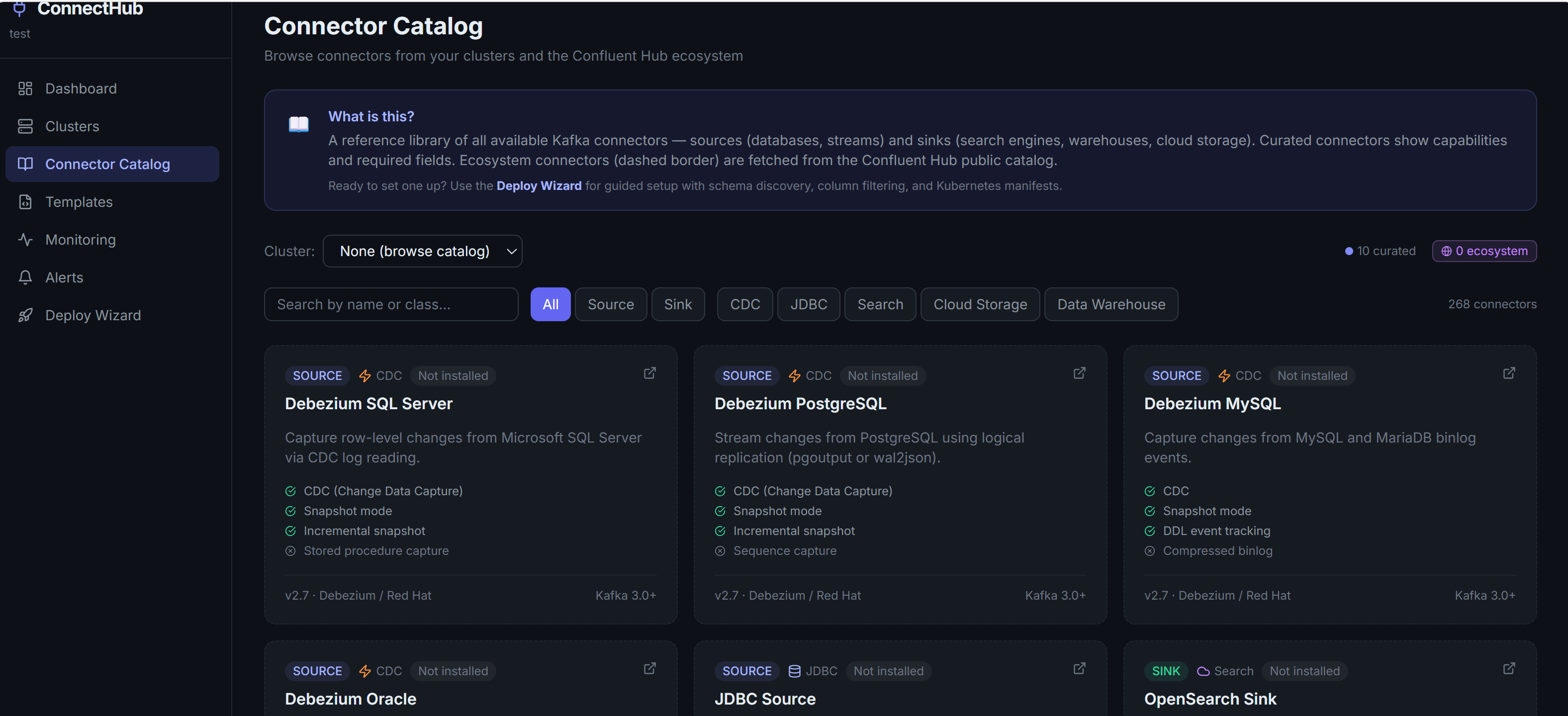
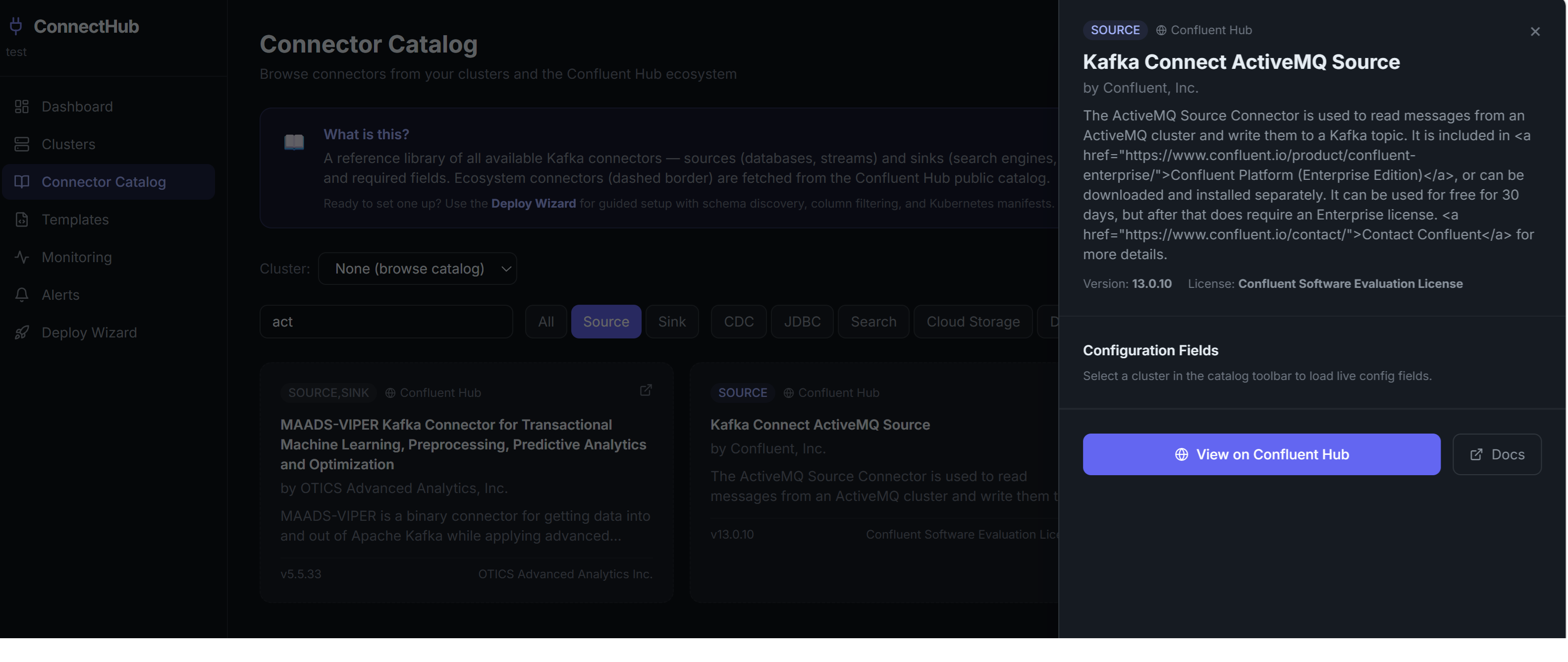
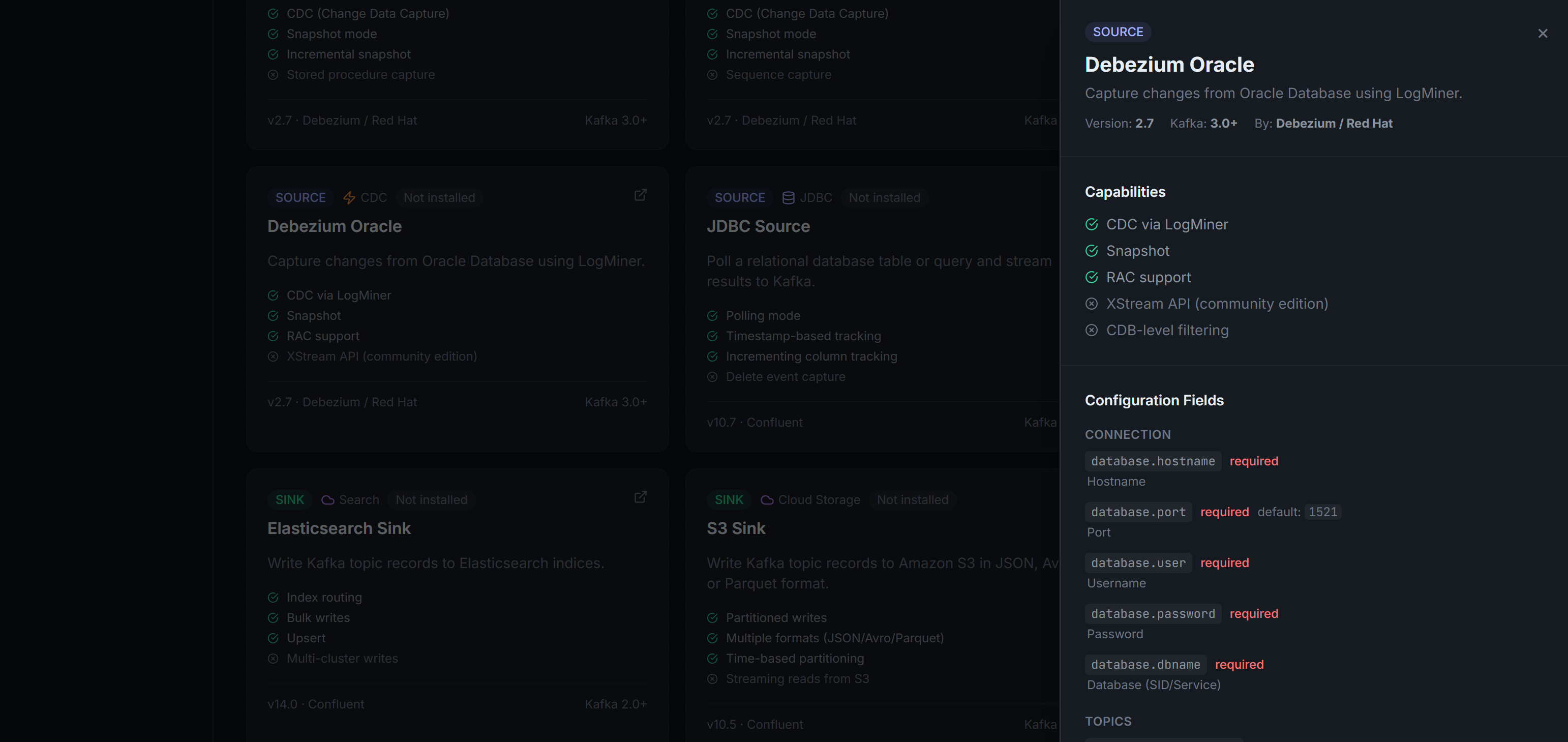
Confluent Hub Connector Catalog

Browse the full Confluent Hub connector catalog directly inside ConnectHub. Every available source and sink connector is listed with its required and optional configuration properties, accepted values, and defaults. Engineers can evaluate and compare connectors before starting a pipeline, without leaving the platform or reading external documentation.

Discovery

What ConnectHub
Actually Changed

The metrics that matter to a data engineering team shipping real pipelines to production at scale. Not feature counts, but operational outcomes.

Faster Pipeline Deployment

What previously required 2-3 days of a senior data engineer's time, including researching connector properties, hand-writing JSON, configuring SMT chains, and writing K8s manifests, now completes in under 30 minutes through the guided wizard. Day-one engineers deploy production CDC pipelines correctly, every time.

100%

PII Compliance Enforced at the Connector Layer

Column-level masking and SHA-256 hashing applied before data reaches any Kafka broker. No PII in transit, no PII at rest downstream. Compliance teams get an auditable config history with every masking rule, every change, and every timestamp. GDPR and HIPAA requirements addressed structurally, not by policy.

0

Silent Failures Reaching Production Undetected

Pipelines that previously showed RUNNING while silently accumulating DLQ messages are now caught within two health-check cycles (60 seconds). DLQ accumulation, snapshot gaps, consumer lag anomalies, and schema mismatches surface in plain language before they become incidents.

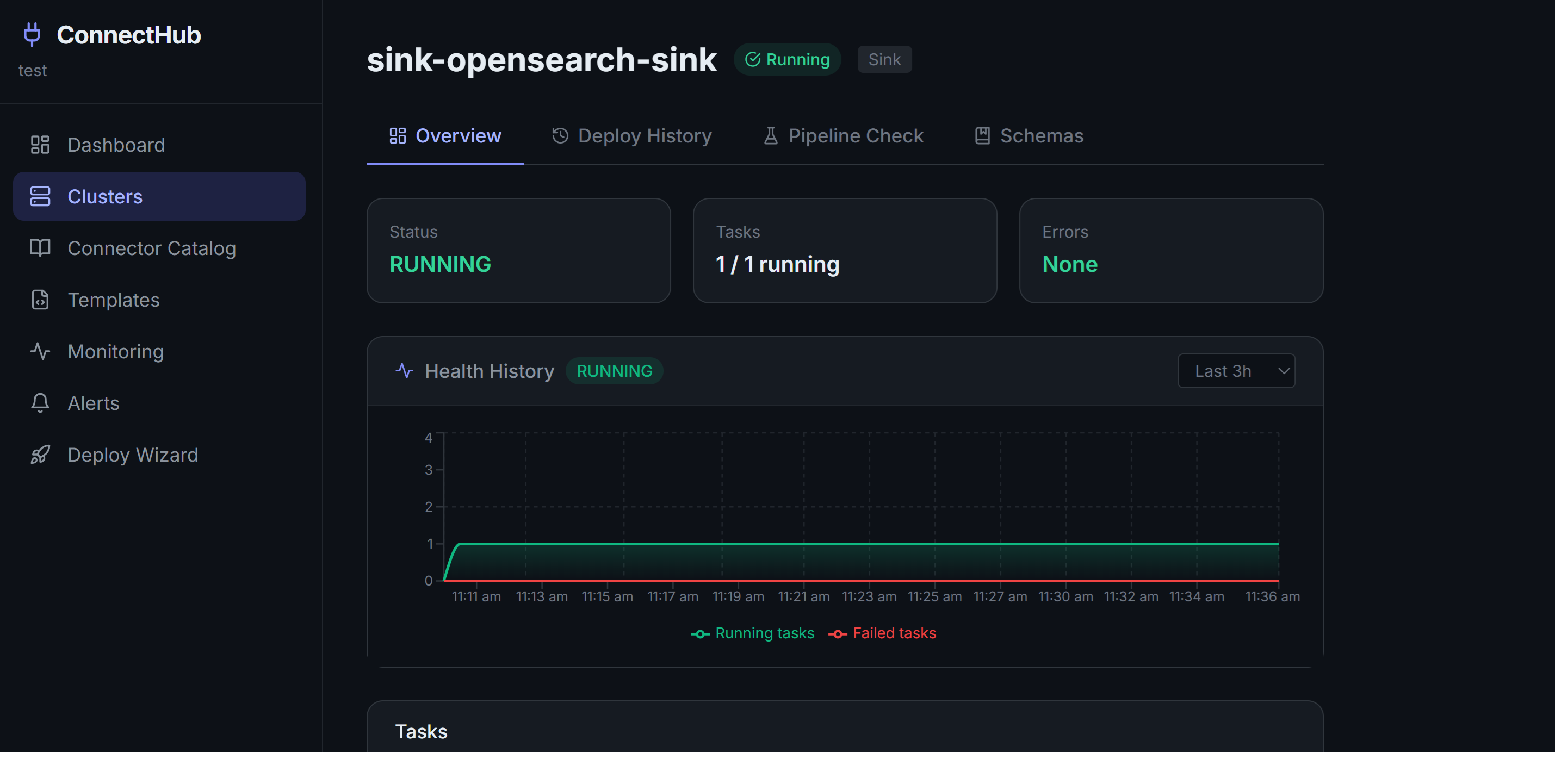
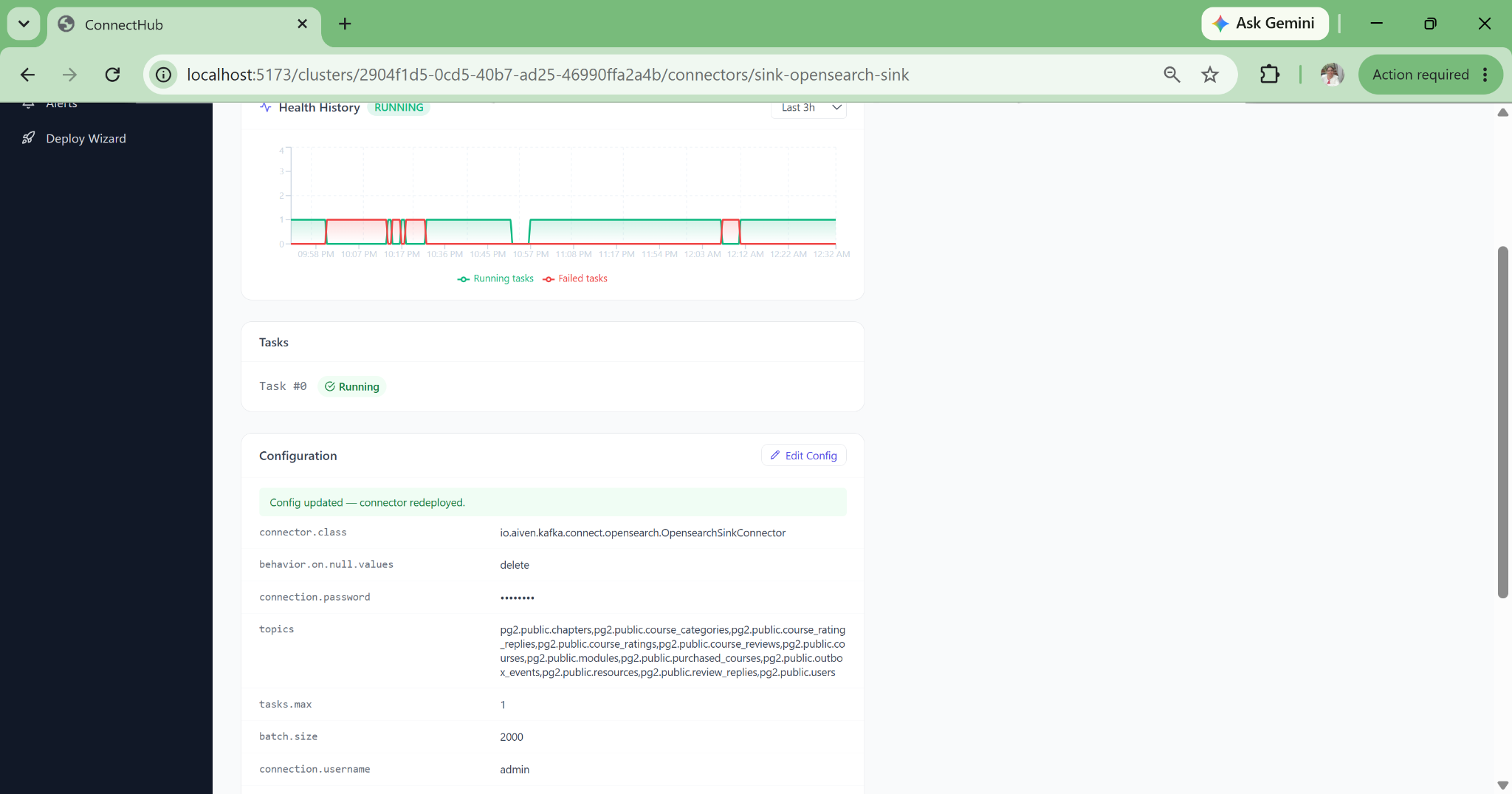
ConnectHub connector deploy status — live health and task state
1-click

Kubernetes Manifest Generation

Strimzi KafkaConnector CRDs and credential Secrets generated with correct base64 encoding and namespace configuration. Engineers previously spending hours writing and debugging K8s manifests now export them directly from the same view they deployed from.

Auto

Data Lineage, Always Current

A visual DAG derived from live connector configurations, not from documentation that goes stale. Auto-refreshes every 60 seconds. Compliance audits that previously required days of manual lineage reconstruction now complete in seconds.

9

SMT Transforms, Guided and Validated

Single Message Transforms including ExtractNewRecordState, MaskField, TimestampConverter, and ByLogicalTableRouter configured through a UI, not by reading Kafka Connect documentation and hand-constructing transform chains that break silently when mis-ordered.

Full

Multi-Cluster Operations Without Context Switching

Dev, staging, production, and regional clusters managed from a single interface. Accidental cross-environment deploys eliminated by org-level isolation. Teams promote pipeline configurations from dev to prod with confidence, as the config is identical and only the target cluster changes.

Strict Separation of Management Plane
and Data Plane

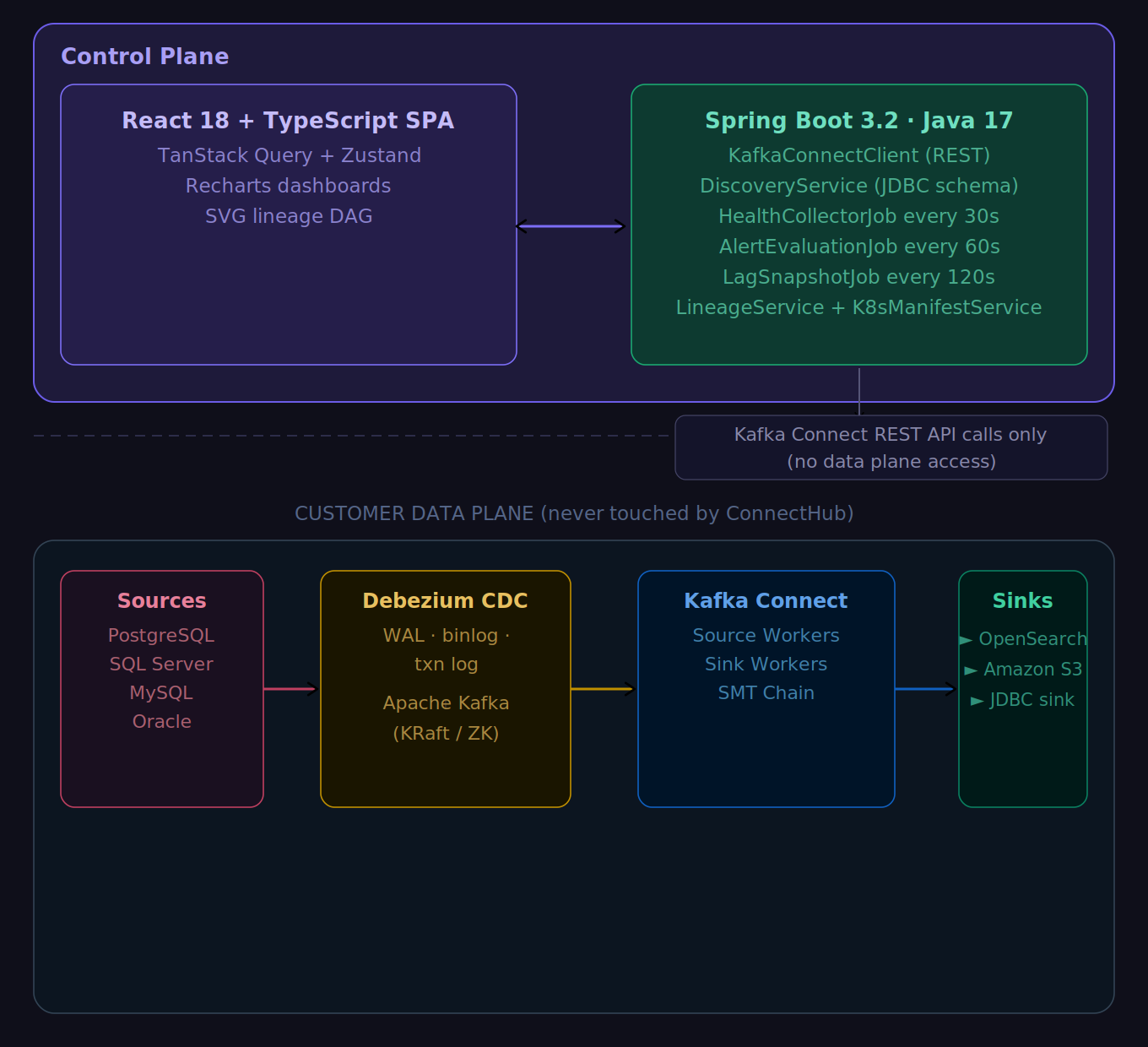
ConnectHub is architecturally isolated from the customer data plane. All business data flows directly from source to Kafka broker to sink. ConnectHub calls only the Kafka Connect REST API to manage connector lifecycle. This is a structural guarantee, not just a policy.

"ConnectHub never receives, stores, or proxies any of your business data. Source DB credentials are sent directly to the Kafka Connect REST API during the wizard and are not retained. This is the architecture, not a marketing claim."

System Architecture  ·  Management Plane vs. Customer Data Plane
ConnectHub system architecture showing the management plane separated from the customer data plane

Frontend

React 18 + TypeScript Vite + Tailwind CSS TanStack Query Zustand + Recharts

Backend

Spring Boot 3.2 Java 17 Spring WebFlux Spring Security + JWT

Data Layer

PostgreSQL metadata Flyway migrations JDBC schema discovery Kafka AdminClient (lag)

Integrations

Kafka Connect REST API Schema Registry REST Strimzi KafkaConnector Webhook delivery

Auth & Security

JWT stateless tokens Org-scoped claims BCrypt hashing Multi-tenant DB isolation

Scheduled Jobs

Health snapshots / 30s Alert evaluation / 60s Lag snapshots / 120s Lineage refresh / 60s

Data Lineage — Zero Configuration

The lineage DAG is derived entirely from live connector configurations via the Kafka Connect REST API. No manual metadata entry, no separate lineage tool, no YAML to maintain. The moment you deploy a new connector, it appears in the lineage graph.

  • Source database → connector → Kafka topic → sink connector → destination
  • Auto-refreshes every 60 seconds from the live cluster state
  • One-click access from the clusters view, always current
  • Compliance audit trail without documentation overhead

Full Debezium CDC Ecosystem
Covered Out of the Box

Four Debezium CDC source connectors spanning every major enterprise database, plus Kafka-to-Kafka replication via MirrorMaker 2. Three sink connectors covering the most common downstream targets, and nine guided Single Message Transforms for production-grade data shaping.

Source Connectors — CDC via Debezium 2.7

ConnectorCDC MethodLicense
PostgreSQLWAL pgoutput / wal2jsonApache 2.0
SQL ServerCDC + transaction logApache 2.0
MySQLBinlogApache 2.0
OracleLogMinerApache 2.0

Kafka-to-Kafka replication via MirrorMaker 2 is also supported as a Kafka Connect source connector (MirrorSourceConnector), for cross-cluster and cross-region topic mirroring.

ConnectHub deploy wizard — live JDBC schema discovery: select tables and columns

Need a connector not listed above? ConnectHub's architecture is built to onboard any new Debezium source or Kafka Connect sink in 2 to 3 days of engineering effort. MariaDB, MongoDB, Cassandra, or a custom sink — the wizard, schema discovery, PII controls, and Strimzi manifest generation all extend to new connectors with minimal plumbing. The platform grows with your stack.

ConnectHub deploy wizard — step 4: select sink destination connector

Sink Connectors

ConnectorUse Case
OpenSearch (Aiven)Search and analytics indexing with full document upsert support
Amazon S3 (Confluent)Data lake and cold archival using Parquet, Avro, or JSON format
JDBC Sink (Confluent)Any JDBC-compatible database target with upsert, insert, or delete mode

The guided wizard covers the connectors above. The Connector Catalog goes further — it surfaces every connector available on Confluent Hub, complete with all configuration properties and accepted values, so your team can evaluate any connector before requesting it for a new pipeline. No external documentation needed.

SMT 01

ExtractNewRecordState

Unwraps the Debezium CDC envelope to a flat row representation. Essential for all CDC pipelines: without it, sinks receive the full Debezium change event structure, not the row data.

SMT 02

MaskField

Replaces sensitive fields with null or a fixed string. Applied per-column from the PII configuration step with no manual SMT JSON required.

SMT 03

TimestampConverter

Converts timestamp formats between representations: Unix milliseconds to ISO-8601, epoch to string, and more. Eliminates sink-side type mismatch errors.

SMT 04

ByLogicalTableRouter

Routes multiple source tables into a single Kafka topic with a discriminator field. Used for multi-tenant schemas and table sharding patterns.

SMT 05

ReplaceField

Include, exclude, or rename specific fields in the message payload. Strips internal Debezium metadata fields before data reaches downstream consumers.

SMT 06–09

InsertField · Filter · Cast · ValueToKey

Add metadata fields (e.g. __source_table) to every message; drop events by field condition; cast field data types (String → Int32, Long → Double) to fix schema mismatches before data reaches sinks; promote payload fields to the Kafka message key for correct partition assignment and log compaction.

Enterprise-Grade Isolation
at Every Layer

Multi-tenancy enforced at the database query level, not just application logic. Every JWT carries an orgId claim and every query is scoped to the org. Cross-tenant data access is structurally impossible.

Authentication

Stateless JWT tokens with configurable expiry. BCrypt password hashing with appropriate cost factor. All API endpoints require a valid JWT with org-scoped claims. No session state is stored server-side, making it horizontally scalable without sticky sessions.
Multi-Tenancy

Every JWT carries an orgId claim. Every database query filters by orgId at the query level so clusters, connectors, alert rules, health history, and lag snapshots are all fully org-isolated. A compromised token from Org A cannot reach Org B's data by any code path.

Zero Data Custody

ConnectHub never receives, stores, or proxies your business data. Source database credentials entered during the wizard are transmitted directly to the Kafka Connect REST API and are not retained in ConnectHub's database. This is the architecture, not a configuration option.

Credential Safety

Passwords masked in UI displays and config history diff views. Kubernetes manifests generate separate Secret objects, where credentials are never embedded in KafkaConnector CRDs. Base64-encoded and reference-linked for clean GitOps workflows that pass security scanning.

The hardest security property to achieve is the one that eliminates an entire class of risk by design. Zero data custody isn't a control; it's an architectural constraint that means there's nothing to breach in the first place.

Full-Stack Pipeline Health Visibility
Without the Toil

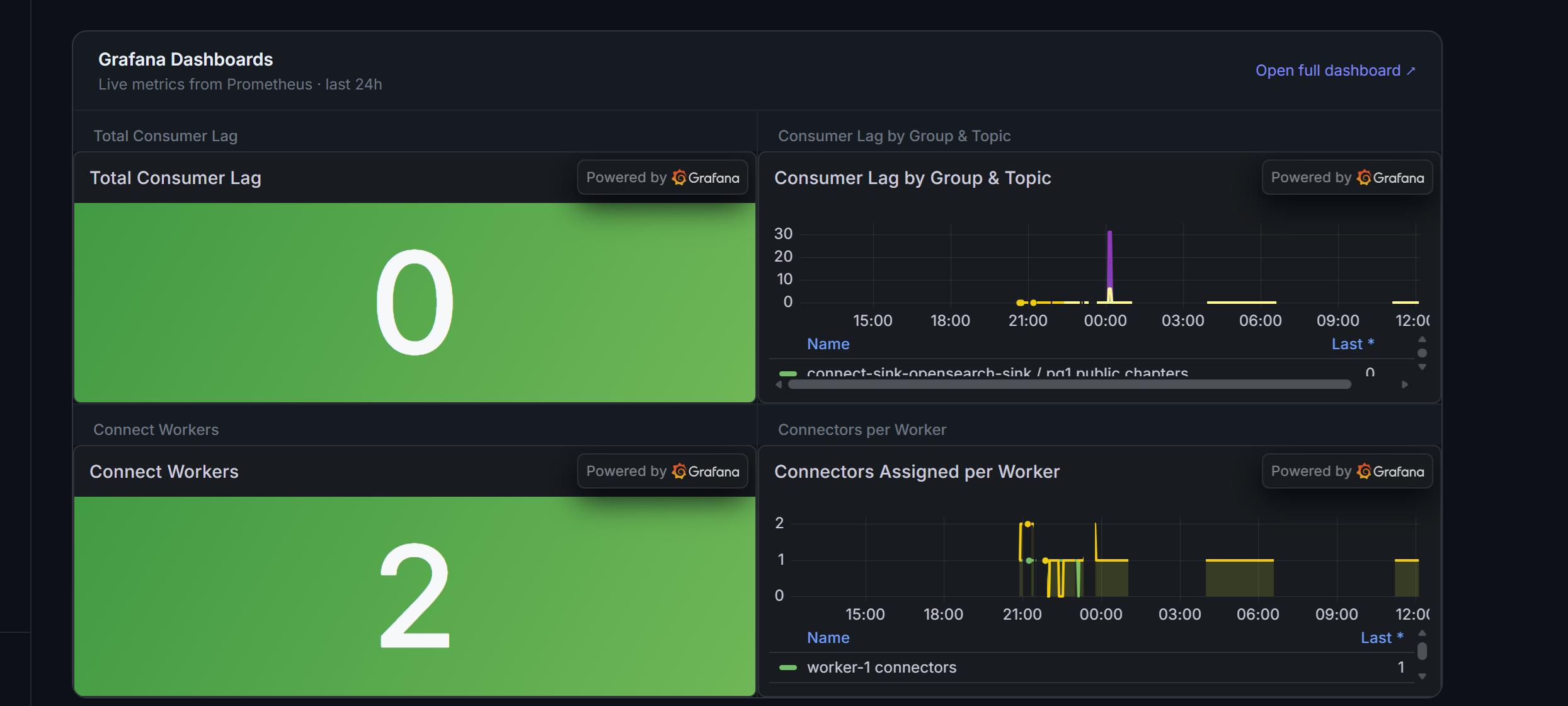
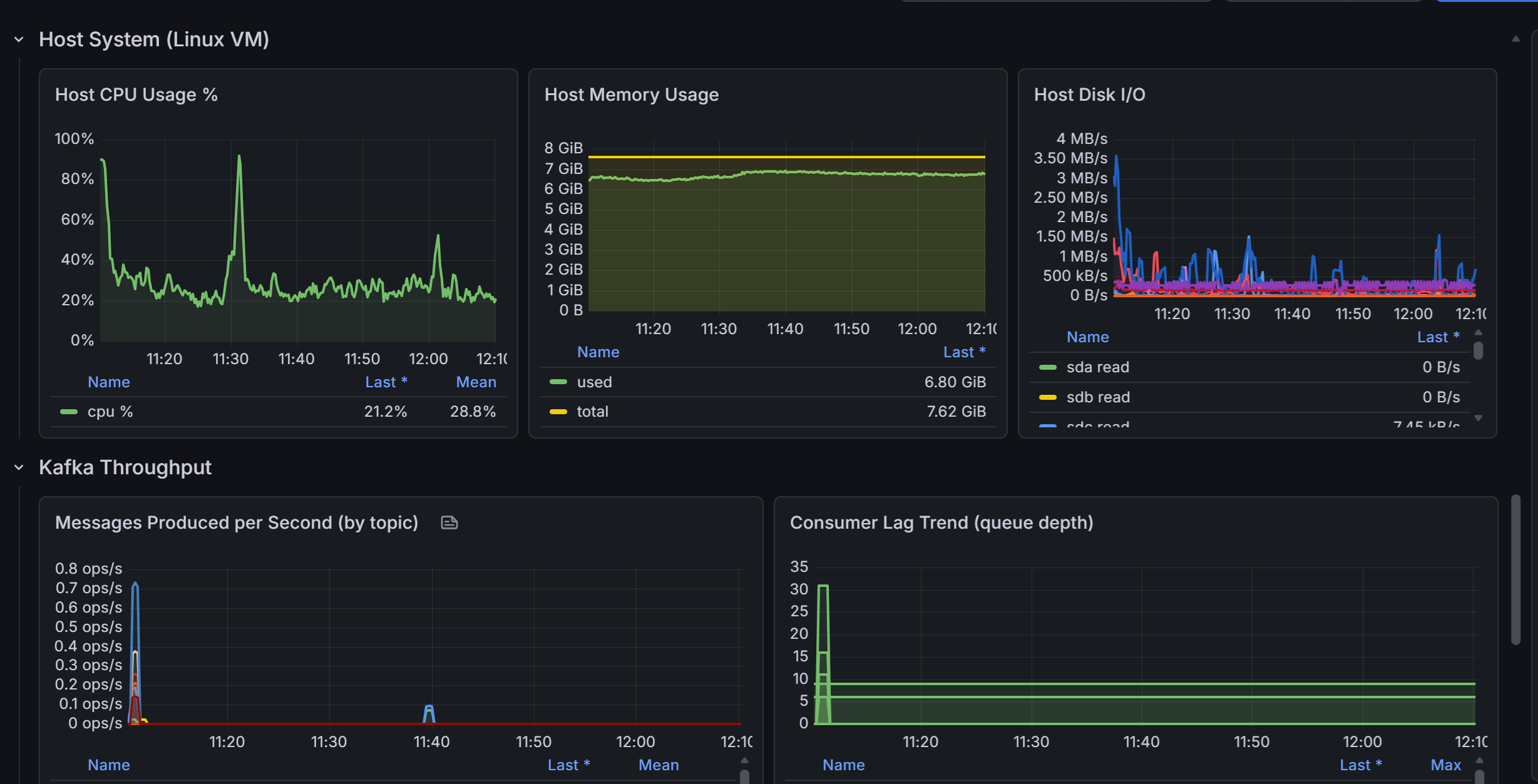
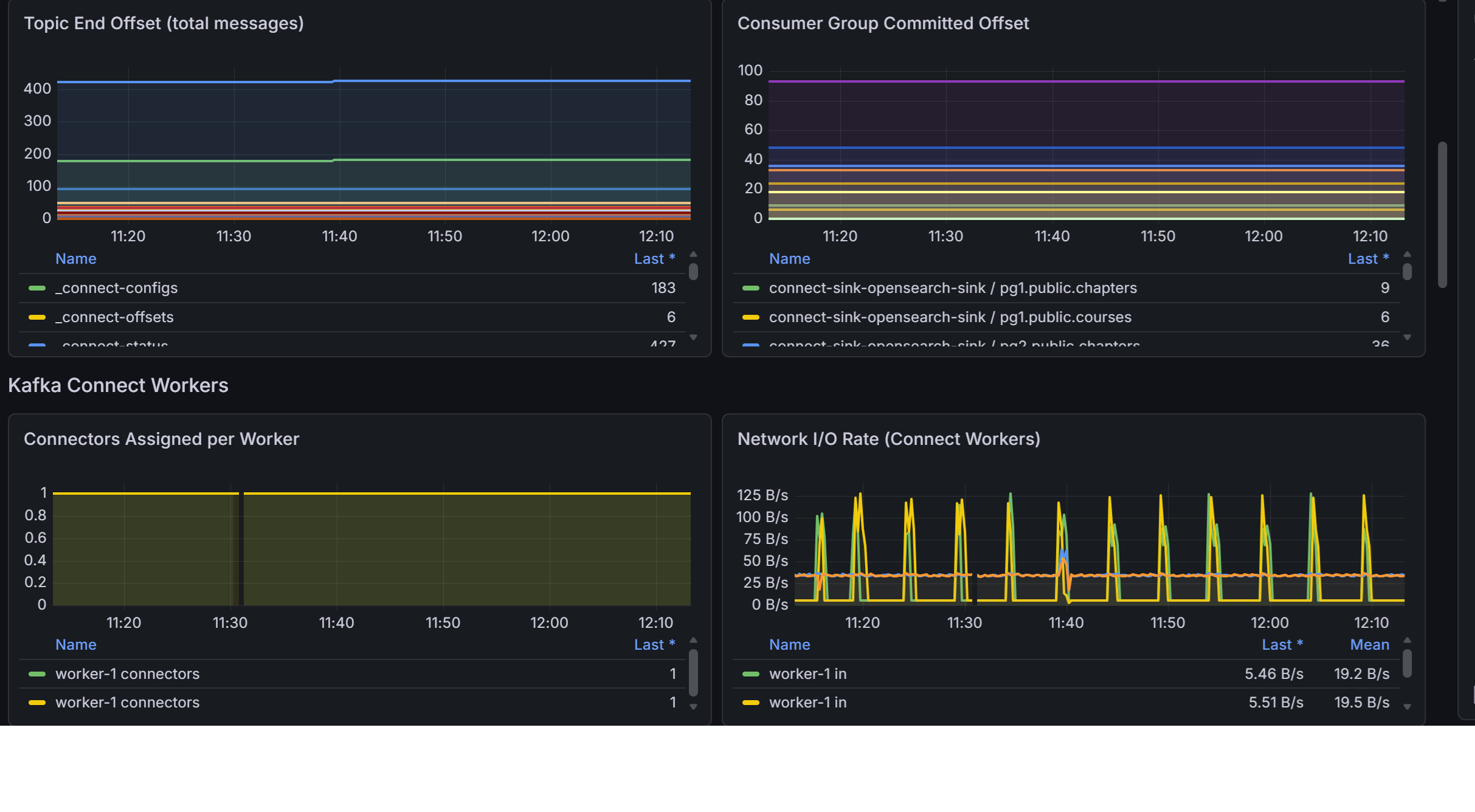
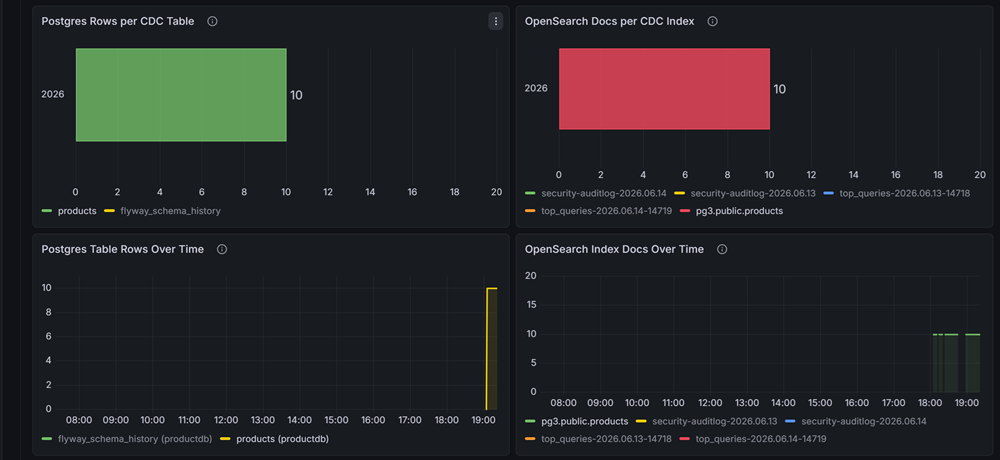
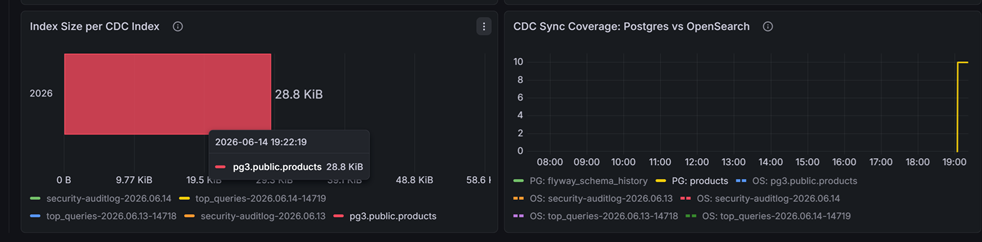
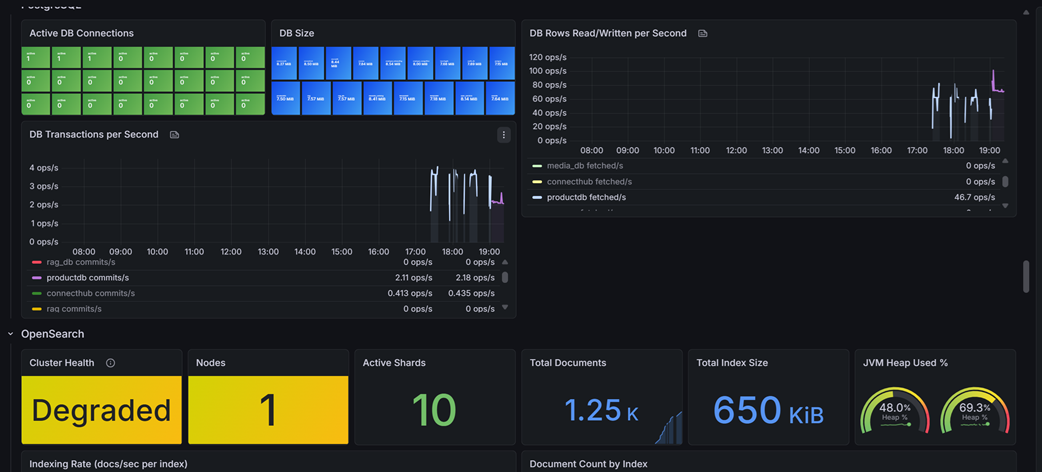
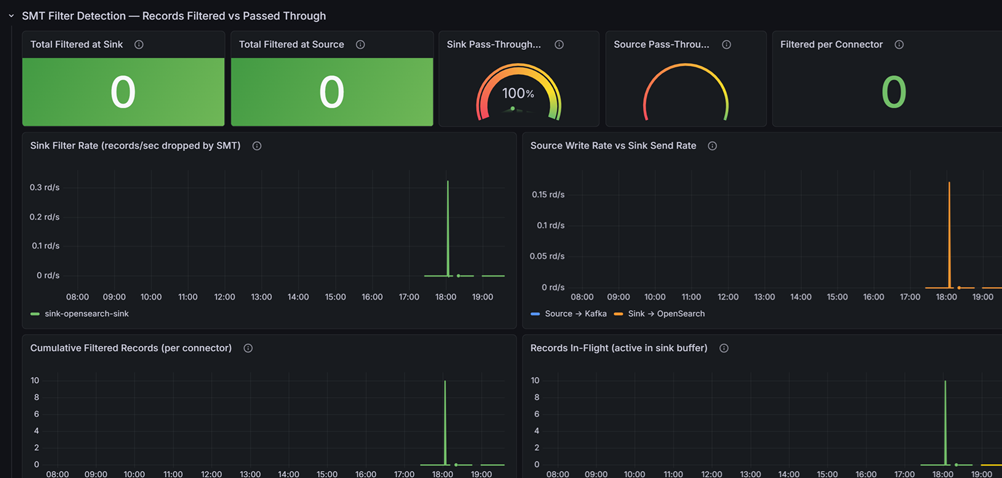
Health snapshots every 30 seconds. Alert evaluation every 60 seconds. Consumer lag polled via Kafka AdminClient every 120 seconds. Grafana dashboards expose connector health, host metrics (CPU, memory, disk), and Kafka JMX metrics (JVM heap, GC pause, thread count) with no external monitoring infrastructure to deploy separately.

Grafana dashboard showing ConnectHub connector health, host metrics, and Kafka JMX metrics

Connector Uptime %

Running snapshots divided by total snapshots in the selected time window. Per connector, per cluster, with trend line.

MTTR

Average time from first FAILED snapshot to next RUNNING. An objective measure of pipeline brittleness that tracks improvement over time.

Error Event Timeline

Hourly bar chart of snapshots where tasksFailed > 0 or state equals FAILED. Correlate with deployment events.

DLQ Message Count

Dead-letter queue accumulation surfaced in the Pipeline Health Check. Catches messages being silently dropped before they become data loss.

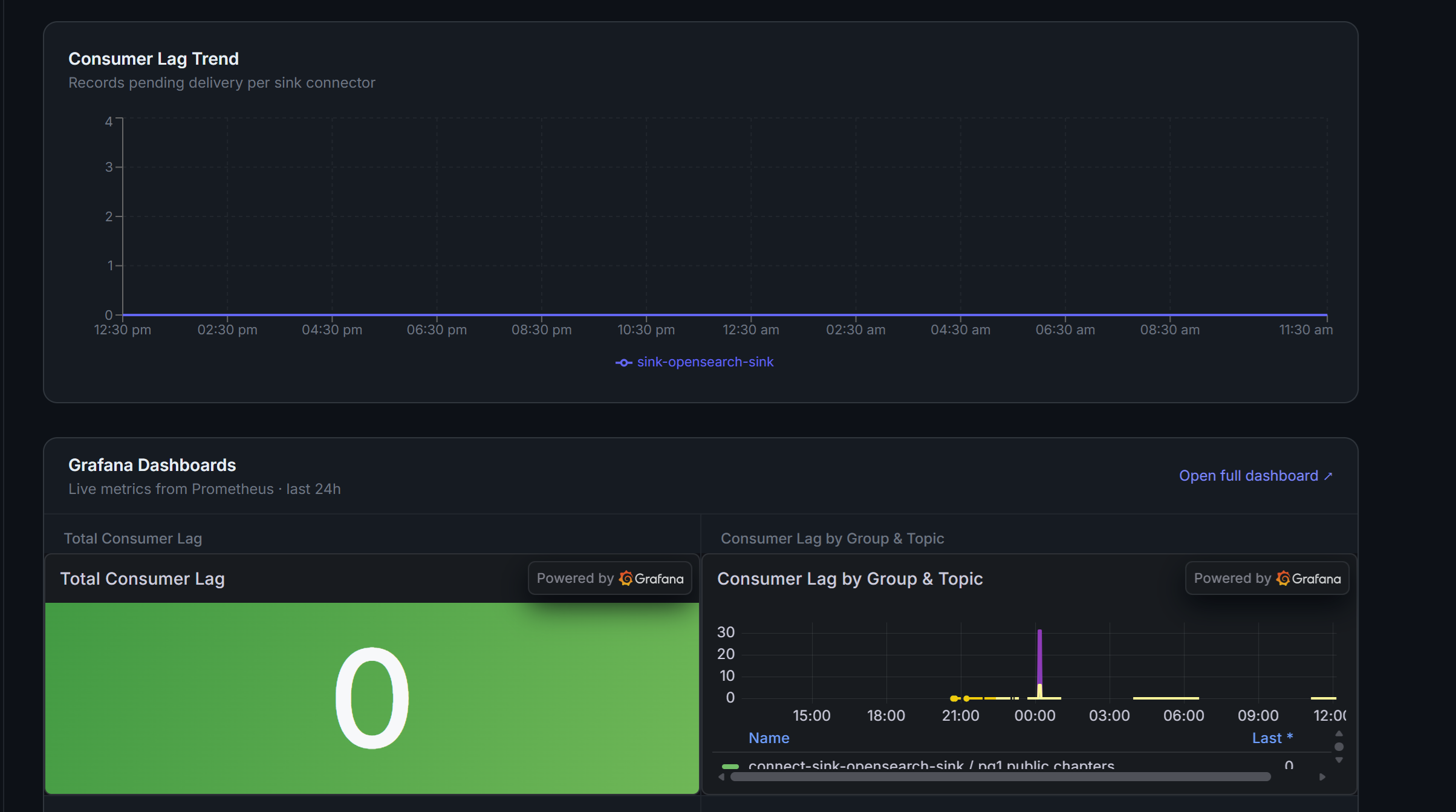
Consumer Lag Trend

Area chart per sink connector from the lag snapshots table. Total lag plus trend line for early warning before sinks fall behind irreversibly.

Schema Evolution Warnings

Schema Registry compatibility checks per connector, flagging schema compatibility violations before they cause downstream consumer failures.

CDC Offset Position

LSN or binlog position per partition tracked over time. Derive data velocity from offset delta to detect CDC stalls before replication lag becomes visible.

Snapshot Gap Detection

Warns when tables are added to table.include.list after the initial snapshot, a common cause of missing historical rows that silently corrupts downstream aggregations.
Every Screen, In Sequence

A complete visual tour of ConnectHub, from registering a cluster through the full 6-step deploy wizard to the monitoring dashboards. Every screenshot is a real screen from the running application.

Cluster Management Register clusters · list connectors · edit connection settings
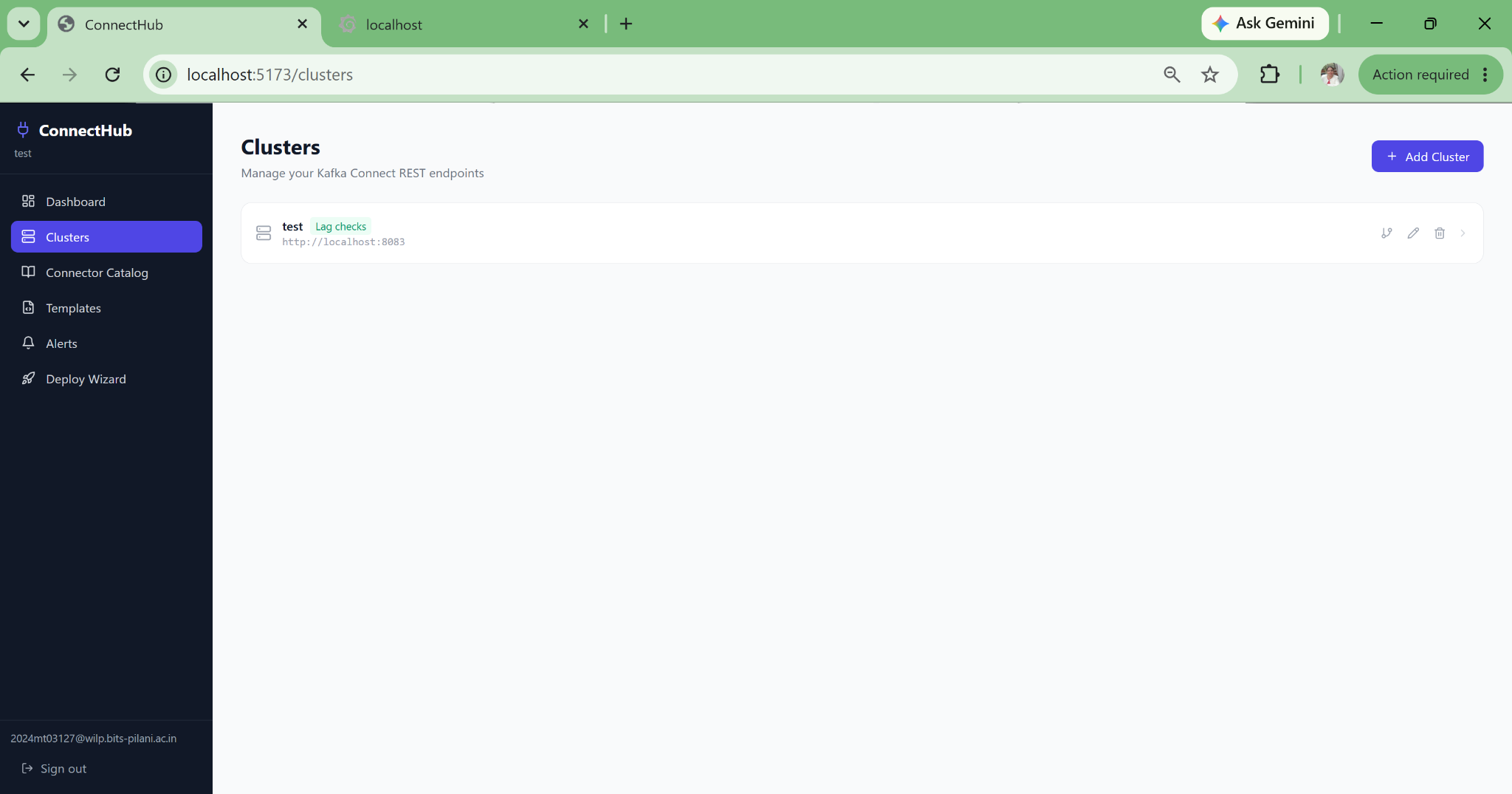
Add and manage Kafka Connect clusters
Step 01

Add a Cluster

Register your Kafka Connect cluster REST endpoint. Dev, staging, prod, or multi-region, each fully isolated.

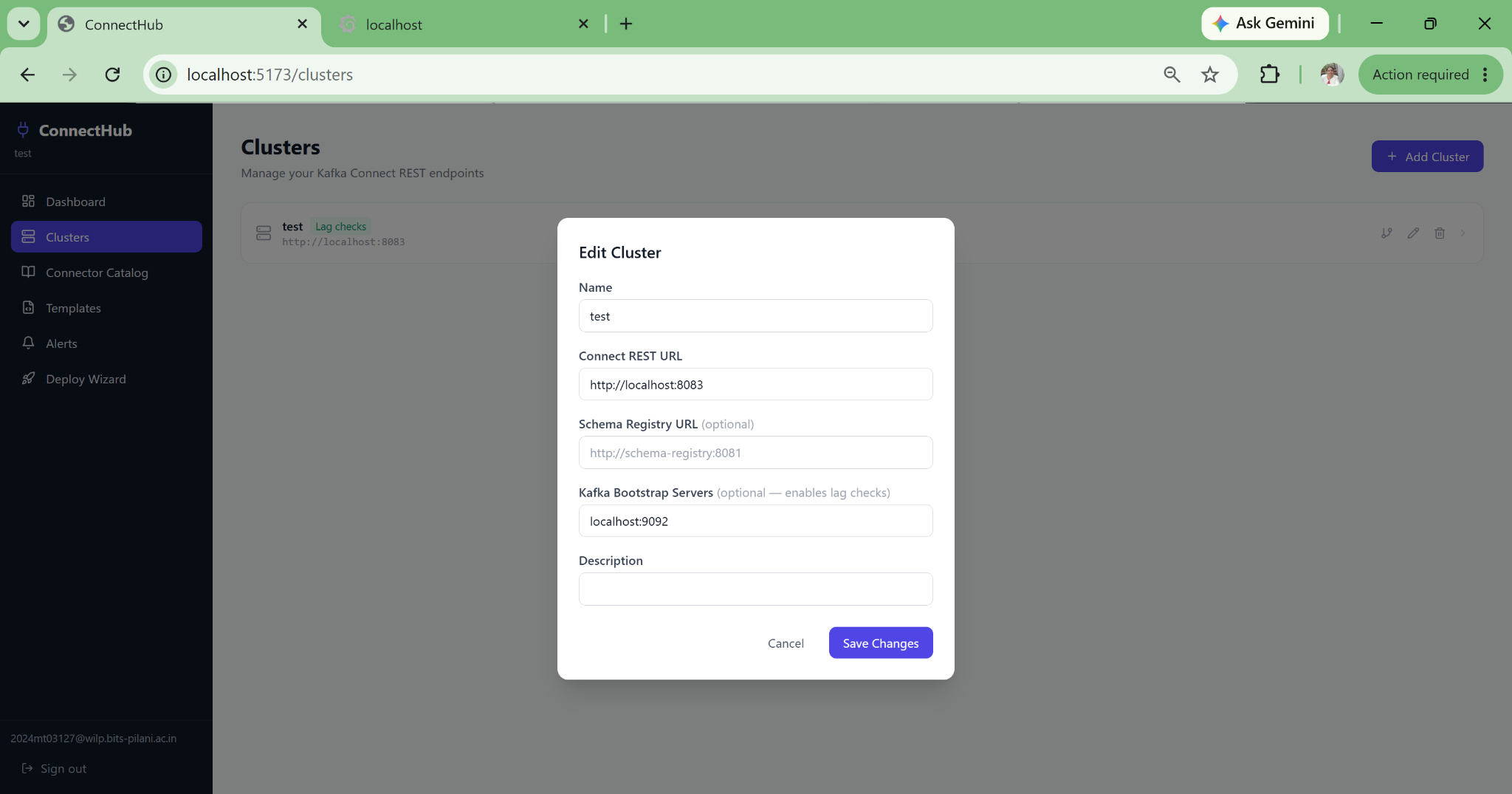
Edit cluster connection URL
Step 02

Configure Connection

Edit the cluster REST URL, auth credentials, and environment label. Changes take effect immediately.

List all connectors in a cluster
Step 03

View All Connectors

All connectors in the cluster listed with live status, task counts, and one-click access to config and health.

Connector Operations Edit config · monitor status · redeploy · replay offsets
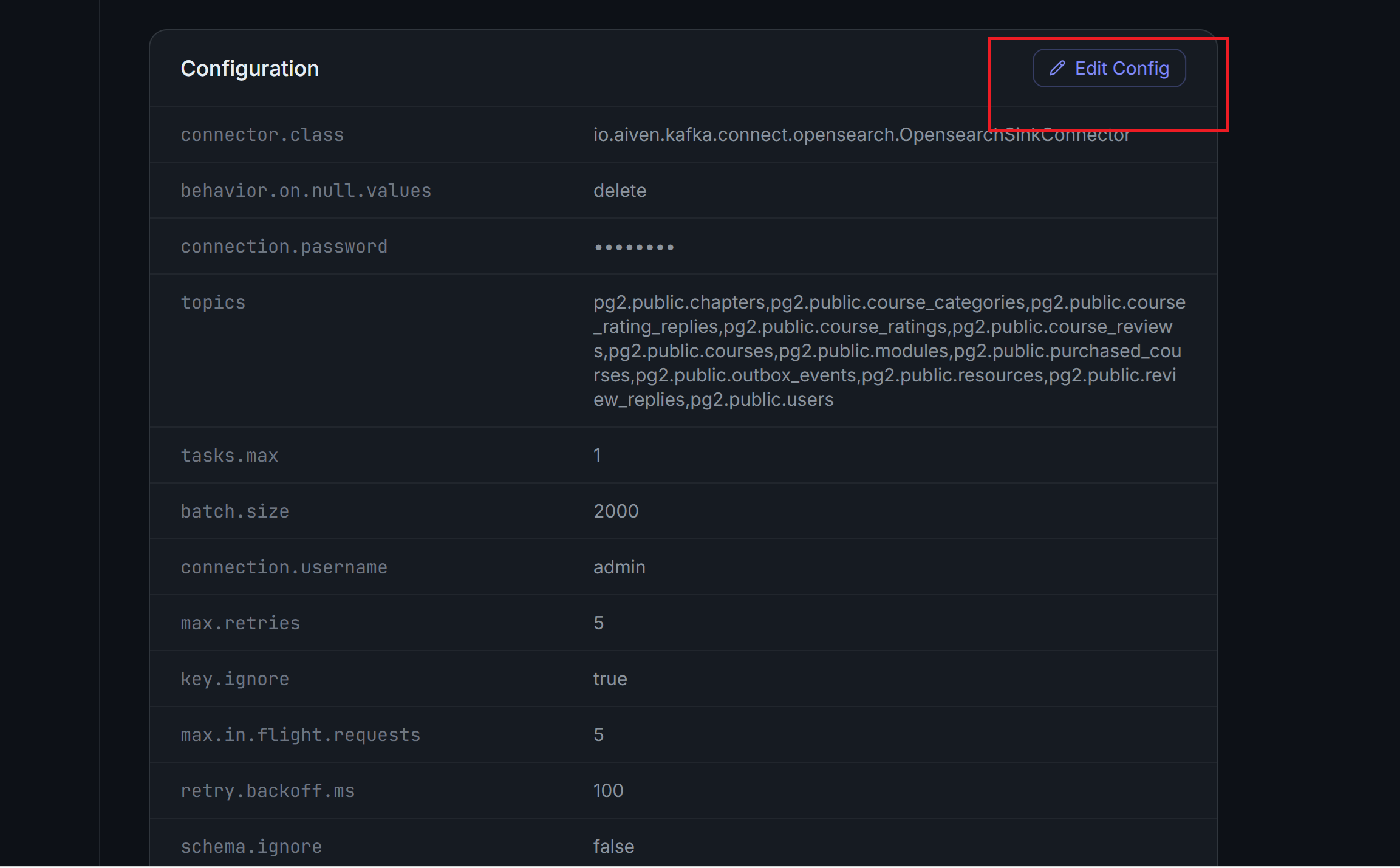
Edit source connector configuration
Step 04

Edit Connector Config

Modify any connector property through a validated form. All changes are diffed and stored in audit history.

Source connector live status
Step 05

Source Connector Status

Live status of the CDC source connector: task states, throughput, and WAL/binlog offset position.

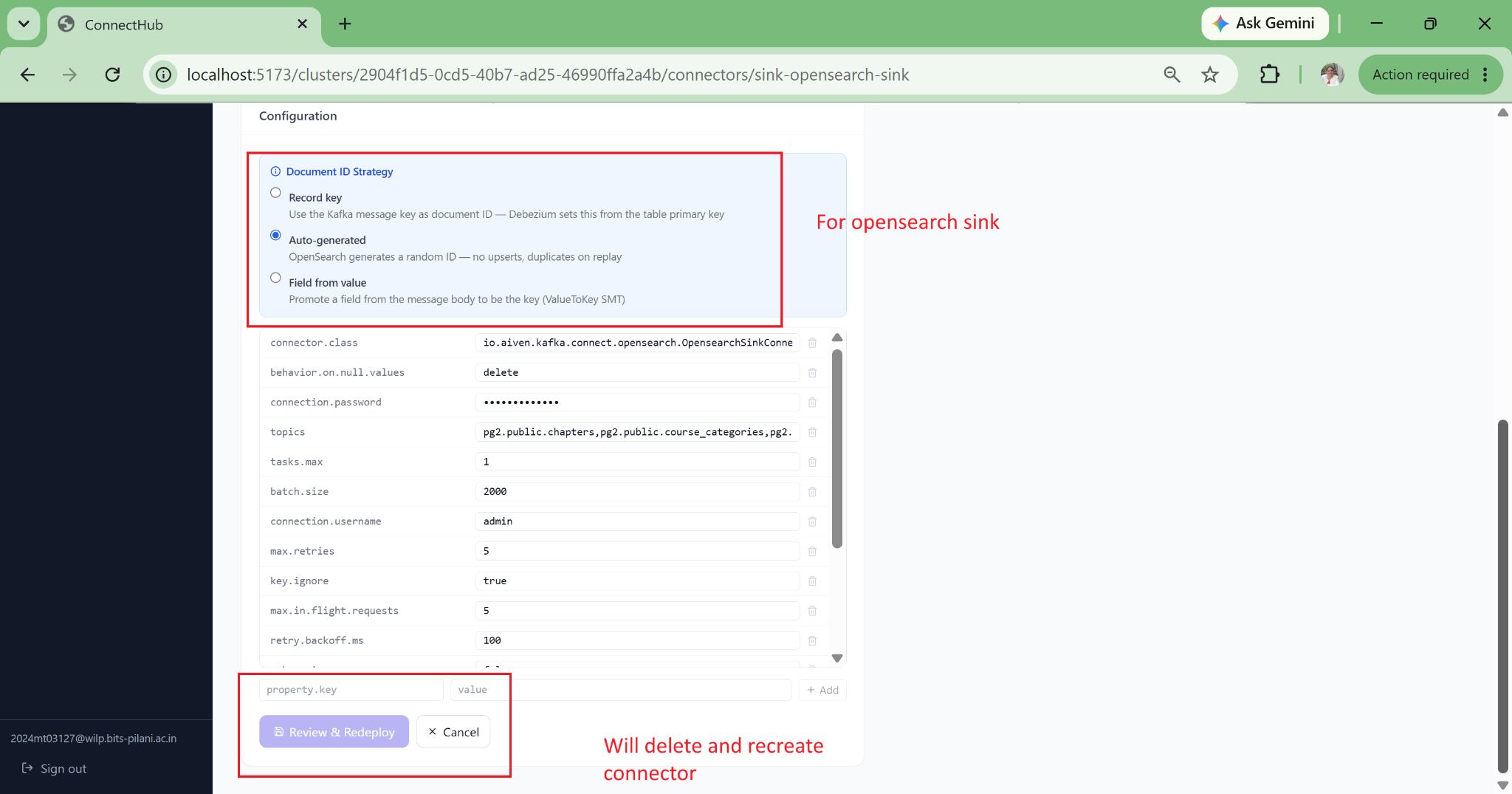
Redeploy connector after config modification
Step 06

Redeploy After Config Change

One-click redeploy after modifying connector properties, no manual REST API calls required.

Status after redeployment
Step 07

Post-Redeploy Status

Connector status confirmed RUNNING after the config change is applied. Tasks healthy across all partitions.
View connector deployment status
Step 08

Deploy Status View

Full deploy status panel showing task assignment, worker node, error messages, and connector uptime.

CDC sink connector status
Step 09

CDC Sink Status

Sink connector health: consumer lag per partition, records written to destination, and error rate.

Templates & Alerting Reuse deployed configs · replay offsets · configure alerts
CDC connector redeploy with offset replay
Step 10

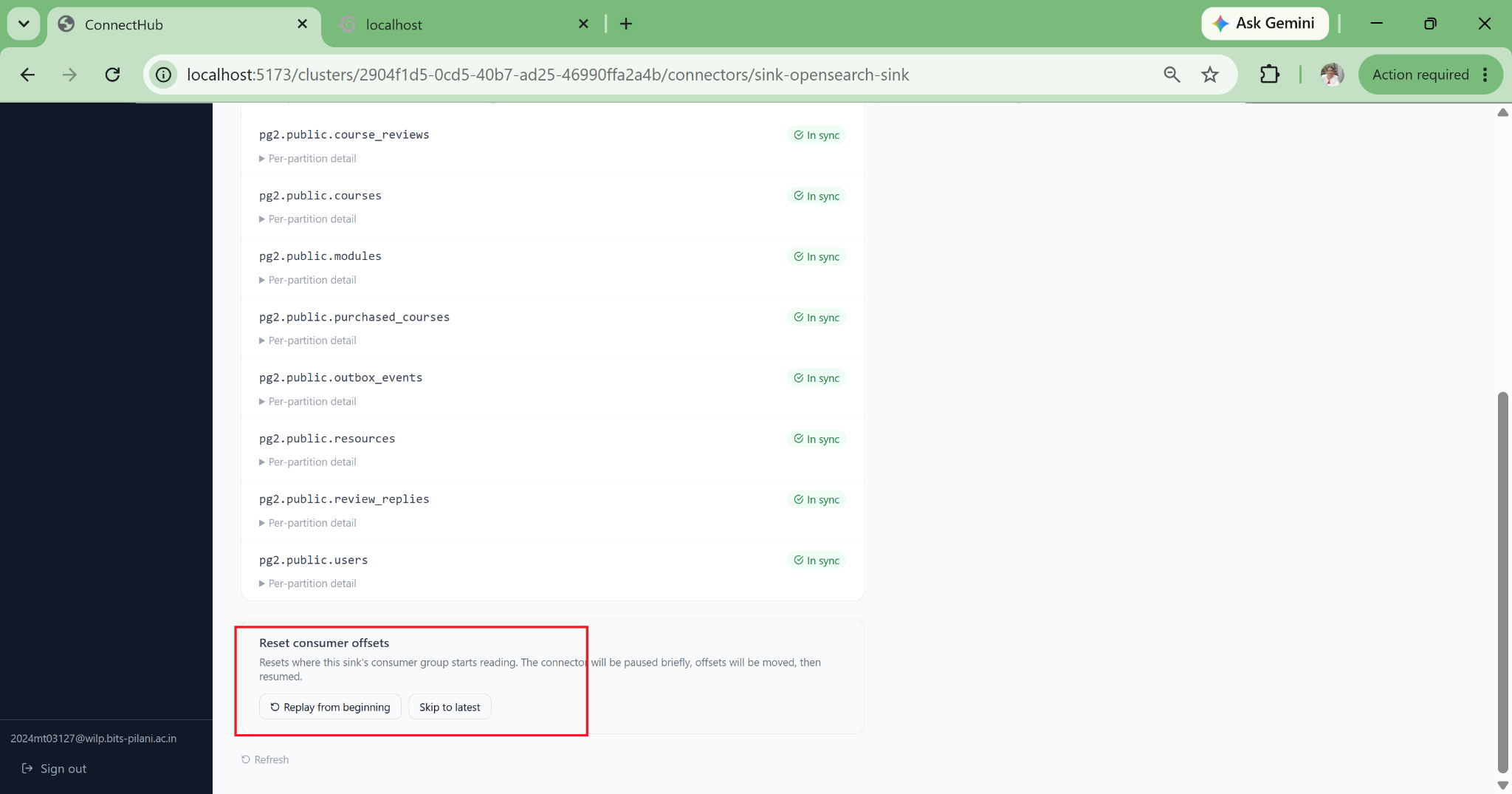
Replay from Offset

Redeploy a CDC connector from a specific WAL offset or binlog position, useful for recovering from data gaps.
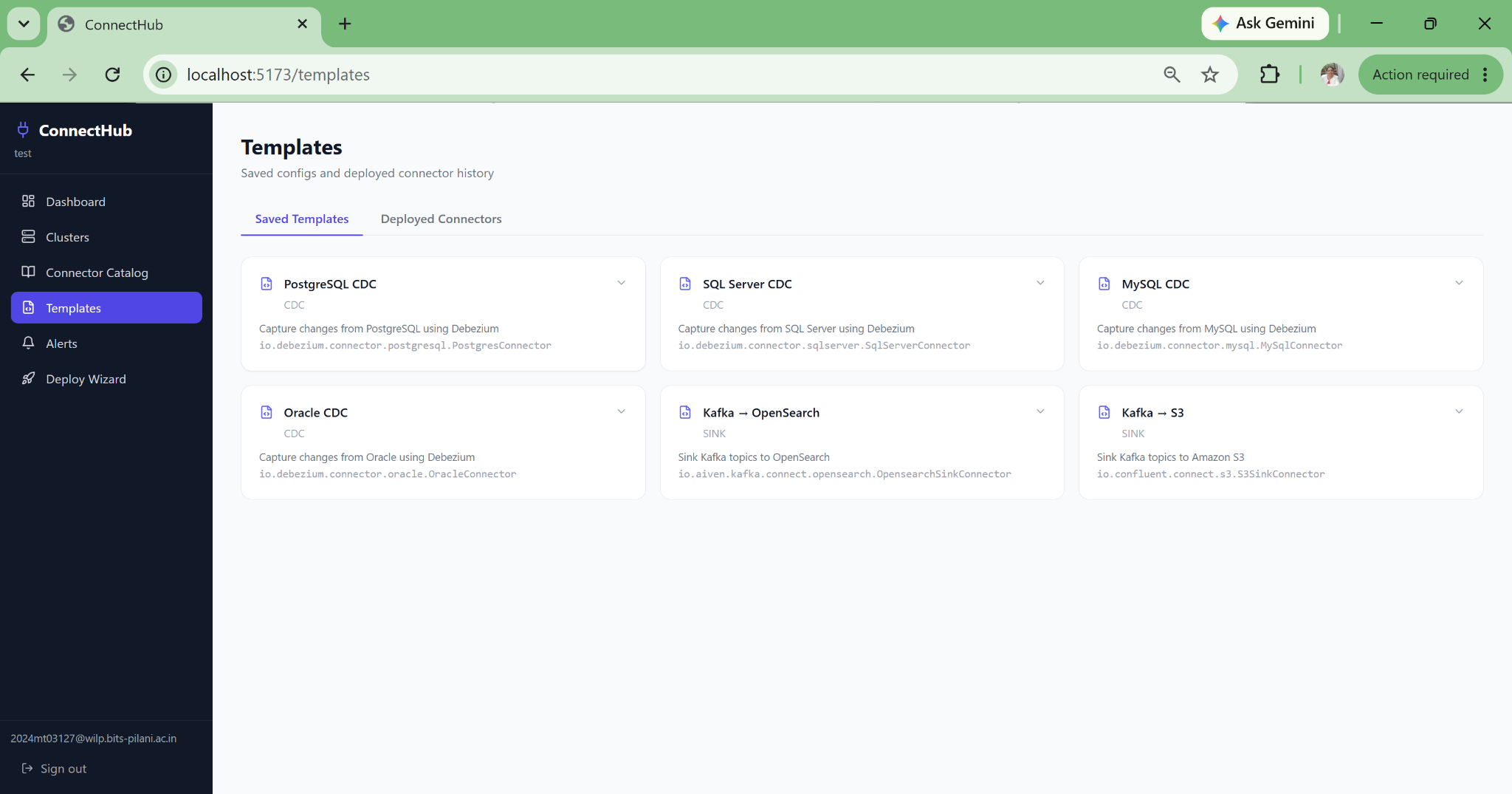
Previously deployed connector templates
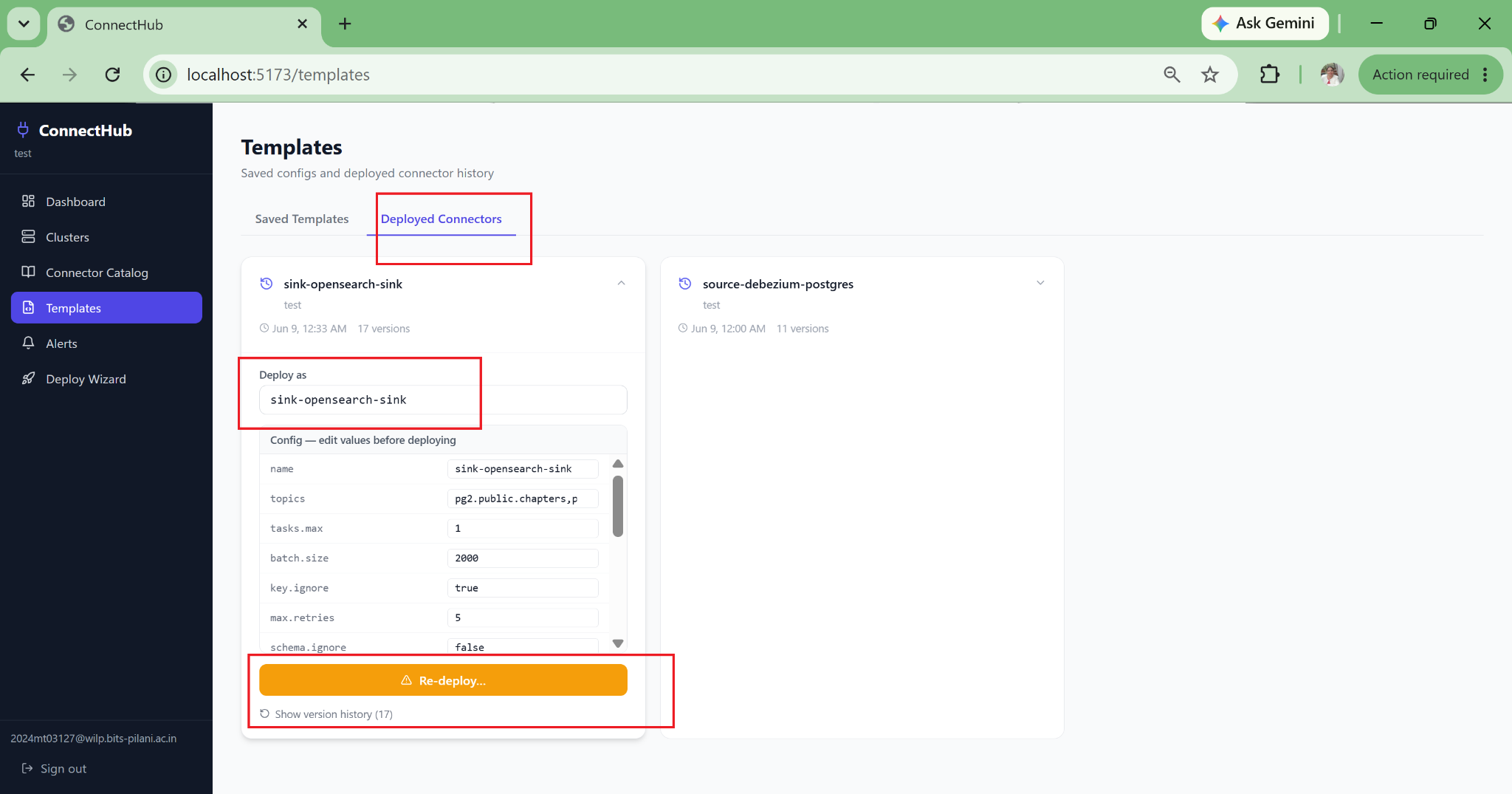
Step 11

Deployment History

All previously deployed connector configurations saved as reusable templates for one-click redeploy.

Sample connector configuration templates
Step 12

Sample Templates

Pre-built templates for common CDC patterns including Postgres-to-OpenSearch, MySQL-to-S3, and more.

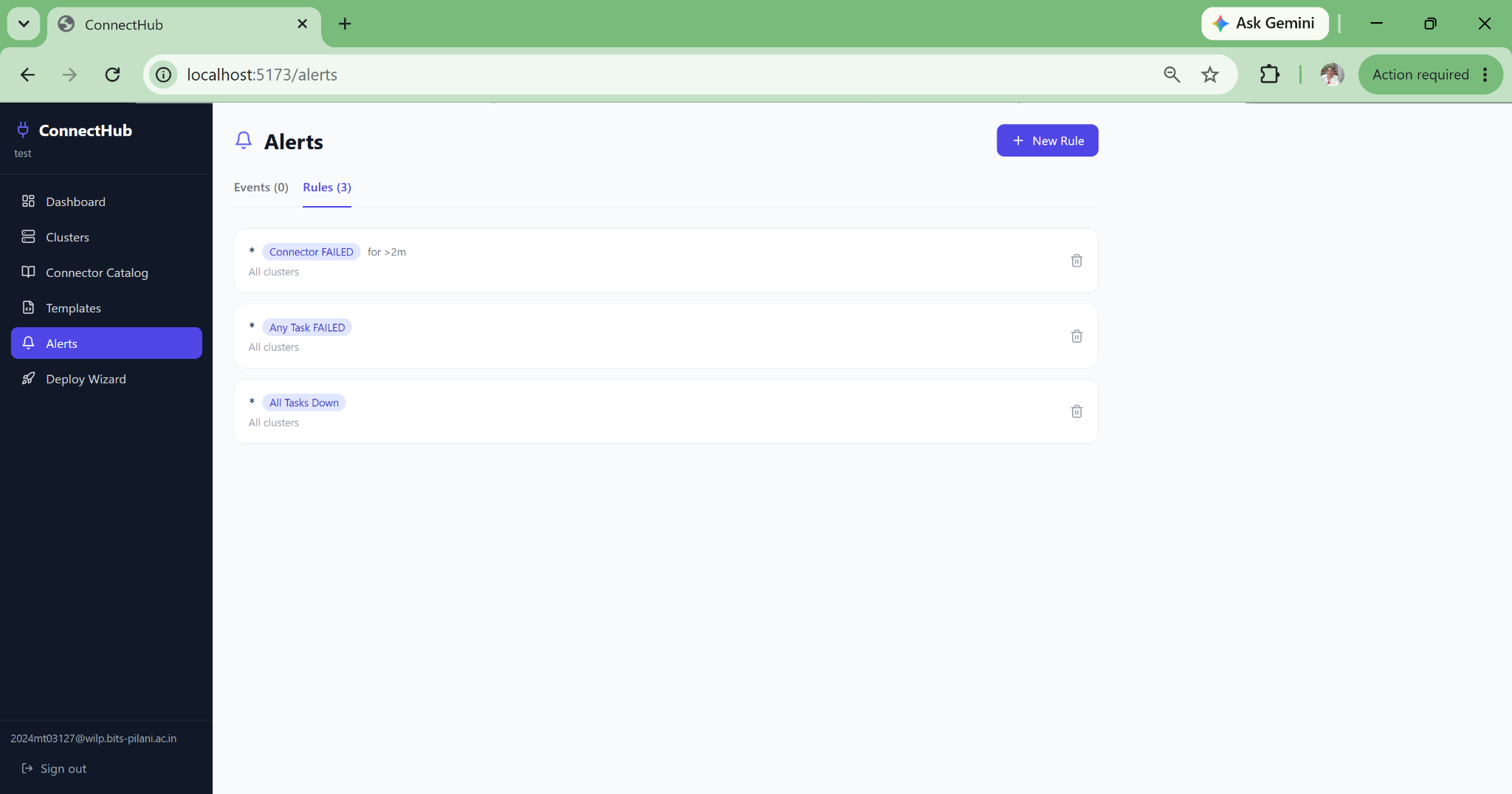
ConnectHub alert rules configuration
Step 13

Configure Alerts

Webhook alert rules scoped to connector name patterns, supporting PagerDuty, Slack, OpsGenie, or a custom endpoint. Auto-resolves on recovery.

Deploy Wizard — 6 Steps Source, schema, PII, sink, SMTs, deploy. All without writing JSON.
Deploy wizard step 1: choose source connector
Wizard Step 1

Choose Source

Select PostgreSQL, SQL Server, MySQL, Oracle CDC, or MirrorMaker 2. Missing plugins detected immediately.

Deploy wizard step 2: select tables and columns from live schema
Wizard Step 2

Schema Discovery

Live JDBC connection enumerates every table and column. Point-and-click selection with no typing table names.

Deploy wizard step 2: select individual table columns
Wizard Step 2b

Select Columns

Per-column selection within each table. Excluded columns never appear in the generated connector config.

Deploy wizard step 3: PII masking — mask, SHA-256 hash, truncate, or exclude
Wizard Step 3

PII Rules

Per-column: mask with asterisks, SHA-256 hash (GDPR-compliant), truncate to N chars, or exclude entirely.

Deploy wizard step 4: choose sink destination
Wizard Step 4

Choose Sink

OpenSearch, Amazon S3, or JDBC sink. Kafka topic names auto-derived from your earlier table selections.

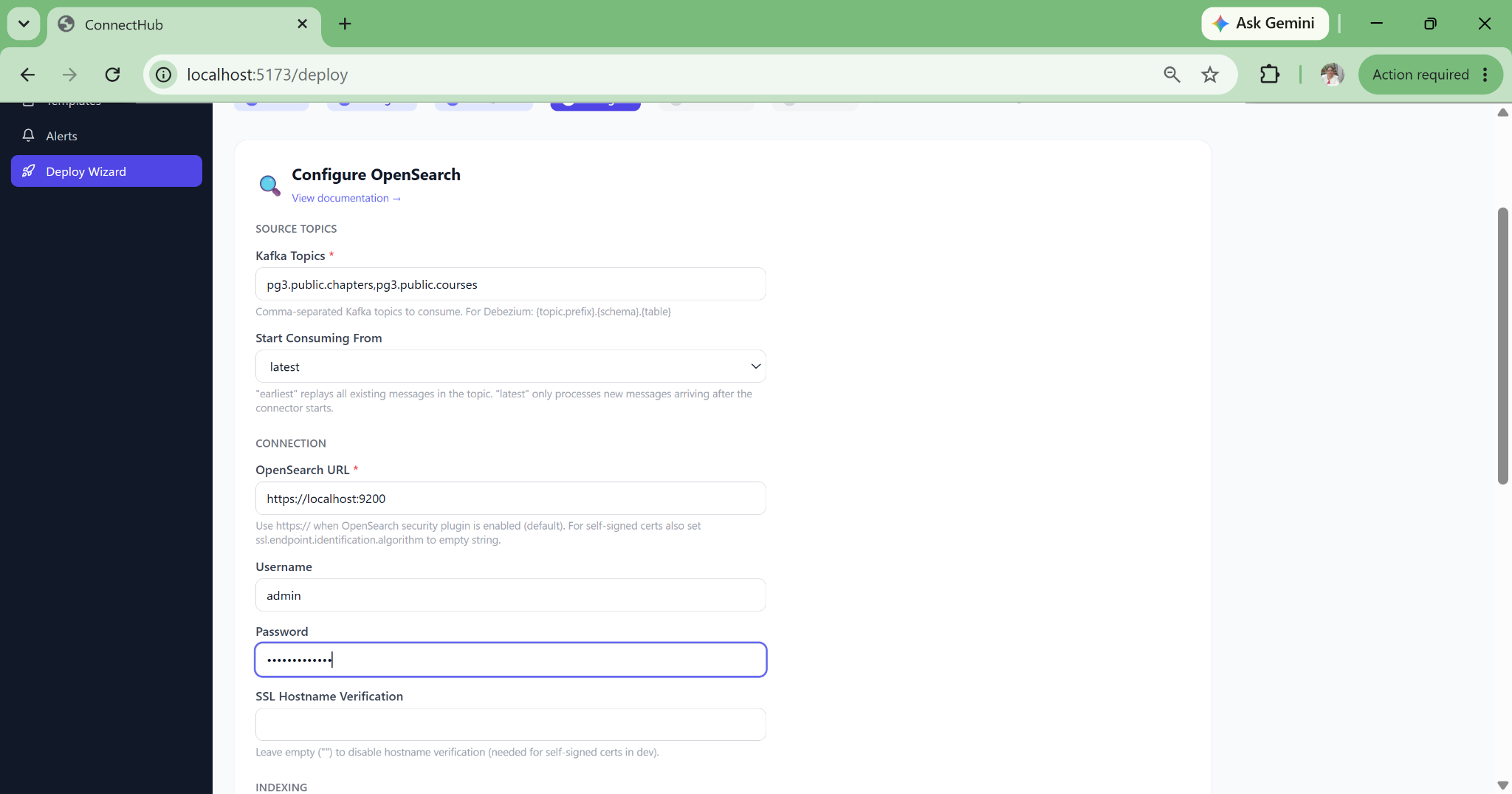
Deploy wizard step 4: sink connector settings
Wizard Step 4b

Sink Settings

Configure the sink: index name, batch size, flush interval, error tolerance, and connection details.

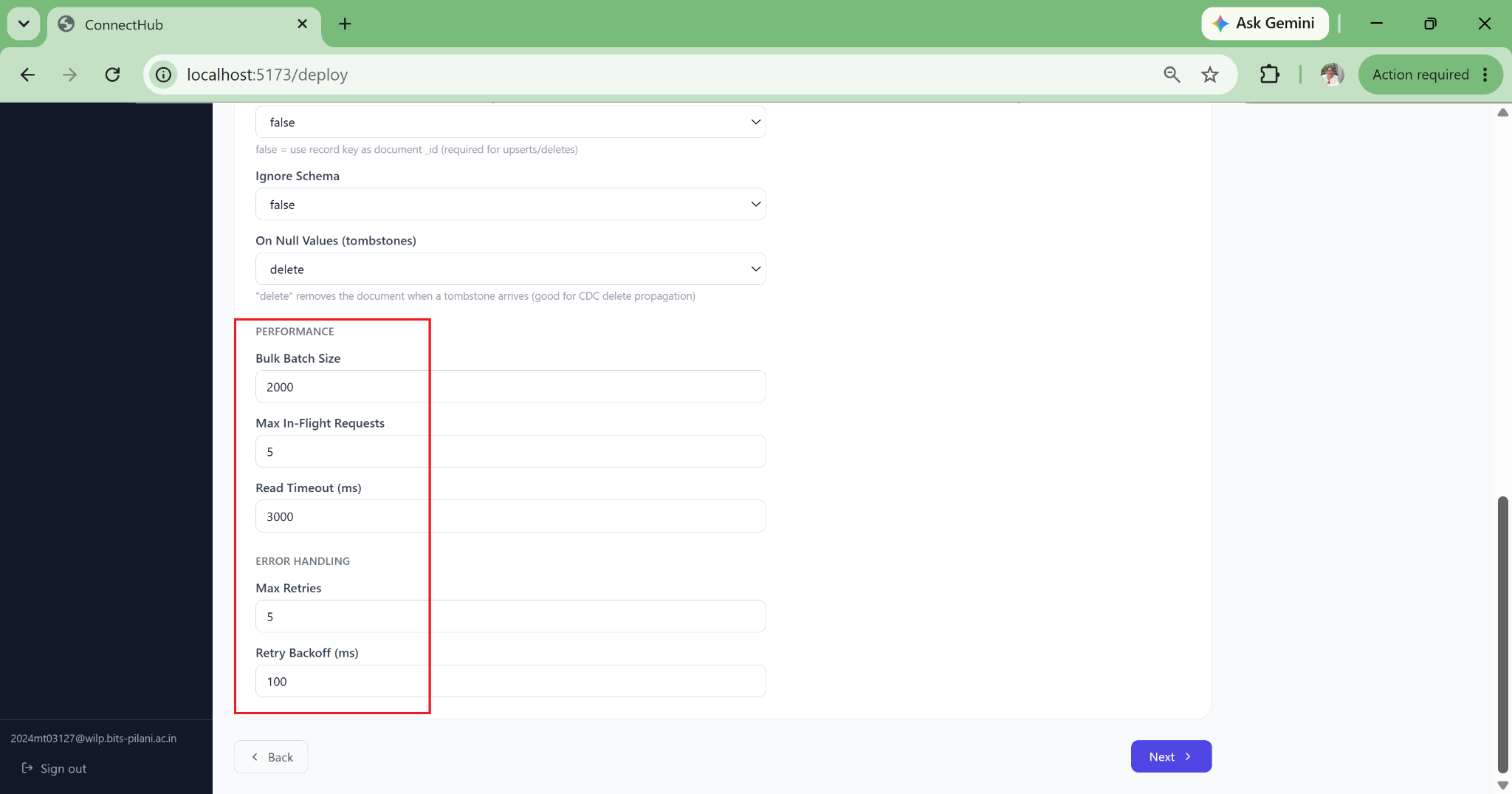
Deploy wizard: connector performance and throughput settings
Wizard Step 4c

Performance Settings

Task parallelism, poll interval, max batch size, and error tolerance, all with safe defaults pre-filled.

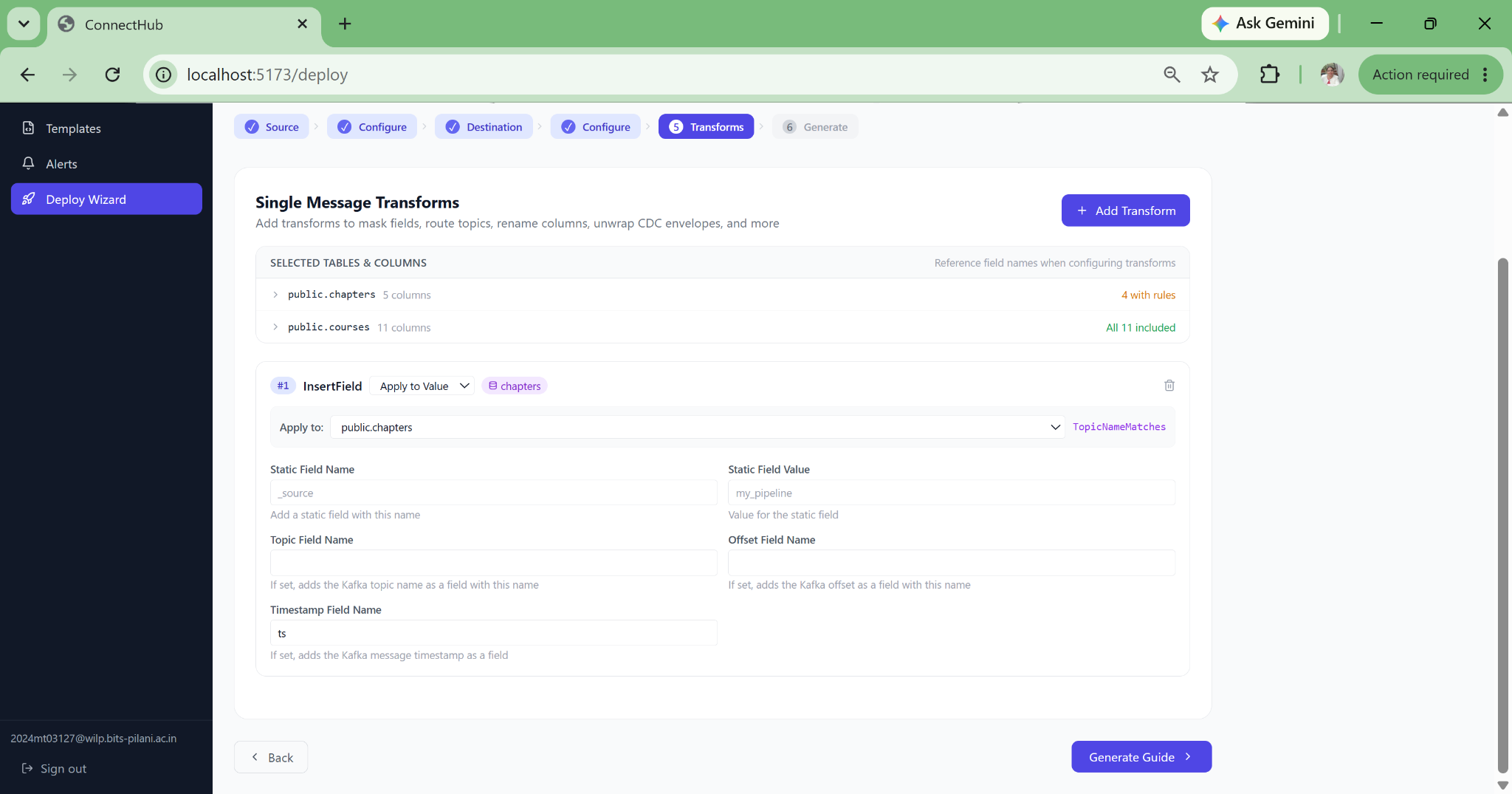
Deploy wizard step 5: configure Single Message Transforms
Wizard Step 5

Add SMT Transforms

9 guided transforms: ExtractNewRecordState, MaskField, TimestampConverter, ByLogicalTableRouter, ReplaceField, InsertField, Filter, Cast, ValueToKey.

Deploy wizard step 5: SMT transform detail configuration
Wizard Step 5b

Configure Transform

Each SMT configured through a guided form with field names, routing regex, and format strings validated before deploy.

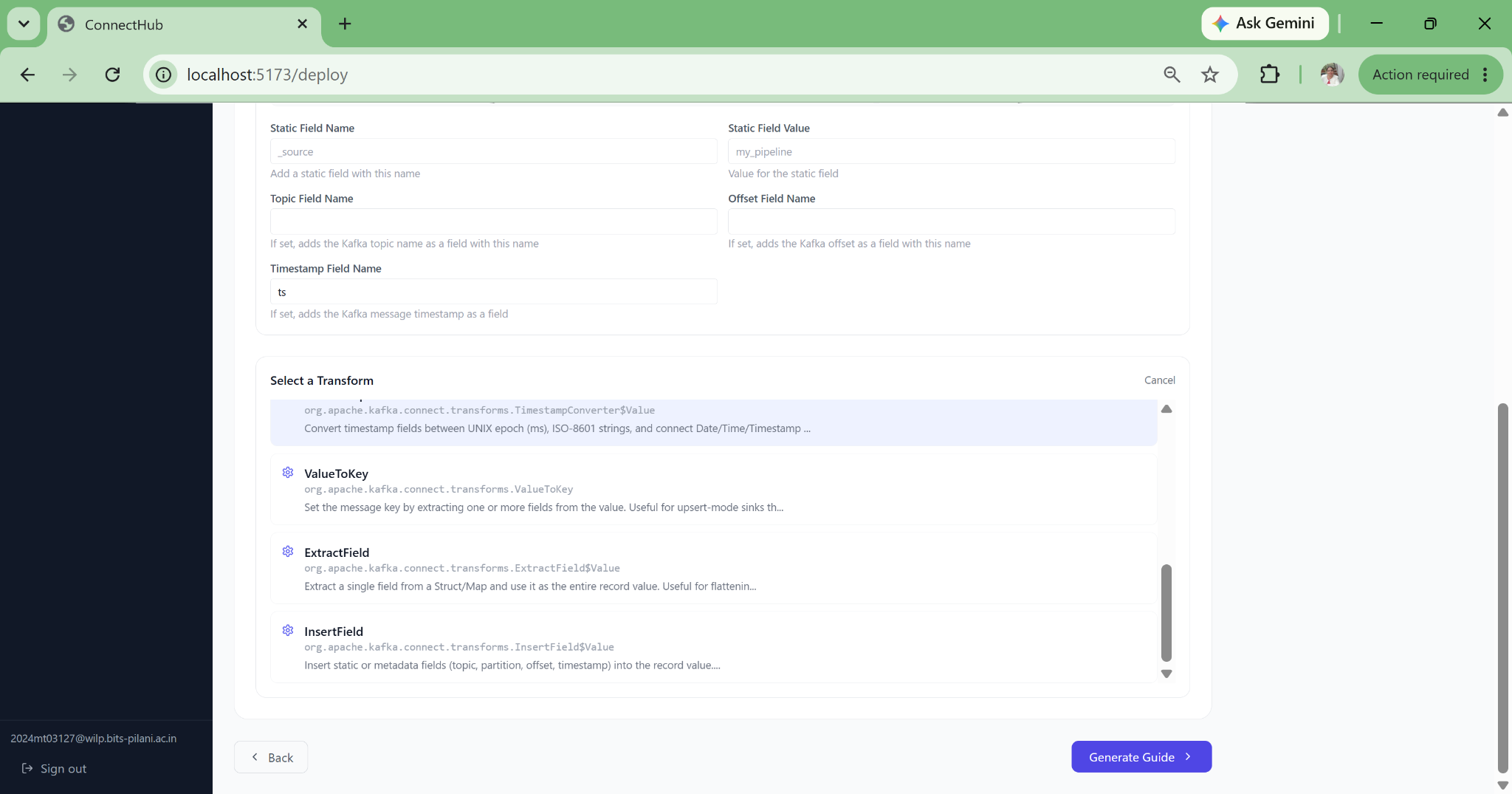
Deploy wizard: add timestamp column via TimestampConverter SMT
Wizard Step 5c

Timestamp Conversion

TimestampConverter SMT to convert Unix milliseconds to ISO-8601, inject event time fields, and more.

Deploy wizard step 6: deploy to Kafka Connect cluster
Wizard Step 6

Deploy to Cluster

One-click deploy via Kafka Connect REST API. Source and sink deployed together, topics verified, status confirmed.

Export Artifacts Connector JSON · Docker Compose · Kubernetes manifests for GitOps workflows
Generated connector JSON configuration
Export 01

Connector JSON

The exact connector config JSON sent to the REST API, downloadable for CI/CD pipelines and version control.

Generated Docker Compose stack
Export 02

Docker Compose

Ready-to-run compose with KRaft Kafka, Kafka Connect workers, and all environment variables pre-populated.

Generated Strimzi Kubernetes manifest
Export 03

Strimzi K8s Manifests

KafkaConnector CRD + separate Secret object. Credentials base64-encoded and reference-linked. GitOps-safe.

Monitoring Dashboards Grafana integration: uptime, MTTR, consumer lag, host metrics, Kafka JMX
Grafana monitoring dashboard for Kafka Connect pipelines
Dashboard 01

Connector Health Overview

Uptime percentage, task failure count, and MTTR across all connectors. Host metrics (CPU, memory, disk) alongside connector state. Time windows from 6h to 7d.

Grafana consumer lag and throughput dashboard
Dashboard 02

Kafka JMX and Consumer Lag

Kafka JMX metrics: JVM heap usage, GC pause time, and thread count. Per-sink consumer lag with trend line and early warning threshold. Per-partition breakdown.

Grafana error event timeline dashboard
Dashboard 03

Error Timeline and Disk I/O

Hourly bar chart of connector error events. Disk I/O and network throughput panels to correlate infrastructure bottlenecks with connector failures.

What ConnectHub Delivers
That Nothing Else Does

Confluent Control Center and Lenses.io address cluster management and observability. Neither was designed to solve the setup complexity, PII compliance, or Kubernetes automation problems that kill adoption of Kafka Connect CDC in regulated industries.

Capability Confluent Control Center Lenses.io Manual / Scripts ConnectHub
6-step guided deployment wizard Partial No No Yes, fully guided
Live schema discovery via JDBC No No No Yes, live JDBC
Per-column PII masking in wizard No No No Yes, mask / hash / exclude
Missing plugin detection + install guide No No No Yes, auto-detected
Strimzi K8s manifest generation No No Manual Yes, one click
Silent failure detection (DLQ, snapshot gap) Partial No No Yes, full pipeline check
Data lineage auto-derived from configs Partial Yes No Yes, zero config
SMT configuration UI (9 transforms) No No No Yes, guided UI
Monitoring with MTTR computation Partial Yes No Yes, 6h to 7d windows
Schema Registry with evolution warnings Partial Yes No Yes, per connector
Self-hostable SaaS only Yes N/A Yes, self-host or SaaS
Data custody Confluent sees data Lenses sees data N/A Zero (pure control plane)

Ready to Bring Real-Time CDC
to Your Data Platform?

Our data engineering team built and operates ConnectHub end-to-end — from Debezium CDC internals to Spring Boot backends to Strimzi Kubernetes deployments. We bring this exact expertise to client engagements in streaming data architecture, pipeline operations, and compliance-ready data engineering. Explore our broader engineering services or see other case studies.