Starter Edition Live · Free to Start
Case Study · EdTech · SaaS

Full-Stack EdTech Platform
Built from the Ground Up

A production-grade, fully branded education platform, live payments, in-browser creative tools, microservices architecture, and zero lost enrolments. Here's exactly how we built it, and you can try the Starter Edition free today.
Custom Software EdTech AI Course Generation SaaS Microservices DDD
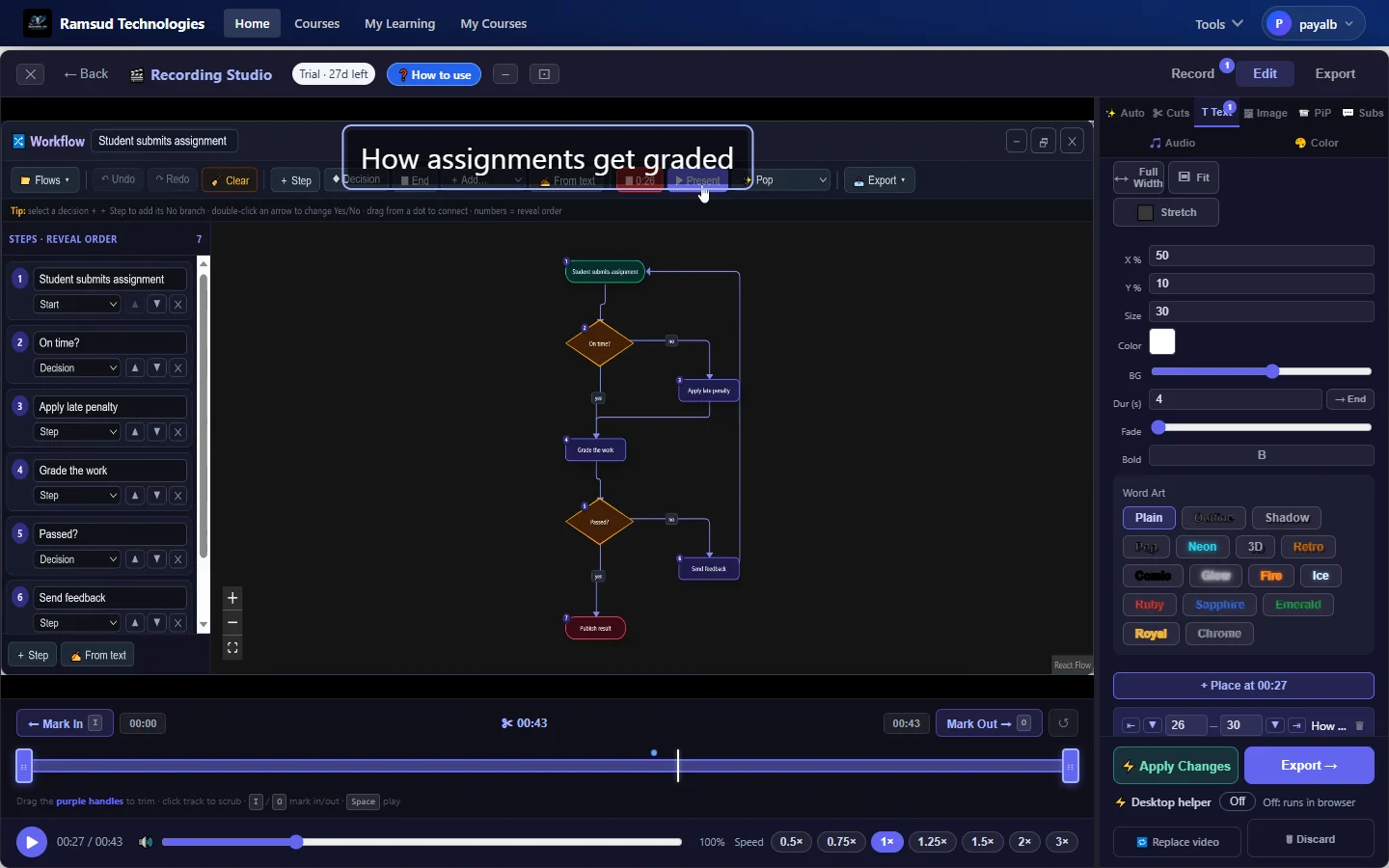
Recording Studio editor: a flowchart lesson with a title overlay, Word Art styles and the editing timeline

The client needed a platform no SaaS product could offer, complete ownership, custom branding, and a payment system they could trust with real revenue.

Starter Edition live, free to start
Core platform architecture complete
Payments & enrolment live
7 in-browser studio tools shipped
Auto Visuals, releasing soon
Analytics dashboard, in progress
Mobile apps, planned
AI course generation & interactive slides, live

Off-the-Shelf Wasn't
Good Enough

A growing education company had outgrown every generic LMS on the market. Teachable, Thinkific, Moodle, none of them could support a vision where teachers record professional lessons, build interactive mind maps, publish content to social media, conduct live whiteboard sessions, and sell courses and tool subscriptions, all under one roof, fully owned, fully branded.

They came to us with one clear requirement: build something that scales, doesn't break when payments happen, and is secure enough for real money. No compromises. No vendor lock-in. No half-measures.

What Off-the-Shelf Couldn't Deliver

  • In-browser video recording & editing
  • Live whiteboard sessions with PDF annotation
  • AI-adapted social media publishing
  • Separate tool subscription billing
  • Full platform ownership & branding
  • Tamper-proof payment verification

One Platform. Three User Roles.
Zero Compromises.

A production-grade, multi-service education platform serving teachers, students, and administrators with live payments, automated lifecycle emails, fuzzy course search, personalised recommendations, and a full in-browser creative suite.

Students

  • Browse and purchase courses via Razorpay
  • Auto-enrolled on payment confirmation
  • Track progress lesson-by-lesson
  • Personalised "Continue Learning" feed

Teachers

  • Build courses: chapters → modules → resources
  • Record and edit video lessons in-browser
  • Draw on a live whiteboard
  • Publish AI-adapted content to 5 social platforms

Administrators

  • Approve and publish courses
  • Manage tool subscription pricing
  • Issue coupons and process refunds
  • Full course lifecycle oversight

Companies and Colleges
Need a Real LMS. Schools Too.

Corporate L&D teams and higher-ed institutions are the primary fit, both run structured, recurring training or coursework at a scale where "just use a shared drive and Zoom" stops working, and both need content they own outright, not rented seats in someone else's SaaS. Schools run on the same platform too. Off-the-shelf tools force a choice between owning your content and moving fast; with AI-assisted course generation now live, you get both, a full course ships in minutes, not weeks.

Primary Fit

Companies

  • Onboard and upskill teams without stitching together five separate SaaS tools
  • Keep proprietary training material fully owned, never hostage to a vendor's pricing
  • Track completion and quiz scores per employee for compliance and audits
Primary Fit

Colleges & Universities

  • Faculty publish full courses, chapters, and graded assessments under your own brand
  • Recorded lectures, live whiteboard sessions, and AI-generated outlines in one place
  • Scales to a full department or campus, no per-seat pricing surprises

Schools

  • Turn a lesson plan into an interactive, quizzed slide deck in minutes
  • Every subject teacher gets recording, whiteboard, and quiz tools built in, no extra licences
  • One login for students across every subject and every teacher's content

Traditional LMS Platforms
Hold L&D Teams Back

Most learning management systems were designed to host courses, not to help people make them. These are the problems training teams describe most often, and how this platform handles each one.

Per-seat pricing that grows with every hire

A larger organisation pays several times more for the same platform, and the bill rises with each new employee.

How we solve it: The Enterprise Edition is sized for your teams and learners, with no per-seat surprises as you add departments.

Content spread across five tools

Video lives in one product, written lessons in another, and quizzes in a third, so every course is a juggling act.

How we solve it: Recording, editing, whiteboard, mind maps, quizzes and publishing all run in one browser tab.

Completion rates without the reason

You can see that learners stop, but not where they lose interest or which lesson needs work.

How we solve it: Progress is tracked lesson by lesson, with completion and quiz scores per learner, so weak spots are easy to find.

Every topic turns into a long course

A five-minute refresher still becomes a thirty-minute module because building anything shorter takes the same effort.

How we solve it: AI course generation turns a topic or your existing notes into a structured course as PDF handouts, PowerPoint or interactive slides.

Customisation means a consulting project

Anything beyond the vendor template needs a paid engagement, so the platform shapes your training instead of the other way round.

How we solve it: Run the platform on your own domain under your brand, or have us build a version tailored to your industry.

Instructors who cannot produce video

Teams either hire a studio or ask trainers to become video editors on top of their day job.

How we solve it: The Recording Studio handles screen and camera capture, cuts, subtitles, noise removal and music, with a teleprompter for the script.

7 Independent Microservices:
Nothing Shares a Database

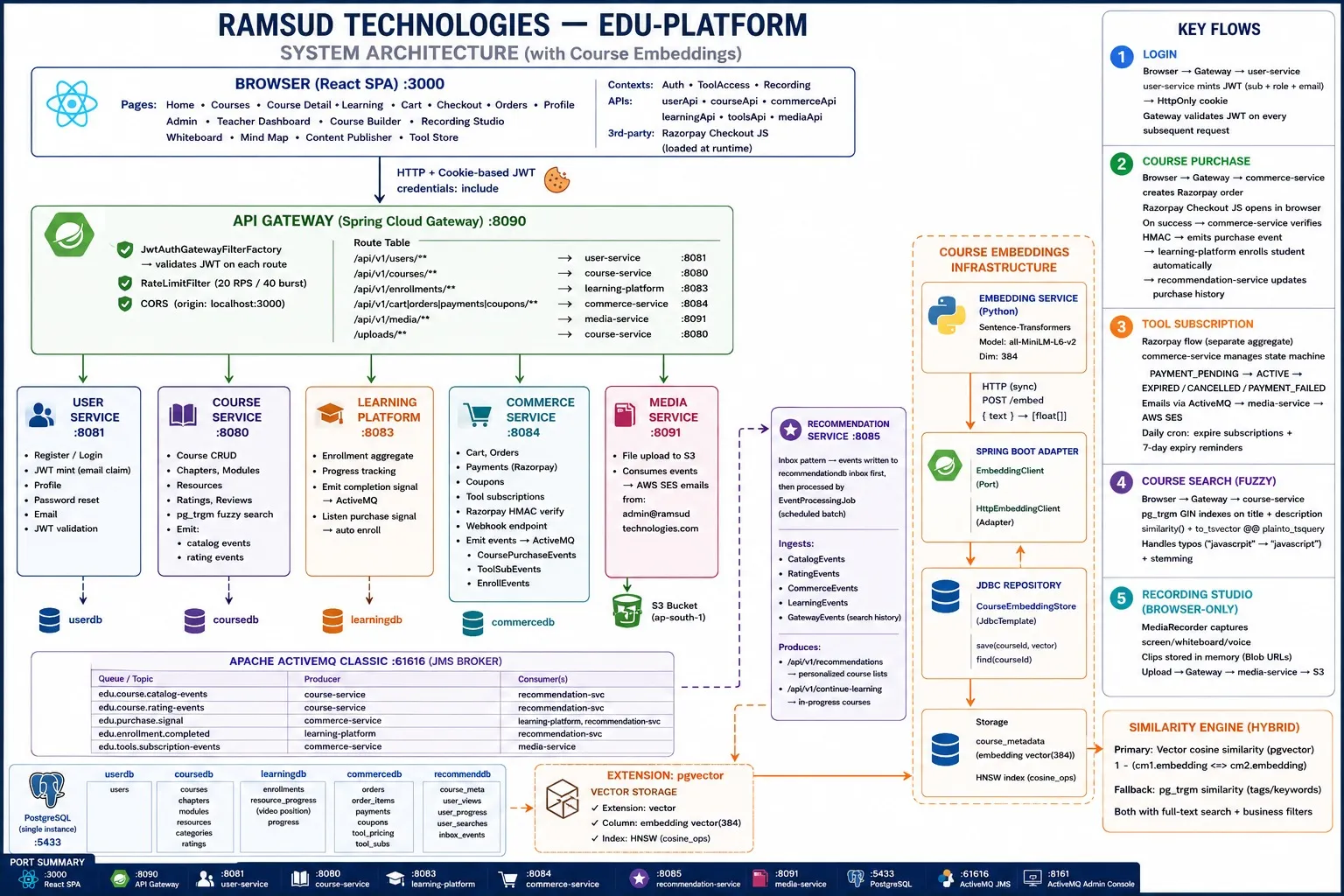
Every service owns its domain, its database, and its deployment lifecycle. Cross-service communication is fully asynchronous via Apache ActiveMQ, a slow recommendation engine can never cause a payment to fail.

Ramsud Technologies, EdTech Platform System Architecture with Course Embeddings

Full system architecture, React SPA · Spring Cloud Gateway · 7 microservices · Apache ActiveMQ · pgvector · AWS S3 / SES

Service Responsibilities

Service Responsibility
API Gateway JWT validation, rate limiting (20 RPS / 40 burst), CORS, routing to all downstream services
User Service Registration, login, JWT minting, password reset, email verification
Course Service Course CRUD, chapters / modules / resources, ratings, pg_trgm fuzzy search
Learning Platform Enrolment, per-lesson progress tracking, completion signals via ActiveMQ
Commerce Service Cart, orders, Razorpay payments, tool subscriptions, coupons, HMAC verify
Media Service File upload to S3, transactional email via AWS SES, lifecycle notifications
Recommendation Service Personalised course recommendations, "Continue Learning" feed, vector similarity

Domain-Driven Design:
Applied, Not Just Named

This isn't a naming convention, it's a hard boundary between business logic and infrastructure that paid off when we swapped the mock payment gateway for live Razorpay: zero domain code changed. One adapter file.

Aggregates

Enforce all business rules. ToolSubscription is a state machine, PAYMENT_PENDING → ACTIVE → EXPIRED / CANCELLED / PAYMENT_FAILED. No invalid state is representable in code.

Repository Ports

Defined in the application layer, implemented in infrastructure. The domain has zero dependency on JPA, Spring, or any framework. Swap PostgreSQL for MongoDB, domain stays untouched.

Application Services

Orchestrate use cases. They never reach into persistence or HTTP directly. BookAppointmentUseCase, EnrolStudentUseCase, each owns one workflow, nothing more.

Infrastructure Adapters

Handle JPA entities, S3 uploads, JMS publishing, and Razorpay calls, fully replaceable without touching business logic. Hexagonal architecture enforced from day one.

The Transactional Outbox:
No Ghost Enrolments, Ever

The most important architectural decision in the entire project. When a payment succeeds, two things must happen atomically: save the payment and trigger enrolment. If the message broker goes down between those two steps, the payment is recorded but the student is never enrolled. We solved this completely.

Payment PAID

Razorpay confirms. Commerce service writes to outbox atomically with payment record.

Outbox Poll

Scheduled poller reads undelivered events from the outbox table.

Forward to MQ

Event forwarded to ActiveMQ. Marked delivered only on successful publish.

Student Enrolled

Learning platform consumes event and auto-enrolls the student.

If the broker goes down, the outbox accumulates. When it comes back, every event is delivered in order, exactly as written. Zero ghost enrolments since launch.

Every event listener is idempotent. A student receiving the same CoursePurchasedEvent twice is enrolled exactly once, no duplicates, no side effects.

Razorpay with HMAC Verification:
Tamper-Proof by Design

Card data never touches our servers. Every payment callback is cryptographically verified server-side before any access is granted. Browser manipulation cannot bypass subscription checks.

01

Create Order

POST /checkout, Commerce Service creates an Order + Payment record, calls Razorpay Orders API, returns razorpayKeyId + gatewayOrderId.

02

Client Checkout

Razorpay Checkout modal opens in the browser. No card data ever touches our servers, PCI scope eliminated entirely.

03

Verify Signature

Frontend calls POST /payments/verify. Backend computes HMAC-SHA256(keySecret, orderId|paymentId).

04

Grant Access

If signature matches, payment marked confirmed and outbox event fires. If it doesn't match, access is denied, regardless of what the frontend claims.

Seven Studio Tools.
One Browser Tab.

Everything a teacher needs to record, explain and publish a lesson, purpose-built for education and running in the browser. Nothing to install.

Recording Studio

Record screen and camera, then edit in the same place: cuts, titles, images, picture-in-picture, automatic subtitles, background music, noise removal, colour, and splitting one recording into several lessons.

Workflow

Type the steps and the flowchart draws itself, with decisions, branches and loops. Then present it one step at a time.

3D Studio

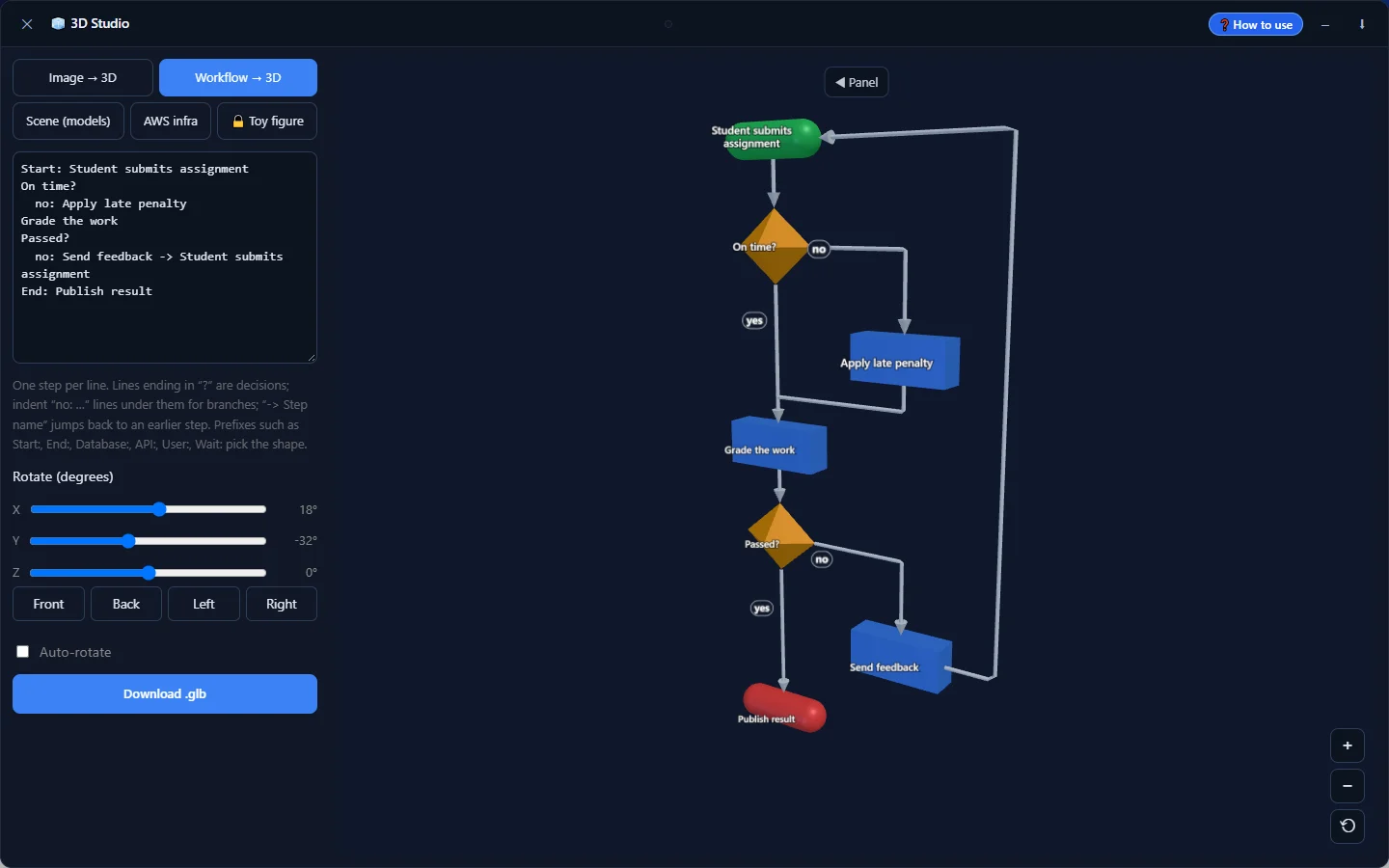
Turn a flowchart into a rotating 3D diagram, or explain with ready-made 3D models, and record it straight into a lesson.

Whiteboard

Annotate over uploaded PDFs and images, talk through it while you draw, and export the board as an image or course resource.

Mind Map

Keyboard-first mapping (Tab, Enter, F2) with auto-save, and export to an image for slides and handouts.

Image Editor

Draw shapes, arrows and text on top of a screenshot or photo to make quick explainer visuals.

Teleprompter

Read your script while you record, scrolling at your pace, so every take sounds prepared.

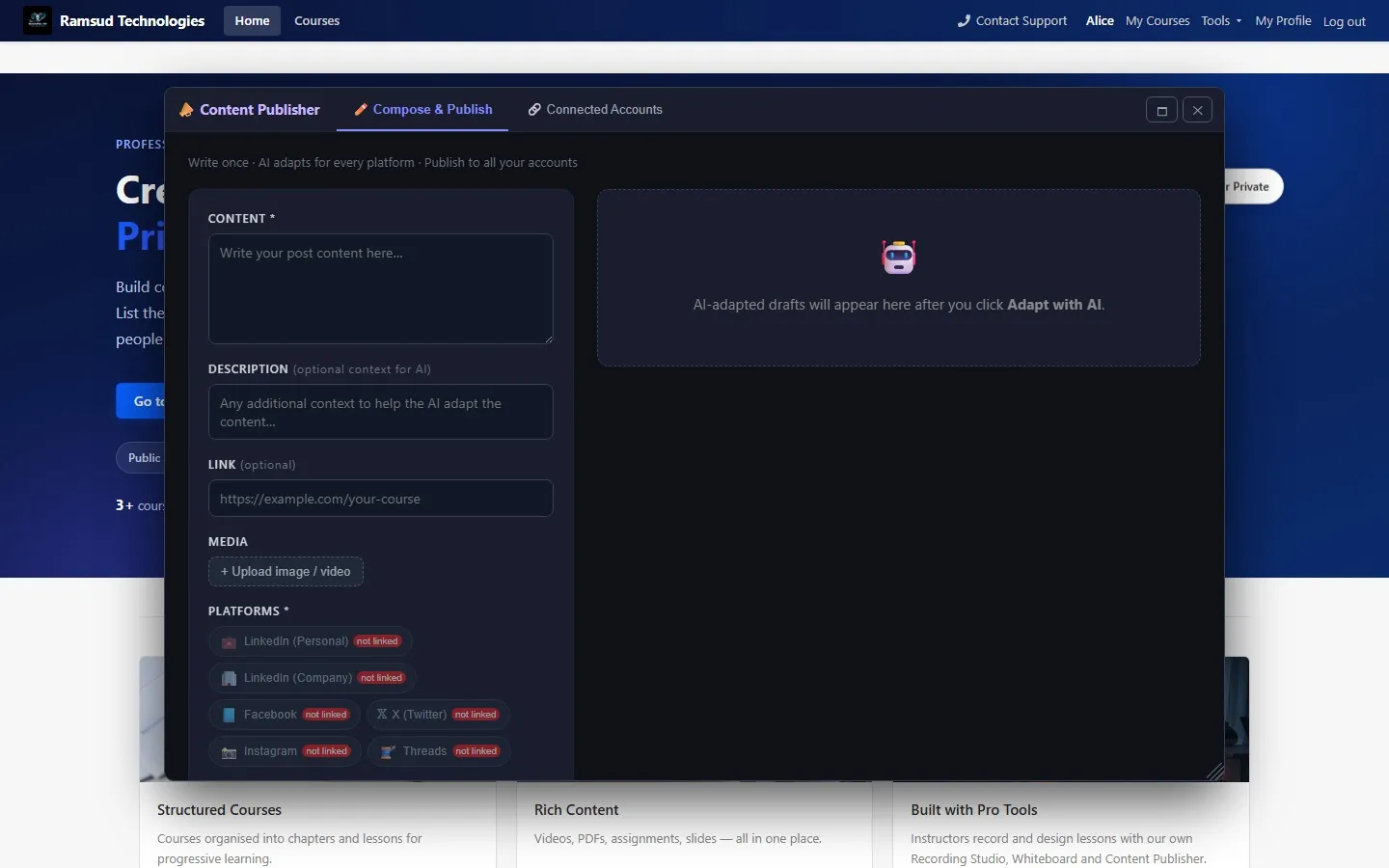
Content Publisher

Write once, adapt for LinkedIn, Facebook, Instagram, X and Threads, and publish everywhere in one click.

Enterprise

Plus everyday utilities: trim and crop video, capture thumbnails, resize images, merge and split PDFs.
An optional free desktop app speeds up exports of long videos.

Start Free.
Scale When You're Ready.

Try the tools yourself today, run the full platform under your own brand, or have us build something like it for your business.

Live now

Starter Edition

For teachers and creators

Sign up and start creating today. No setup, no installation, free to start.

  • Recording Studio with full editing
  • Workflow, 3D Studio, Whiteboard, Mind Map
  • Image Editor, Teleprompter and utilities
  • Publish courses and share your lessons
Try Starter Free
Custom build

Your Own Product

For businesses with a product idea

Need a platform like this for your industry: training, onboarding, a marketplace, a SaaS tool? We design and build it with the same production-grade engineering.

  • Product discovery and architecture
  • Payments, AI and media features built in
  • Web, mobile and cloud, fully owned by you
Discuss Your Idea

Type the Steps.
Watch the Flowchart Build Itself.

Teachers describe a process as a plain outline, one step per line, and the Workflow tool turns it into a real flowchart, with decisions, branches, loops, databases and API calls laid out automatically. Then it presents the chart one step at a time, ready to record or drop into a lesson. No AI and no drawing: it all runs in the browser.

Work in progress: everything shown in this demo works today, but the interface is still being refined. The toolbar is being reorganised into a cleaner, less crowded layout, so the finished tool will look tidier than this recording.

From Outline to Flowchart

The value: end a line with ? for a decision, indent no: Fix it for a branch, add -> Step to loop back. The chart is laid out instantly, and it can be edited by dragging or as text, whichever is quicker.

The Shapes Real Processes Need

The value: start and end, steps, yes/no decisions, input/output, databases, API calls, users and waits, each drawn as its standard flowchart symbol. Technical processes read correctly at a glance, not as a row of identical boxes.

Reveal It One Step at a Time

The value: present mode builds the chart the way a teacher would explain it, one step per click, with arrows drawing themselves in and a choice of pop, fade, slide, zoom or swirl. Learners follow the logic instead of facing the whole diagram at once.

Record It, Export It, Teach With It

The value: one click records the build and the presentation straight into the Recording Studio for editing. Export a 1920×1080 image for every step, turn the chart into a rotating 3D diagram in 3D Studio, or add it to an interactive slide where learners click through it themselves.

Releasing Soon · Auto Visuals

Visuals Added to Your Video,
Without You Having To.

Record the way you normally teach. Auto listens to what you explain and adds what helps people follow you, right where you say it. You review and edit every suggestion before it goes into your video.

Get Early Access

Starter users will see it in the Recording Studio first.

  • Flowcharts and mind mapsdrawn from your explanation, building up step by step as you speak, flat or in rotating 3D
  • Slides that follow youkey points appear and highlight as you reach them
  • Icons, photos and clipsmatched to the moment, only where they fit what you're saying
  • An end-of-video quizquestions from what you taught, read out by an AI voice with a short explanation of each answer

From a Topic to a Full Course.
In Minutes, Not Weeks.

A teacher types a topic, or pastes existing notes, and the platform's AI planning pipeline designs a complete, pedagogically structured outline, objective, theory, worked example, exercise, assessment, then generates real content for every slide. No blank page. No generic template.

Topic or Notes

Type a subject, or paste what you already teach from.

AI Builds the Outline

A structured plan, objective through assessment, not a wall of bullet points.

Content Generated

Every slide, example, and quiz question, written to that plan.

Choose Your Format

The same course, delivered the way it'll actually be used.

PDF Handouts

Clean, printable material, headings, worked examples, and code, formatted like a proper document for reading offline or handing out before a session.

Why it matters: takeaways students keep, zero design work

PowerPoint Decks

A real .pptx file with the same content, structured slide by slide for live teaching. Download it, edit it in PowerPoint, present it anywhere.

Why it matters: walks into any classroom or conference room as-is

Interactive Slides

A genuine in-browser presentation, not a PDF wearing a slide deck's clothes, diagrams that animate into place, flowcharts learners reveal one step at a time, motion on every image, and scored quizzes built in.

Why it matters: students engage and get graded, not just scroll

What sets this apart: diagrams and workflows assemble on screen node by node, exactly like a presenter building them live, not a static image. Images get real motion, Ken Burns pans, tile-scatter reassembly, focus pulls, chosen automatically or picked by the teacher.

What sets this apart: every interactive deck includes at least one real, scored knowledge check, generated from what that specific course actually taught, never generic trivia, with per-question explanations and a running score as students answer.

AI Drafts It.
You Decide What Ships.

The AI-generated outline and content are a starting point, not a locked box. Every chapter, slide, and word stays fully editable, and you can redirect the AI itself instead of starting over from a blank prompt.

Add or Remove Chapters & Slides

The value: the AI-generated outline is a first draft of the course structure, not the final word. Add a chapter it missed, merge two modules, delete a slide you don't need, reorder anything. Your course, your structure.

Tell the AI What to Change

The value: type an instruction, "make this more technical," "add a worked example here," "simplify for beginners," and regenerate a single slide or the whole lesson to match. No re-prompting from scratch.

Edit Anything by Hand

The value: every heading, paragraph, quiz question, diagram, and image is directly editable in the browser. No AI round-trip needed for a quick fix, and no risk of an AI edit undoing work you did manually.

Pick the Look

The value: theme, background texture, per-image motion style, and quiz behaviour are all teacher-controlled, per slide or across the whole deck. AI picks sensible defaults; you get the final say.

Not Just Architecture Diagrams:
The Actual Product

Live screens from the running platform - the marketing site, the course catalog, and the in-browser studio tools, opened as windows on top of the app.

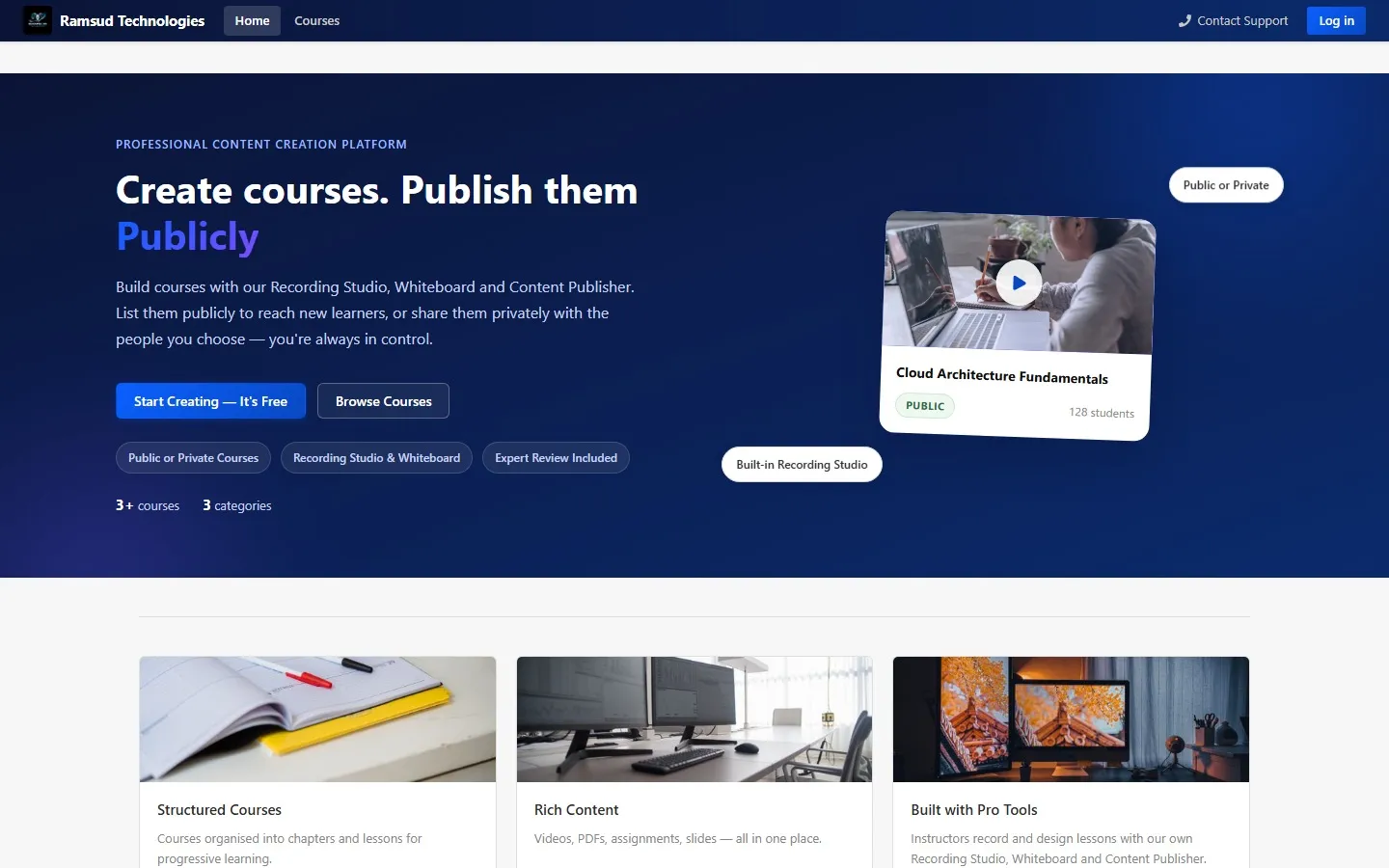
Platform homepage hero and feature highlights

Homepage

The marketing entry point - public or private publishing, built-in creative tools, and a live course preview.

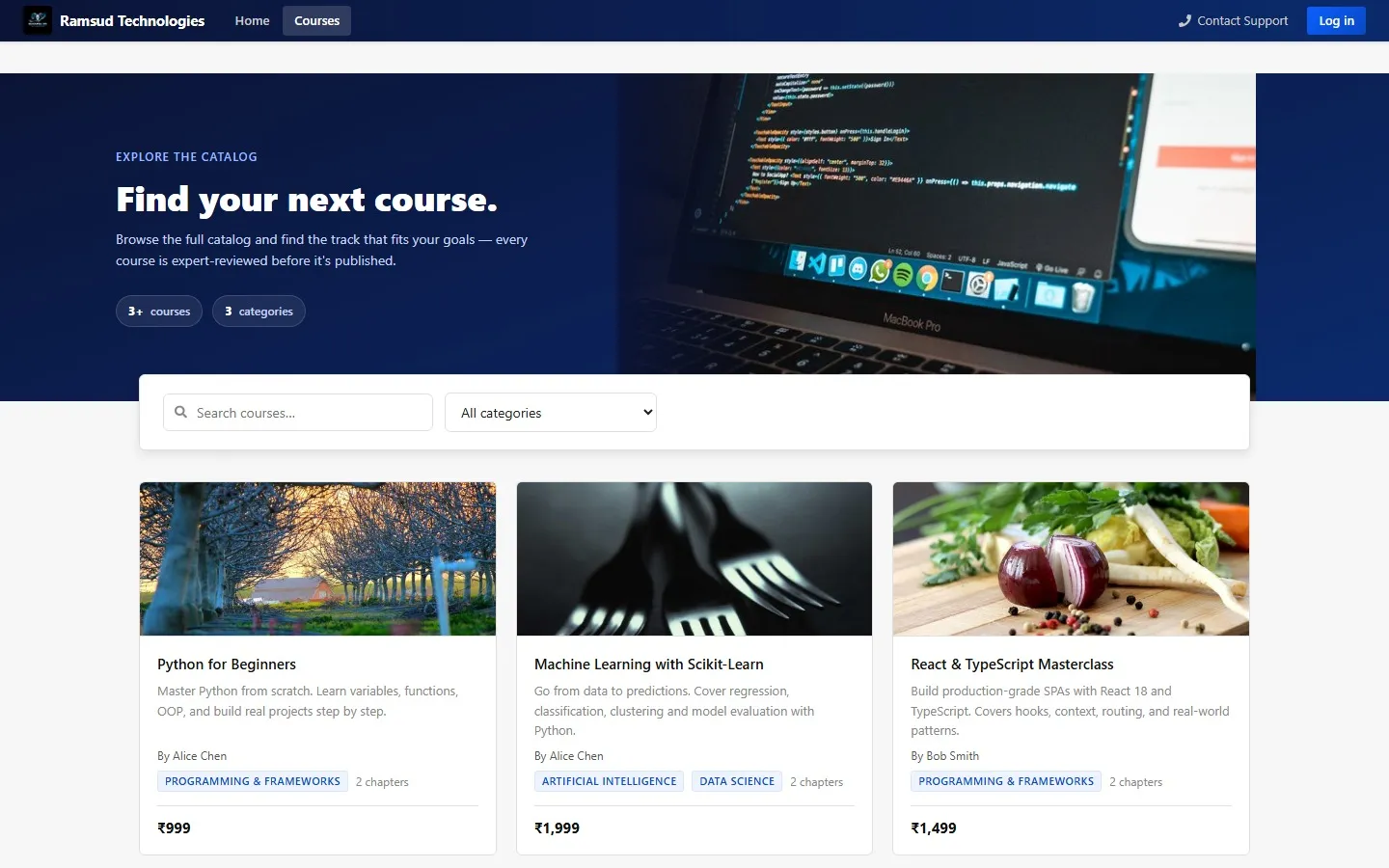
Course catalog with search, category filter, and course cards

Course Catalog

Search and category filtering over published courses, backed by pg_trgm fuzzy search.

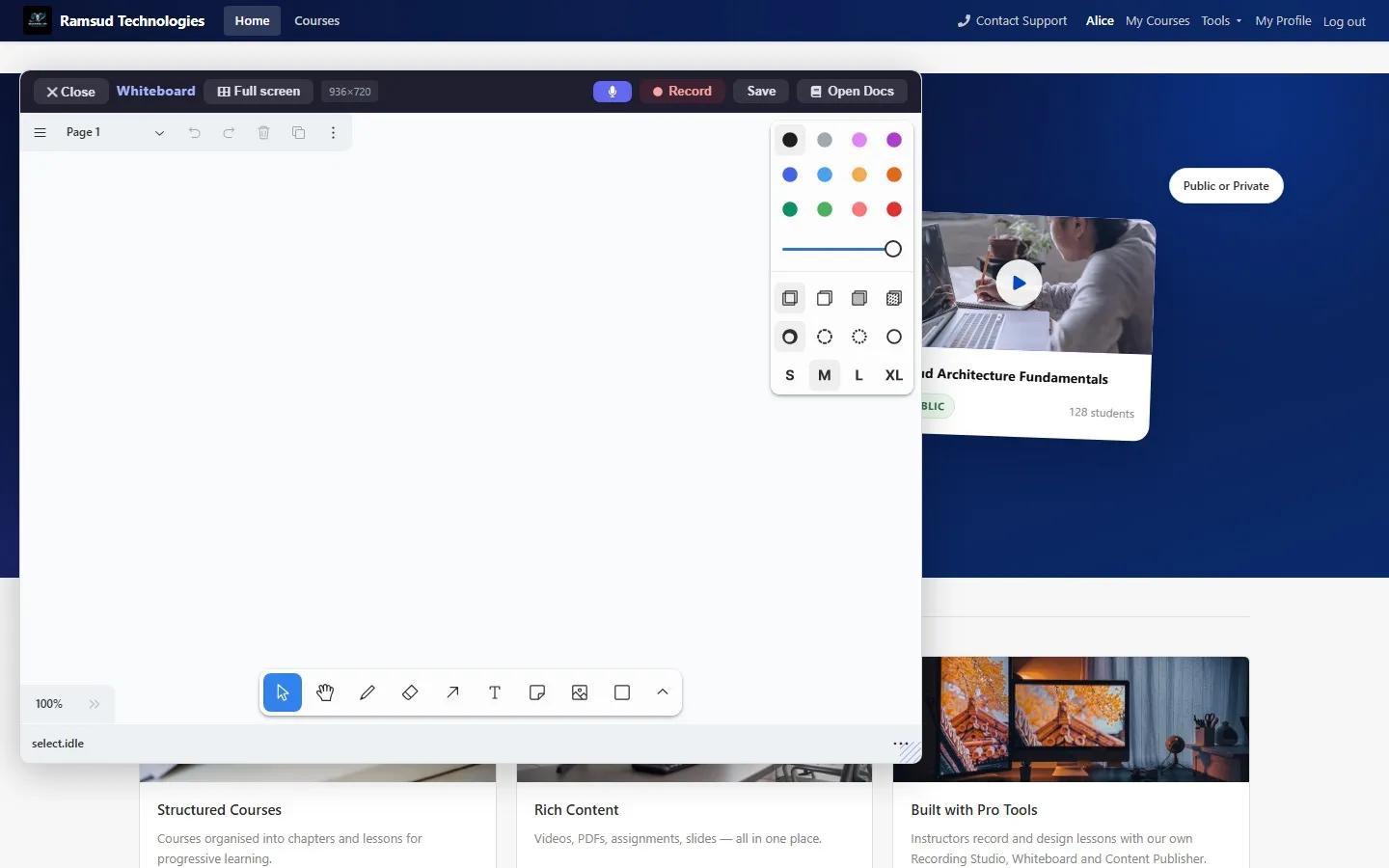
Interactive whiteboard tool rendered as a floating overlay

Whiteboard

A full tldraw-based canvas for live teaching sessions, opened as an overlay without leaving the page.

Recording Studio editor with a title overlay on a flowchart lesson and the editing timeline

Recording Studio

Record screen and camera, then edit in the same window: titles with Word Art, cuts, picture-in-picture, subtitles, music and a timeline.

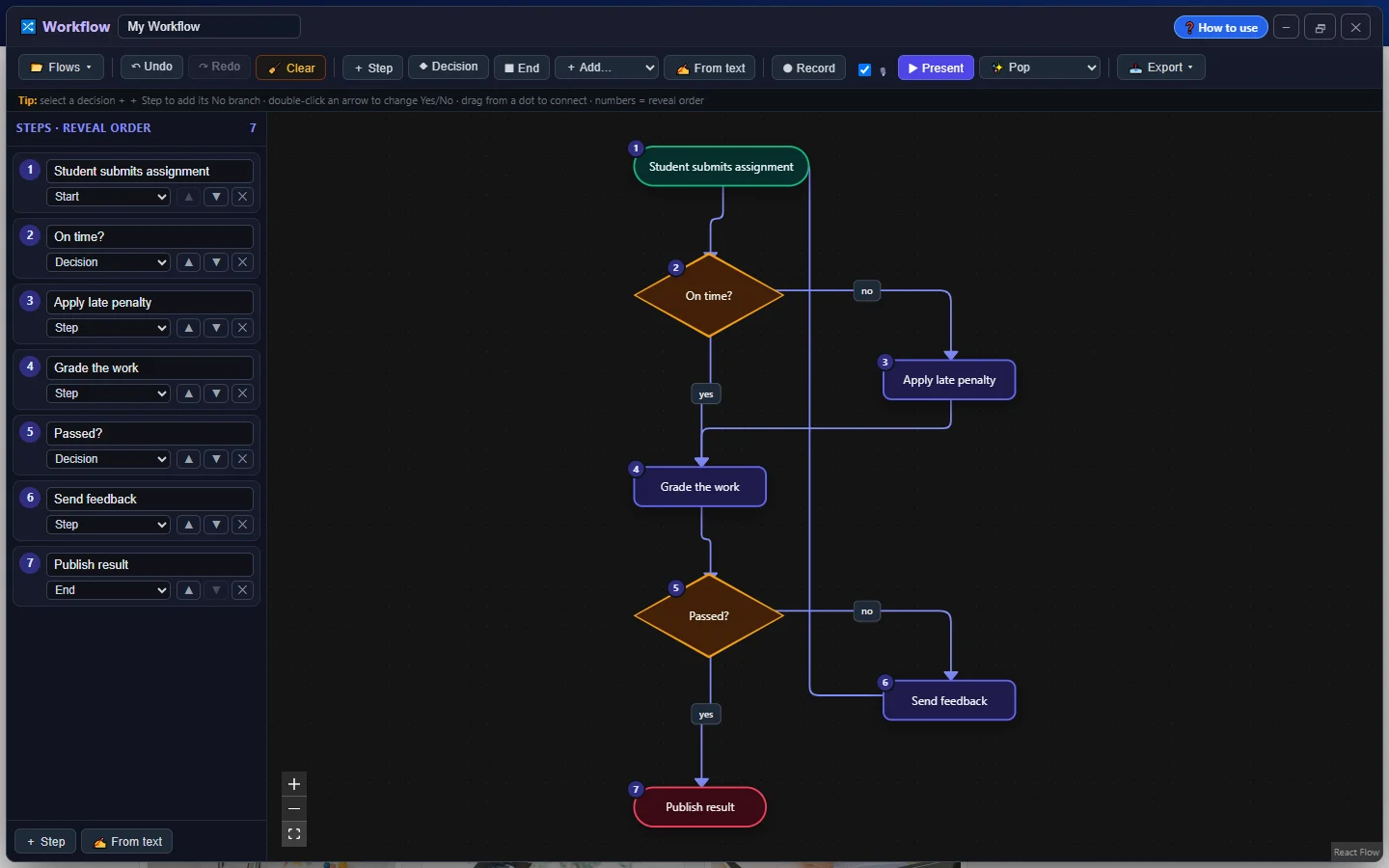
Workflow tool: an assignment grading flowchart with decisions, branches and a loop, built from a typed outline

Workflow

Type the steps and the flowchart lays itself out, with decisions, branches and loops, numbered in the order they're revealed.

3D Studio showing the grading flowchart as a tilted 3D diagram

3D Studio

The same flowchart as a 3D diagram you can tilt, rotate and record, or download as a 3D model.

Content Publisher tool composing a post for multiple social platforms

Content Publisher

Compose once, adapt with AI, and publish across LinkedIn, Facebook, Instagram, X, and Threads.

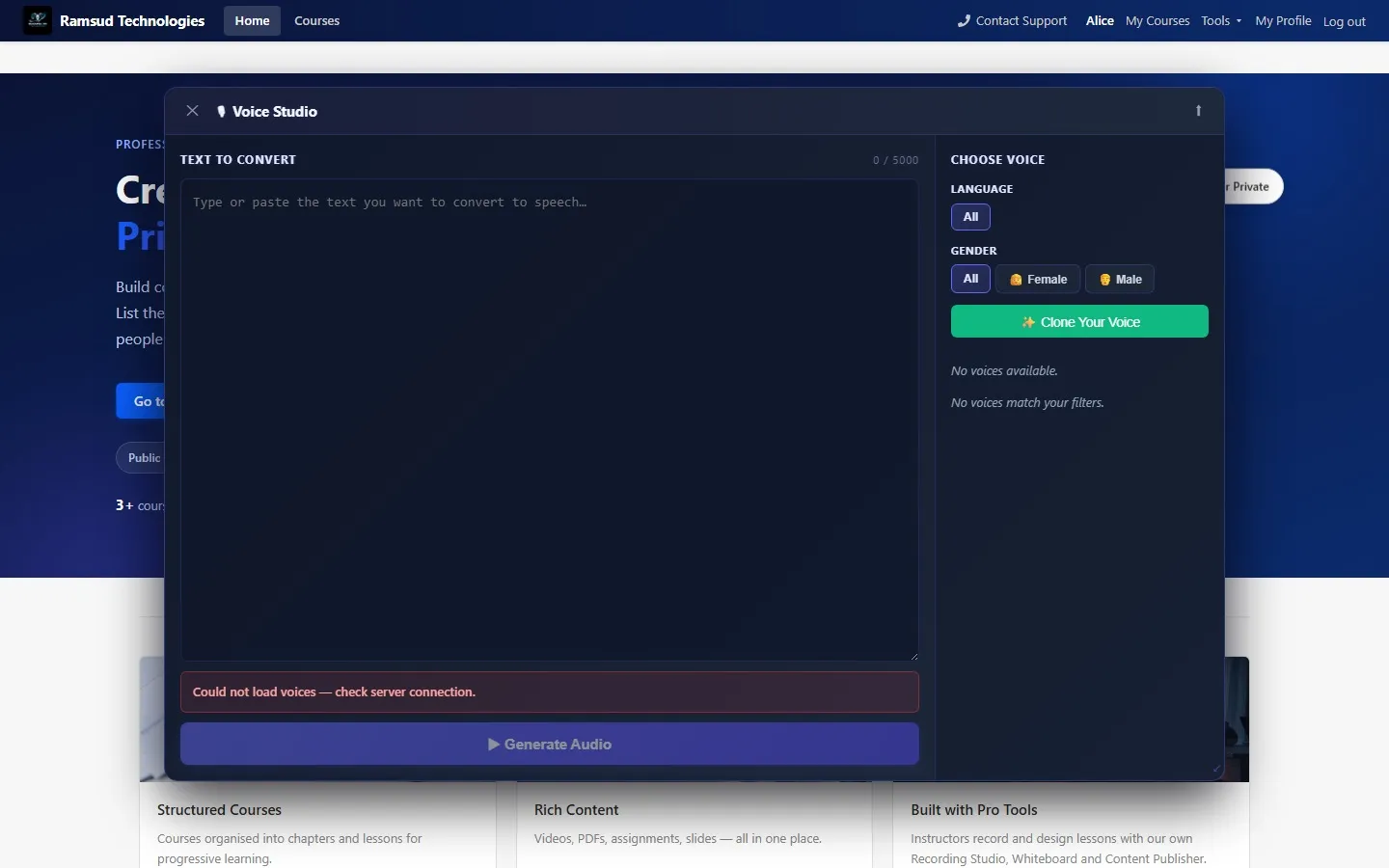
Voice Studio tool with text-to-speech voice selection

Voice Studio

Text-to-speech across languages and genders, plus custom voice cloning for narrated lessons.

Hybrid Similarity Engine:
Vector + Fuzzy Search

The recommendation service uses a hybrid approach, vector cosine similarity via pgvector as the primary engine, with pg_trgm similarity as a fallback for keyword and tag matching. Both layers combine with full-text search and business filters.

  • Sentence-Transformers model
  • HNSW index with cosine_ops via pgvector
  • Inbox pattern, events written to recommenddb first, then processed by scheduled batch
  • Ingests CatalogEvents, RatingEvents, CommerceEvents, LearningEvents, GatewayEvents
  • Produces personalised lists + in-progress courses feed
Course recommendation engine

Production Metrics
That Matter

Every architectural decision was made to protect revenue, reduce operational overhead, and deliver a platform the client's team can own and extend independently.

0
Payment-enrolment mismatches since launch
<100ms
Course search latency via pg_trgm, no Elasticsearch needed
8
Automated email types per subscription lifecycle
7
Independent microservices, each with its own database

Full Course Lifecycle

Draft → Teacher submission → Admin approval → Published, with rejection reasons and resubmission flow built in.

Subscription Revenue Secured

Server-side access checks on every tool page. Browser manipulation cannot bypass a paywall, only a valid DB row grants access.

Scheduled Maintenance, Automated

Expired subscriptions at 01:00 UTC, reminder emails at 02:00, orphaned payments at 03:00, outbox cleanup at 03:30. Zero manual intervention.

This Platform is
Still Growing

This is an ongoing engagement, the core platform is built and stable. New features are being designed and shipped continuously. Here's where things stand today.

Shipped

Core Platform

  • 7 microservices, full DDD, hexagonal architecture
  • Razorpay payments with HMAC verification
  • Transactional outbox, zero ghost enrolments
  • In-browser creative suite: 7 studio tools plus utilities
  • Starter Edition, live and free to start
  • AI-powered course recommendations
  • AI course generation, outline, PDF, PPT & cinematic interactive slides
  • Scored quizzes with streaks, generated from what each course taught
  • Automated subscription lifecycle emails
  • Fuzzy search via pg_trgm
In Progress

Now Building

  • Auto Visuals: AI visuals from what you say
  • Teacher revenue & enrolment analytics
  • Student progress heatmaps per course
  • Admin platform-wide revenue reporting
  • Subscription churn and renewal tracking
  • Course performance benchmarking
Planned

Next Features

  • Live session scheduling & calendar integration
  • Mobile apps (iOS & Android)
  • Certificates of completion
  • Multi-tenant white-label support

Built on a Stack
That Scales

Frontend

React SPA

React 19TypeScriptReact Router v7 tldrawmind-elixirRazorpay Checkout JS CSS Modules
Backend

Spring Boot Microservices

Spring Boot 3Spring Cloud Gateway Spring Data JPASpring JMSPython (Embeddings)
Database

PostgreSQL 16

PostgreSQL 166 isolated schemas pg_trgmpgvectorHNSW index
Messaging

Apache ActiveMQ Classic

ActiveMQ ClassicTransactional Outbox Idempotent ConsumersJMS
Cloud

AWS + Razorpay

AWS S3AWS SESRazorpay HMAC-SHA256
Architecture Patterns

Production-Grade Design

MicroservicesDDDHexagonal Architecture Outbox PatternRepository PatternEvent-Driven

From Keyword Matching to
Semantic Recommendations

Traditional recommendation systems rely heavily on tags and keyword overlap, this often misses deeper contextual relationships between learning content. Here's how we thought differently.

The Problem

Tag and keyword-based matching surfaces courses that share labels, not courses that share meaning. A student interested in "neural networks" gets courses tagged "AI" but not the foundational "linear algebra" course they actually need next.

Our Approach

Semantic embeddings via Sentence Transformers + pgvector in PostgreSQL with cosine similarity search. Embeddings capture contextual meaning, not just surface keywords. Combined with event-driven ingestion pipelines for continuous freshness.

Why PostgreSQL, Not a Vector DB

We optimised for operational simplicity, scalability, and cost efficiency without prematurely introducing unnecessary infrastructure complexity. pgvector with HNSW index delivers sub-100ms similarity search at our scale, no separate vector database needed.

Result

The platform delivers more relevant recommendations, contextual learning discovery, and improved personalisation, through a scalable pipeline that evolves responsibly with scale. Good architecture isn't about using the most technologies. It's about building systems that grow cleanly.

The Stack Behind
Semantic Search

  • Python Embedding Service
  • PostgreSQL pgvector, HNSW index with cosine_ops
  • Event-driven ingestion, CatalogEvents, RatingEvents, CommerceEvents
  • Inbox pattern, events batched then processed by scheduled job
System Architecture Diagram

Good architecture is not about using the most technologies. It's about building systems that evolve responsibly with scale.

Distributed Video Processing
with Redis

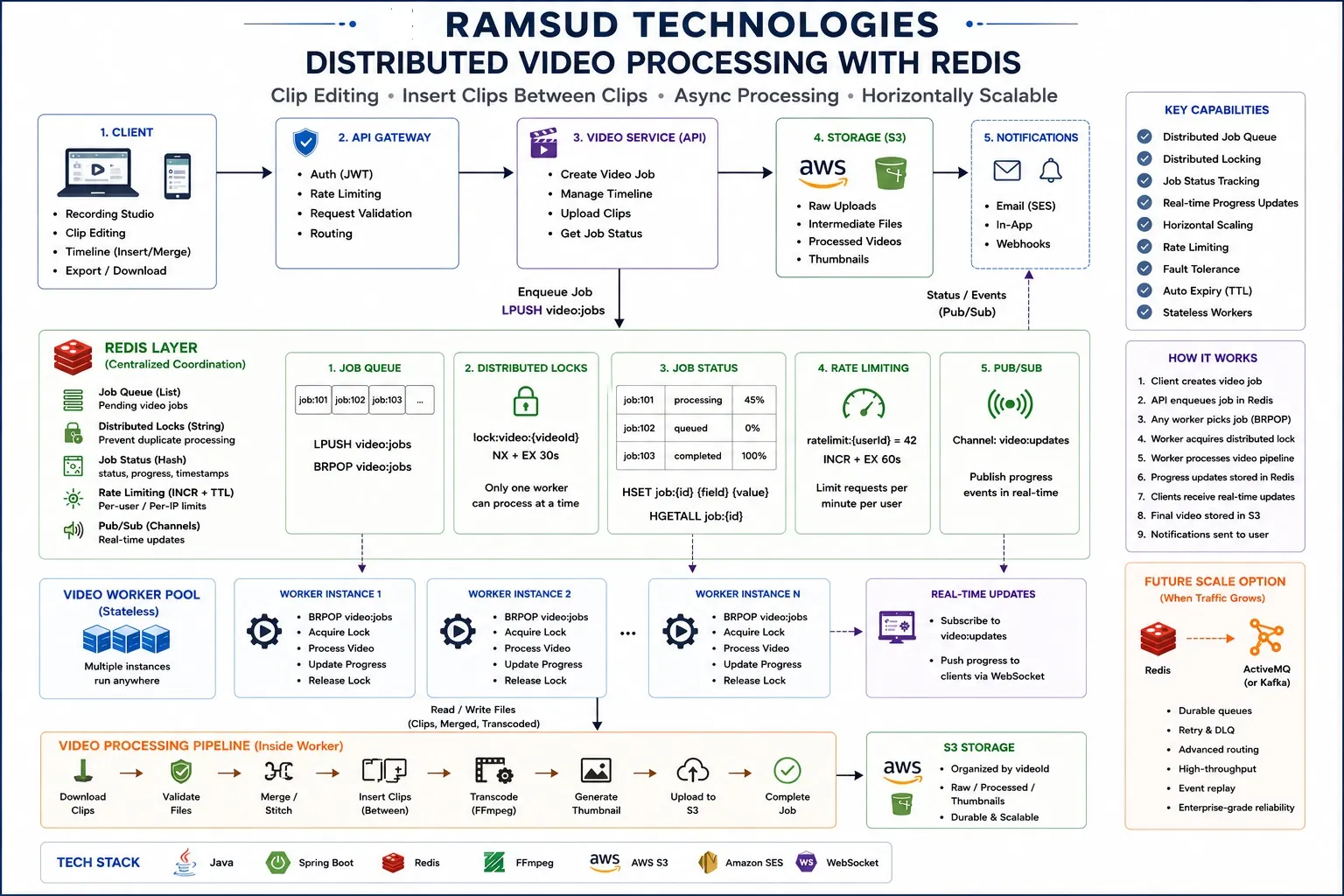
As the platform evolved with browser-based recording, clip editing, timeline stitching and async exports, traditional in-memory processing using ConcurrentHashMap became a hard limit on horizontal scaling. Here's how we redesigned the architecture around Redis-based distributed coordination.

The Problem

In-memory job state breaks the moment you run more than one server instance. Two workers can simultaneously pick the same job, a server restart loses all in-flight processing, and a client on instance A can't see the state of a job running on instance B.

Our Approach

Distributed coordination via Redis: LPUSH/BRPOP for job queues, atomic SET NX EX for distributed locking, HSET/HGETALL for shared job state, and Pub/Sub channels for real-time progress to clients via WebSocket.

Why Redis, Not a Message Broker

Redis gave us sub-millisecond performance, atomic operations, TTL-based auto-cleanup, and Pub/Sub, all in a single lightweight infrastructure component. No Kafka or ActiveMQ overhead at this scale. Stateless workers mean we add instances with zero configuration change.

Result

Multiple video worker instances run safely across servers without race conditions or duplicate processing. Clients receive live progress updates without polling. Lock TTL auto-expires on crash, jobs re-enter the queue automatically. Horizontally scalable from day one.

The Redis Layer Behind
Distributed Processing

  • Job Queue, LPUSH / BRPOP video:jobs
  • Distributed Lock, SET lock: {videoId} NX EX 30
  • Job Status, HSET job:{id} status progress
  • Rate Limiting, INCR ratelimit:{userId} EX 60
  • Pub/Sub, real-time progress → WebSocket → client
Distributed Video Processing with Redis, full system architecture showing client, API gateway, video service, Redis coordination layer, stateless worker pool, S3 storage, and notification pipeline

Build lean initially. Design for scale from day one.

Not Just Another
AI Slide Generator

Plenty of tools will generate a pretty slide deck from a prompt. Here's what each part of this one is actually built to do, and why that's worth paying for over a generic AI slide tool bolted onto your LMS.

Actually Teaches, Not Just Looks Good

The value: a pedagogically structured outline comes first, objective, theory, worked example, exercise, assessment, the same instructional design a course architect would use, not a slideshow of AI-generated bullet points. Students learn in the right order, every time.

Real Assessment, Built In

The value: every interactive deck can include scored quizzes tied to exactly what was taught on the slides before it, with per-question explanations and a running score. No separate quiz tool, no generic question bank.

One Topic, Three Formats

The value: generate once, get a PDF for handouts, a PowerPoint for live teaching, and an interactive deck for self-paced learning, each built for how it's actually used, not the same file wearing three different hats.

You Own It

The value: no vendor lock-in, no separate per-seat AI tool subscription stacked on top of your LMS bill. Course generation lives inside the platform you already own, on the same production architecture behind your payments and enrolment.

Questions Teams Ask
Before They Start

What is the Ramsud education platform?

It is a course creation platform and learning management system in one. Teachers record, build and publish courses in the browser, students buy and follow them with lesson-by-lesson progress, and administrators approve courses and manage pricing, coupons and refunds.

Is there a free version?

Yes. The Starter Edition is free to start at learning.ramsudtechnologies.com. It includes the Recording Studio with full editing, the Workflow tool, 3D Studio, Whiteboard, Mind Map, Image Editor and Teleprompter, and you can publish and share courses.

Do you charge per seat?

The Enterprise Edition is sized for your teams and learners, with no per-seat surprises as you grow. Book a demo call to discuss the size and needs of your organisation.

Can we run the platform under our own brand?

Yes. The Enterprise Edition runs on your own domain under your branding, and your course content and learner data remain yours.

Can the platform create courses with AI?

Yes. In the Enterprise Edition, a teacher enters a topic or pastes existing notes, and the platform plans a structured course and generates it as PDF handouts, PowerPoint or interactive slides. Teachers review and edit everything before it is published.

Who is the platform built for?

Corporate L&D teams and colleges or universities are the primary fit. Schools use it too, with recording, whiteboard and quiz tools for every subject teacher.

How are payments handled?

Payments run through Razorpay. Card data never touches our servers, and every payment is verified server-side with an HMAC signature before any access is granted.

Can you build a similar platform for our business?

Yes. If you need a platform like this for training, onboarding, a marketplace or a SaaS product, we design and build it with the same engineering, fully owned by you. Book a free consultation.

Want a platform like this, or your own product?

We build custom software for education companies, SaaS startups, and businesses that need more than a template can offer. Tell us what you have in mind, or see our full range of services.

Book a Free Consultation Try Starter Free See More Case Studies

Learning Platforms

Built for your exact workflow, not a generic LMS with your logo on it.

Payment Systems

Tamper-proof, transactionally safe, and verified server-side. No lost transactions.

Microservices Architecture

Designed for independent deployment, owned by your team, built to scale.

Embedded Creative Suites

Recording studio, workflow, 3D, whiteboard and publisher, integrated into your product.